

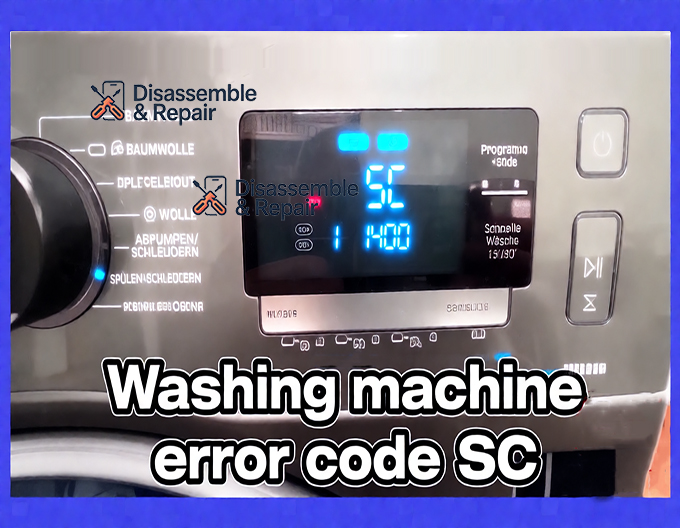
If you have recently encountered the Washing machine error code SC on your display, it indicates that your appliance is struggling to drain water effectively within the allotted time. This drainage failure halts the washing cycle immediately, often leaving your clothes soaking wet and the drum filled with water, which can be a frustrating experience for any homeowner. While modern appliances are designed with self-diagnosis capabilities, understanding the specific root cause of this error is essential for a permanent fix.
The Washing machine error code SC is predominantly associated with a Samsung washing machine, though it may appear on other brands with similar diagnostic systems. On many digital displays, the number “5” can closely resemble the letter “S,” leading users to read the “5C” code as “SC.” Regardless of whether your manual lists it as SC, 5C, or 5E, the underlying issue remains the same: the drainage system is blocked, restricted, or malfunctioning. This guide will serve as a detailed troubleshooting guide to help you identify the problem, inspect critical components like the drain pump and debris filter, and restore your washer to optimal performance.
Understanding the Drainage Cycle and Error Logic
To effectively troubleshoot the issue, it is important to understand how your front load washer manages water removal. During the drain cycle, the main control board sends a signal to the pump motor to activate. The impeller spins, creating a vacuum that pulls water from the tub, through the debris filter, and out through the drain hose into your home’s drain pipe.
The washing machine monitors this process using a water level sensor (also known as a pressure switch). If the sensor detects that the water level has not dropped sufficiently after a set period (usually around 10 to 15 minutes), the main computer assumes a blockage or failure and triggers the safety protocol. This stops the motor to prevent overheating and flashes the Washing machine error code SC to alert the user.
Common Causes of Washing machine error code SC
When diagnosing this error, you are looking for anything that physically obstructs water flow or prevents the mechanical components from doing their job.
1. Clogged Debris Filter
In a Samsung washing machine, the debris filter is the first line of defense. It traps lint, coins, buttons, and hair to prevent them from entering the pump. If this filter becomes completely saturated, water cannot pass through, triggering the error.
2. Blocked or Kinked Drain Hose
The drain hose connecting your machine to the wall outlet can easily become kinked if the machine is pushed back too far. Additionally, debris that bypasses the filter can lodge itself in the corrugations of the hose, creating a clogged hose that restricts flow.
3. Pump Failure
The drain pump is the heart of the evacuation system. Over time, the pump motor can burn out electrically, or the impeller (the plastic fan inside the pump) can break physically. If the impeller spins loosely on its shaft or is jammed by a foreign object, it cannot push water out.
4. Plumbing Issues
Sometimes the issue is not with the machine but with the household plumbing. A clogged drain pipe in the wall can cause back pressure, preventing the washer from emptying.
Step-by-Step Troubleshooting Guide
Before you begin any repairs, safety is paramount. Always unplug the washing machine from the power source and turn off the water supply valves. Since the machine likely has water in it, prepare a shallow pan and several large towels to manage leaks.
Step 1: Drain the Water and Inspect the Debris Filter
For most front load washer models, the debris filter is located behind a small access door at the bottom front of the unit. This is the most common culprit for the 5C error code or SC code.
- Locate the Emergency Drain Tube: Open the access panel. You will typically see a small rubber hose next to the filter cap. Pull this hose out and remove the plug to drain the remaining water into a shallow pan. This prevents a flood when you open the filter.
- Remove the Filter: Once the water stops flowing, unscrew the debris filter by turning it counter-clockwise.
- Clean and Inspect: Remove any lint, coins, or sludge. Look inside the housing for any objects that might be blocking the path to the impeller.
- Check the Impeller: While the filter is out, use your finger to reach into the housing and touch the impeller blades of the drain pump. It should spin with some magnetic resistance (a “bouncy” feel). If it spins freely with no resistance, or if it is seized and won’t move, the pump is likely damaged.
Step 2: Examine the Drain Hose
If the filter was clean, the restriction is likely further down the line in the drainage system.
- Check for Kinks: Pull the washer forward carefully. Inspect the gray corrugated drain hose behind the unit. Ensure it is not pinched between the washer and the wall.
- Inspect for Clogs: Disconnect the drain hose from the household drain pipe. Blow through the hose or pour water through it to ensure it is clear. If you suspect a clog, you may need to use a plumber’s snake or a high-pressure water stream to clear it.
- Verify Height Requirements: For the siphon action to work correctly, the end of the drain hose must be positioned correctly. It should typically be between 18 and 36 inches off the floor. If it is too low, water may siphon out prematurely; if it is too high, the pump motor may not be strong enough to push the water up, causing the Washing machine error code SC.
Step 3: Test the Drain Pump
If the path is clear, the drain pump itself may be the issue. Even if the impeller spins manually, the motor might be too weak to operate under load.
- Listen to the Sound: Plug the washer back in and start a “Spin Only” or “Drain” cycle. Listen near the bottom of the washer. A low, steady hum usually indicates the pump is running. A loud grinding noise suggests debris is in the impeller chamber. A buzzing sound followed by silence often indicates a seized motor or a jam.
- Electrical Continuity (Advanced): If you are comfortable with a multimeter, you can test the pump motor for continuity. A reading of infinity (open loop) means the electrical windings are broken, and the pump must be replaced.
Step 4: Inspect the Water Level Sensor
The water level sensor tells the control board when the tub is empty. If the air tube connected to this sensor is clogged with gunk, or if the sensor itself is faulty, it may “think” the washer is full of water even when it is empty, or vice versa.
- Check the Pressure Tube: Locate the thin clear tube connecting the tub to the sensor (usually under the top panel). Ensure it is not pinched or punctured.
- Clear Obstructions: Disconnect the tube from the sensor and blow air through it toward the tub to clear any soap scum blockages.
Prevention and Maintenance
Preventing the Washing machine error code SC is often easier than fixing it. Regular maintenance of your drainage system can extend the life of your Samsung washing machine significantly.
- Monthly Filter Cleaning: Make a habit of cleaning the debris filter once a month. This is the single most effective way to prevent drainage errors.
- Check Pockets: consistently check all pockets for coins, receipts, and small items before loading the washer. These small items are the primary cause of damage to the impeller.
- Use High-Efficiency Detergent: Excess suds can confuse the water level sensor and cause the pump to work harder than necessary. Always use HE detergent in appropriate amounts.
- Inspect the Drain Pipe: Periodically check that your home’s drain pipe is not slow-draining. A partial blockage in your home plumbing can mimic a washer error.
When to Call a Professional
If you have followed this troubleshooting guide, cleaned the filter, straightened the hose, and verified the pump is running, yet the Washing machine error code SC persists, the issue may be electronic. A fault in the main control board or a wiring harness failure can cause false error codes.
Furthermore, replacing a drain pump or water level sensor can be complex if you are not comfortable dismantling the washer cabinet. In these cases, contacting a certified technician is recommended to avoid voiding your warranty or causing further damage.
Conclusion
The Washing machine error code SC serves as a critical warning that your appliance cannot evacuate water. While it can be alarming, it is often resolved by clearing a simple blockage in the debris filter or clogged hose. By methodically checking the drainage system, inspecting the impeller, and ensuring your drain pump is functional, you can often save the cost of a service call. Remember that codes like 5C error code and SC are functionally identical, pointing you toward the same resolution: restoring the free flow of water to get your laundry routine back on track.
Frequently Asked Questions
Is error code SC the same as 5C or 5E?
Yes. On many digital displays, the number “5” is stylized in a way that closely resembles the letter “S.” Whether your washing machine displays SC, 5C, or 5E, they all indicate the same underlying problem: a failure in the drainage system that prevents water from leaving the drum within the required time.
How often should I clean the debris filter to prevent this error?
To keep your drainage system running smoothly and prevent the SC error from appearing, you should clean the debris filter at least once a month. Regular maintenance prevents the buildup of lint, hair, and small items like coins or buttons that can eventually lead to a total blockage of the drain pump.
Can I fix the SC error code myself?
In many cases, yes. The most common causes of this error are a clogged debris filter or a kinked drain hose, both of which can be addressed by the homeowner without specialized tools. However, if the issue involves a failed drain pump motor or a faulty electronic control board, you may need to contact a professional technician.
What should I do if my washer is full of water when the SC code appears?
Before attempting to inspect the filter or hose, you must manually drain the machine. Most front-load washers have a small emergency drain tube located next to the debris filter. Use this tube to empty the water into a shallow pan or tray. This prevents water from flooding your floor when you unscrew the main filter cap.
Why is my washing machine making a loud grinding noise during the drain cycle?
A loud grinding or rattling noise usually indicates that a foreign object, such as a coin or a screw, has bypassed the filter and is hitting the drain pump’s impeller. If this isn’t cleared quickly, it can break the impeller blades or burn out the pump motor, leading to a permanent SC error code.


