

Encountering a Sharp washer E2 error can be a frustrating disruption to your laundry routine. This specific fault code typically indicates an issue with the water drainage system or the lid mechanism, signaling that the appliance cannot proceed to the next cycle safely. When this error appears on your digital display, the machine will usually stop mid-cycle, leaving clothes soaking in water or refusing to begin the high-speed spin.
Understanding the root cause of the Sharp washer E2 error is essential for any homeowner or technician looking to perform an appliance repair without unnecessary costs. In most Sharp top load washer models, the E2 code serves as a warning that the water is not exiting the drum within the allotted time or that the lid switch has failed to engage. By following a systematic troubleshooting guide, you can identify whether the problem lies in a simple blockage or a mechanical failure of the drain pump or control board.
Understanding the Sharp Washer E2 Error Code
Before diving into repairs, it is vital to understand what the machine is trying to communicate. In the ecosystem of Sharp appliances, the E2 error is generally categorized as a “drainage timeout” or a “lid safety” fault.
When the washing machine enters the drain and spin phase, the control board sends a signal to the drain pump to evacuate the water. If the pressure sensor does not detect a drop in water level within a specific timeframe (usually 5 to 10 minutes), the system triggers the E2 code. Similarly, if the lid switch or door lock assembly is not properly engaged during the spin cycle, the machine may throw the same error to prevent injury or mechanical damage.
Initial Steps and Safety Precautions
Before performing any appliance repair, safety must be your top priority. Always begin by disconnecting the power supply to the washing machine. Working with water drainage systems and electrical components like the drain pump or control board carries a risk of electric shock if the unit remains plugged in.
Furthermore, if your washer is currently filled with water, you will need to manually drain it. Prepare a shallow bucket and several towels. You can usually lower the drain hose into a floor drain or bucket to let gravity remove the bulk of the water before you begin inspecting the internal components.
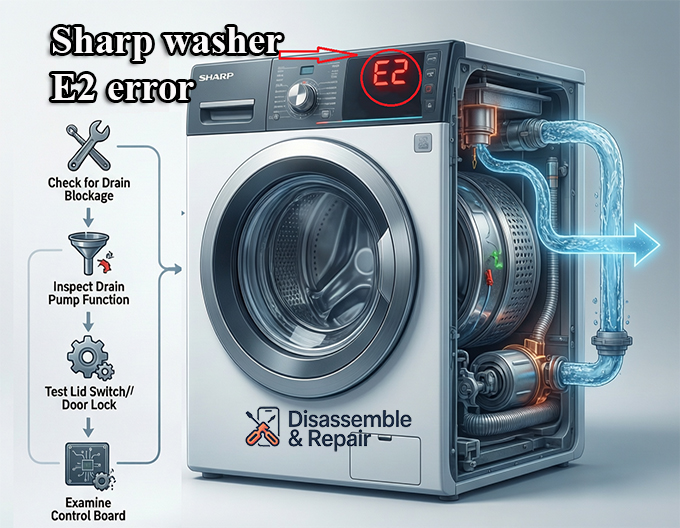
How to Fix the Sharp Washer E2 Error
To resolve the Sharp washer E2 error, you must investigate several key components in a logical order, starting with the most accessible parts and moving toward the more complex electrical sensors.
1. Inspecting the Drain Hose for Blockages
The most common cause of drainage failure is a simple physical obstruction. Over time, lint, coins, or small items like socks can escape the drum and find their way into the drain hose.
- Check for Kinks: Ensure the hose is not pinched between the back of the washer and the wall. A restricted hose prevents the drain pump from pushing water out effectively.
- Remove Blockages: Disconnect the drain hose from both the machine and the standpipe. Inspect the interior for any clogs. You can run a high-pressure stream of water through the hose to clear out accumulated debris or sludge.
- Siphonage Issues: Ensure the drain hose is not inserted too far into the standpipe. If the hose is submerged in the standpipe’s water trap, it can create a siphoning effect that triggers drainage errors.
2. Cleaning the Washing Machine Filter
Most modern Sharp washers are equipped with a washing machine filter (sometimes called a debris filter or pump filter). This component is designed to catch foreign objects before they reach the delicate impeller of the drain pump.
If the filter is clogged with lint or hair, the water drainage speed will drop significantly, eventually triggering the Sharp washing machine E2 error code. To clean it:
- Locate the filter (usually behind a small door at the bottom front or inside the drum for certain top load models).
- Unscrew the filter cap slowly, as residual water will leak out.
- Clean the mesh under running water and remove any debris from the filter housing.
- Reinstall the filter tightly to prevent leaks.
3. Testing the Drain Pump
The drain pump is the heart of the evacuation system. If the pump motor has burned out or if the impeller is broken, the machine will be unable to remove water.
- Listen for Noise: If you hear a loud humming or grinding noise when the machine tries to drain, something is likely stuck in the pump or the motor is failing.
- Check for Obstructions: Once the filter is removed, you can often feel the pump impeller. Ensure it spins freely and is not jammed by a rogue button or bra wire.
- Electrical Testing: Using a multimeter, you can test the drain pump for continuity. If the pump shows “open” (no continuity), the internal windings have failed, and the part must be replaced to clear the Sharp washer E2 error.
4. Examining the Lid Switch and Door Lock Assembly
In many Sharp top load washer designs, the E2 error is closely linked to the lid switch. The machine will not drain or spin if it believes the lid is open.
- Mechanical Check: Ensure the lid is closing completely. If the lid is warped or the striker is broken, the switch won’t engage.
- Sensor Test: The lid switch is a simple circuit. If the switch is faulty, it won’t send the “closed” signal to the control board. This prevents the spin cycle from initiating, often resulting in an E2 or similar safety code. If the door lock assembly is clicking but the error persists, the electronic feedback loop may be damaged.
Advanced Troubleshooting: Sensors and Electronics
If the hoses are clear, the pump is functional, and the lid is closed, the issue may reside in the electronic sensing system of the appliance.
The Role of the Pressure Sensor
The pressure sensor (or water level switch) tells the control board how much water is in the tub. It works via a small plastic tube that connects the tub to the sensor. As water rises, air pressure in the tube increases.
If this tube is clogged with “scrud” (a buildup of detergent and fabric softener) or if the tube has a pinhole leak, the pressure sensor will send incorrect data. The control board might think the tub is still full of water even after the pump has finished its job, or it might not recognize that water is draining at all, leading to a persistent Sharp washer E2 error.
Evaluating the Control Board
The control board is the brain of the washing machine. It coordinates the timing of the drain pump, the signals from the lid switch, and the data from the pressure sensor. While it is rare for the control board to fail, it can happen due to power surges or moisture exposure.
If you have replaced the drain pump and lid switch but the Sharp washer E2 error remains, inspect the control board for visible signs of damage, such as burnt components or “cold” solder joints. At this stage, consulting a professional for appliance repair is recommended, as control boards are expensive and non-returnable once installed.
Preventative Maintenance for Sharp Washers
To avoid seeing the Sharp washer E2 error in the future, regular maintenance is key. Professional SEO specialists and appliance experts agree that a proactive approach saves money and extends the lifespan of your top load washer.
- Monthly Filter Cleaning: Make it a habit to clean the washing machine filter once a month to ensure optimal water drainage.
- Use the Right Detergent: High-efficiency (HE) washers require HE detergent. Using regular soap creates excessive suds, which can confuse the pressure sensor and cause drainage delays.
- Check Pockets: Always check pockets for coins, tissues, and small items that can easily clog the drain pump.
- Inspect Hoses Yearly: Check the drain hose and inlet hoses for signs of wear, cracking, or stiffness. Replacing a $20 hose is much cheaper than repairing water damage to your flooring.
When to Call a Professional
While many causes of the Sharp washer E2 error can be fixed by a DIY enthusiast, certain situations require the expertise of a certified technician. If you suspect the issue is related to the main control board, or if you are uncomfortable disassembling the cabinet of your top load washer, it is best to seek professional appliance repair services. A technician will have the diagnostic tools to pinpoint whether a pressure sensor is out of calibration or if there is a short circuit in the wiring harness.
Conclusion
The Sharp washer E2 error is a manageable issue that usually points toward a localized problem in the drainage or safety systems. By systematically checking the drain hose, cleaning the washing machine filter, and verifying the functionality of the drain pump and lid switch, most users can restore their appliance to full working order.
Maintaining a clean drainage path and ensuring that the door lock assembly is functioning correctly are the best ways to prevent the recurrence of this fault. With a bit of patience and the right troubleshooting guide, your Sharp washer will be back to providing clean laundry without the interruption of error codes.
Frequently Asked Questions
What does the E2 error code specifically mean on a Sharp washer?
The E2 error code typically indicates either a “drainage timeout” or a “lid safety” issue. This means the washing machine has failed to drain the water within the required timeframe (usually 5 to 10 minutes) or the system detects that the lid is not properly closed and locked for the spin cycle.
How can I manually drain my washer if it is stuck with an E2 error?
Before troubleshooting, you should unplug the unit for safety. To remove the water, lower the drain hose into a shallow bucket or floor drain to allow gravity to pull the water out. You can also slowly unscrew the debris filter at the bottom of the machine, but be prepared with towels as water will flow out immediately.
Can a clogged filter cause the E2 error?
Yes, a clogged washing machine filter is one of the most common causes of the E2 error. If lint, coins, or small clothing items block the filter, the drain pump cannot move water out of the drum effectively. Cleaning the filter monthly is recommended to prevent these blockages.
What should I check if the drain hose is not blocked but the error persists?
If the hose is clear, you should inspect the lid switch or door lock assembly. The washer will trigger an E2 error if it cannot confirm the lid is closed. Additionally, listen for unusual humming noises from the drain pump, which could indicate a mechanical failure or an object jammed in the pump impeller.
Does using the wrong detergent cause the Sharp washer E2 error?
Using regular detergent in a High-Efficiency (HE) washer can create excessive suds. These suds can confuse the pressure sensor or physically obstruct the drainage process, leading the control board to trigger a drainage timeout error. Always use the recommended amount of HE detergent to avoid this issue.


