

Encountering a Sharp washer E7 error can be frustrating, especially when it interrupts your laundry routine mid-cycle. This specific error code typically indicates a communication or mechanical failure, often pointing toward issues with the lid lock, motor assembly, or water level detection systems depending on your specific model.
Understanding the Sharp Washer E7 Error
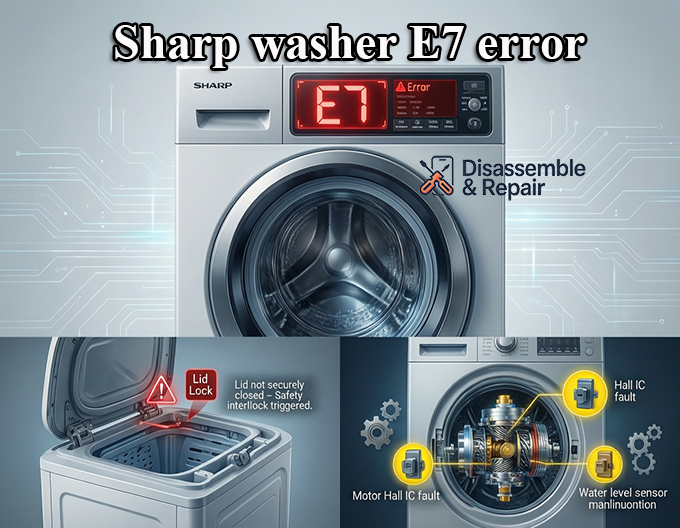
The “E7” code on a Sharp washing machine is not a one-size-fits-all signal; its meaning can vary significantly between top-load and front-load models. Generally, it alerts the user that the electronic controller has detected a fault preventing the machine from operating safely.
1. Top Load Models: Lid Lock and Safety Switch
For most Sharp top-load washers, the E7 error is almost exclusively related to the lid lock mechanism. If the machine cannot verify that the lid is securely closed and locked before the spin cycle, it triggers this alarm to prevent injury.
2. Front Load Models: Motor and Sensor Faults
In front load washer units, the E7 code can be more complex. It frequently points to a motor fault, specifically involving the Hall IC sensor (which monitors motor speed) or a water level sensor malfunction. In some rare cases, it may also signal a “water flow” error linked to the pressure switch.
Common Causes of the E7 Error
Diagnosing the root cause involves inspecting several key components. Below are the primary culprits behind this error code.
Lid Switch or Door Lock Failure
The safety switch is a simple mechanism that completes an electrical circuit when the door is closed. If the wiring harness connecting the switch to the main control board is damaged, or if the mechanical latch is broken, the machine will assume the door is open.
Motor Hall Sensor Issues
Modern washing machines use a Hall sensor to track the drum’s rotation speed. If this sensor fails or becomes disconnected, the electronic controller loses track of the motor’s activity, resulting in an immediate stop and an E7 display.
Faulty Water Level Sensor (Pressure Switch)
The pressure switch monitors the water level inside the drum. If the drainage system is blocked or the air tube connected to the sensor is kinked, the sensor may send erratic data. While often associated with other codes, a “water flow” timeout on specific Sharp models can trigger an E7.
Step-by-Step Troubleshooting Guide
Follow these steps to diagnose and potentially resolve the issue before calling for professional appliance repair.
Step 1: Perform a Hard Reset
Electronics can sometimes glitch due to power surges.
- Turn off the washer and unplug it from the power outlet.
- Wait for at least 5 minutes to allow the main control board capacitors to discharge.
- Plug the machine back in and attempt to run a Rinse/Spin cycle.
Step 2: Check the Lid/Door Mechanism
If you have a top-load washer:
- Ensure there are no clothes obstructing the latch.
- Inspect the magnetic switch (often located in the lid) for cracks or misalignment.
- Clean the contact points of the switch with a dry cloth.
Step 3: Inspect the Wiring Harness
Vibrations during the spin cycle can cause connections to loosen over time.
- Safety Warning: Always unplug the machine before removing panels.
- Remove the back or top panel to access the internal components.
- Check the wiring harness leading from the motor and door lock to the control board. Look for pinched wires, corrosion, or loose plugs.
Step 4: Test the Motor and Hall Sensor
If the door lock seems fine and you have a front loader, the issue might be the motor.
- Locate the motor at the bottom of the machine.
- Check the connector on the motor for any signs of burning or looseness.
- If you have a multimeter, you can test the Hall sensor resistance, though this is advanced troubleshooting best left to a technician.
Step 5: Verify the Pressure Switch and Drainage
A clogged drainage system can sometimes confuse the sensors.
- Check the drain filter (usually at the bottom right front) for blockages like coins or lint.
- Ensure the drain hose is not kinked.
- Inspect the small tube connecting the drum to the pressure switch. If this tube has a hole or is clogged with debris, the water level sensor cannot function correctly.
When to Seek Professional Repair
If you have performed the steps above and the Sharp washer E7 error persists, the fault likely lies with a failed component that requires replacement.
- Main Control Board: If the wiring and sensors are functional, the electronic brain of the washer may be defective.
- Motor Replacement: A burnt-out motor or a permanently failed Hall sensor often requires installing replacement parts.attempting to repair the main control board or motor without proper experience can lead to further damage or safety hazards. In these instances, contacting a certified appliance repair specialist is the most cost-effective and safe solution. By accurately describing the symptoms and the steps you’ve already taken, you can help the technician diagnose the problem faster.
Frequently Asked Questions
What does the E7 error code on my Sharp washing machine mean?
The E7 error generally indicates a communication or mechanical failure within the machine. Depending on your specific model, it typically points to an issue with the lid lock mechanism, the motor’s Hall sensor, or the water level detection system.
How can I perform a hard reset to clear the E7 code?
To reset the washer, turn it off and unplug it from the power outlet for at least five minutes. This allows the capacitors on the main control board to discharge. After waiting, plug the machine back in and attempt to run a Rinse/Spin cycle to see if the error persists.
Why does the E7 error mean something different for top-load and front-load washers?
The electronic controllers are programmed differently across models. In top-load washers, the E7 code is almost exclusively tied to the lid lock safety switch. In front-load washers, the code is more complex and usually signals a motor sensor fault or an issue with the water level pressure switch.
Can a clogged drain trigger an E7 error?
Yes, it is possible. If the drainage system is blocked or the air tube connected to the pressure switch is kinked, the water level sensor may send erratic data to the controller. Checking the drain filter for debris like coins or lint is a recommended troubleshooting step.
When should I stop troubleshooting and call a professional?
If a hard reset and basic inspections of the lid latch and drain filter do not clear the code, the problem may involve a failed motor, a faulty wiring harness, or a defective main control board. These components require professional diagnostic tools and replacement parts to ensure a safe and effective repair.


