

When your appliance displays a cryptic error code or refuses to fill, performing an LG dishwasher float switch reset is often the most effective troubleshooting step. This procedure addresses issues where the machine incorrectly detects a leak or water overflow, allowing you to restore normal functionality without immediately calling a technician. The float switch is a critical component of your dishwasher’s safety system, designed to prevent water damage to your kitchen, but it can occasionally be triggered by debris, software glitches, or component failure.
In this professional guide, we will explore the technical nuances of the float assembly, interpret related error codes, and provide a detailed, step-by-step protocol for resetting and testing the switch. Whether you are dealing with a simple stuck float or a more complex electrical issue, this article covers the essential procedures to get your LG dishwasher running efficiently again.
Why you might need an LG dishwasher float switch reset
The float switch in an LG dishwasher acts as a sentinel for water levels. Its primary function is Overflow Protection. If the water level in the tub gets too high, or if water leaks into the base pan of the unit, the float rises, triggering a Microswitch. This action cuts off the water inlet valve and typically activates the Drain Pump to prevent flooding.
However, this system is sensitive. A “false positive” can occur if the float gets stuck due to food particles, soap scum, or if the sensor malfunctions. In such cases, the dishwasher will refuse to start a new cycle or will continuously try to drain water that isn’t there. Knowing how to perform an Lg Dishwasher Float Switch Reset saves time and helps distinguish between a minor maintenance issue and a major component failure.
Deciphering LG dishwasher error codes: AE and OE
Before attempting a reset, it is crucial to understand the diagnostic language of your appliance. The two most common error codes associated with float switch issues are the AE Error Code and the OE Error Code.
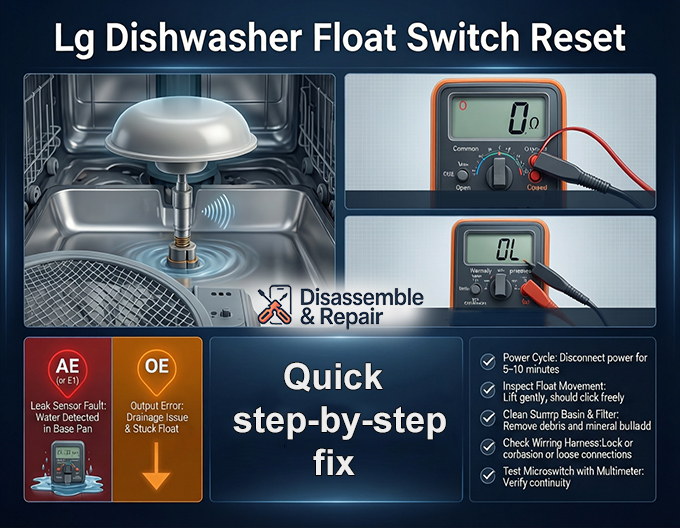
The AE error code and overflow protection
The LG dishwasher AE error code (sometimes displayed as E1 on older models) indicates a leak sensor fault. This specific code is directly tied to the flood switch located in the base of the dishwasher. If water accumulates in the bottom pan—or if the float sensor is faulty—the system triggers this code to stop operation. While an actual leak requires repair, a sensitive switch or a stuck float can trigger an AE code even when no significant leak exists. In these instances, resetting the sensor is the primary solution.
The OE error code and drainage issues
The LG dishwasher OE error code stands for “Output Error,” usually signifying a drainage problem. While often caused by a clogged filter or a kinked hose, it is also linked to the Water Level Sensor and float assembly. If the float is stuck in the “up” position, the dishwasher believes the tub is still full of water. Consequently, the main control board may throw an OE code because it detects that the water level has not dropped despite the drain pump running. Verifying the movement of the float is a critical step in diagnosing persistent OE errors.
Step-by-Step LG dishwasher float switch reset procedure
Resetting the float switch involves more than just pressing a button. It requires a combination of electronic resetting and physical inspection. Follow these steps carefully to ensure safety and accuracy.
Step 1: Performing a power cycle
The first and simplest method to attempt an Lg Dishwasher Float Switch Reset is a hard power cycle. Modern dishwashers utilize complex electronic control boards that can sometimes retain “ghost” errors.
- Disconnect Power: Locate the circuit breaker dedicated to your dishwasher and flip it to the “OFF” position. Alternatively, if your unit is plugged into a wall outlet, unplug it.
- Wait: Leave the power disconnected for at least 5 to 10 minutes. This allows the capacitors on the control board to discharge completely, clearing volatile memory and temporary faults.
- Restore Power: Switch the breaker back on or plug the unit in.
- Test: Attempt to start a new cycle. If the error clears, the issue was likely a software glitch. If the error persists, you must proceed to physical inspection.
Step 2: Inspecting the float assembly and sump basin
If the power cycle fails, the issue is likely mechanical. You need to inspect the Float Assembly located inside the dishwasher tub.
- Locate the Float: Open the dishwasher door and remove the lower dish rack. Look for a round, mushroom-like plastic cover on the floor of the tub. This is the float dome.
- Check for Movement: Gently lift the float up and down. It should move freely with a slight clicking sound (which is the Microswitch engaging and disengaging).
- Clean the Area: Often, debris or calcium buildup can cause the float to stick in the “up” (overflow) position.
- Inspect the Sump Basin: The area surrounding the float and the main filter is known as the Sump Basin. accumulated food waste here can impede the float’s movement. Remove the mesh filter and clean the sump area thoroughly to ensure nothing obstructs the water level sensor mechanisms.
Step 3: Accessing the microswitch and wiring harness
If the float moves freely but the error remains, the problem may lie beneath the tub with the switch itself or the Wiring Harness.
Note: This step requires uninstalling the dishwasher or removing the kickplate.
- Safety First: Ensure the power is turned off at the breaker.
- Remove Kickplate: Unscrew the lower access panel (kickplate) at the bottom of the dishwasher.
- Locate the Switch: Look for the stem of the float assembly protruding through the bottom of the tub. It will be connected to a small click-switch (the microswitch).
- Visual Inspection: Check the wires connecting to the switch. Look for signs of corrosion, detached wires, or damage from pests. A compromised wiring harness can interrupt the signal, causing the machine to think the float is always tripped.
Advanced troubleshooting: Continuity test and replacement
When a physical reset and cleaning do not resolve the issue, you must verify the electrical integrity of the components using a Multimeter. This is the definitive way to determine if a part needs replacement.
Using a multimeter for a continuity test
A Continuity Test determines if a continuous electrical path exists through the switch.
- Set the Multimeter: Turn your multimeter to the continuity setting (often symbolized by a sound wave) or the lowest Ohms setting.
- Disconnect the Switch: Carefully remove the wire connectors from the microswitch terminals.
- Test the Terminals: Place one probe on the “Common” (COM) terminal and the other on the “Normally Closed” (NC) terminal.
- At Rest: The multimeter should beep or show near-zero resistance, indicating a closed circuit (electricity can flow).
- Activated: Manually press the switch trigger. The beeping should stop, or the meter should show “OL” (Open Loop), indicating the circuit is broken.
- Interpret Results: If the switch does not change states when pressed, or if it shows no continuity when at rest, the microswitch is internally failed and must be replaced.
Examining the drain pump and water level sensor
If the microswitch tests fine, the issue might be downstream.
- Drain Pump: If the Drain Pump is failing, it may not be able to evacuate water fast enough, causing the water level to actually rise and trip the float. Check the pump for blockages or impeller damage.
- Water Level Sensor: Some LG models use a pressure sensor (pressostat) in addition to the mechanical float. If this sensor is clogged with gunk from the Sump Basin, it may send incorrect data to the control board. Cleaning the small hose connected to the pressure sensor can often resolve this “phantom” water level reading.
Preventive maintenance for your LG dishwasher
To avoid the need for frequent resets, regular maintenance is essential. The health of your Float Assembly is directly tied to the cleanliness of the machine.
- Regular Cleaning: Clean the filter and Sump Basin once a month. This prevents debris from jamming the float.
- Descaling: If you live in a hard water area, mineral deposits can cause the float mechanism to bind. Run a dishwasher cleaner cycle periodically to remove limescale.
- Proper Loading: Ensure that large items in the lower rack do not impede the movement of the float dome.
- Inspect Seals: Periodically check the door gasket. A bad seal can allow water to leak into the bottom pan, triggering the AE Error Code via the flood switch.
Conclusion
Mastering the Lg Dishwasher Float Switch Reset is a valuable skill for any homeowner. By understanding the relationship between the Float Assembly, the Microswitch, and error codes like AE and OE, you can diagnose issues with precision. Whether the solution is a simple Power Cycle, a thorough cleaning of the Sump Basin, or a technical Continuity Test with a Multimeter, following these steps ensures your appliance continues to operate safely and effectively. Remember, the float switch is a safety device; if it keeps tripping, it is often doing its job to protect your home from water damage. Always address the root cause—be it a leak, a clog, or a faulty part—to ensure the longevity of your LG dishwasher.
Frequently asked questions
Which LG dishwasher error codes are related to the float switch?
The most common codes are AE (or E1) and OE. The AE code specifically indicates that the leak sensor or float switch in the base pan has been triggered by water or a mechanical fault. The OE code signifies a drainage error, which can happen if a stuck float switch incorrectly signals to the control board that the tub is still full of water.
Where is the float switch located, and how do I inspect it?
The float assembly is located inside the dishwasher tub. After removing the lower dish rack, look for a round, mushroom-shaped plastic cover on the floor of the machine. To inspect it, gently lift the dome to ensure it moves up and down freely. You should hear a faint clicking sound, which indicates the microswitch is engaging and disengaging.
How do I perform a manual reset of the LG dishwasher electronics?
To perform a hard reset and clear temporary error codes, disconnect the dishwasher from its power source by either unplugging it or flipping the dedicated circuit breaker to the “OFF” position. Wait for 5 to 10 minutes to allow the control board’s capacitors to fully discharge before restoring power and attempting to start a new cycle.
What should I do if cleaning the float doesn’t clear the AE error code?
If the float moves freely and the area is clean but the error persists, the issue may be electrical. You should check the wiring harness under the unit for corrosion or damage. Additionally, you can use a multimeter to perform a continuity test on the microswitch; if the switch fails to change states when pressed, it is faulty and must be replaced.
How can I prevent the float switch from sticking in the future?
Regular maintenance is the best prevention. Clean the dishwasher filter and the surrounding sump basin at least once a month to prevent food particles and soap scum from obstructing the float’s movement. If you have hard water, periodic descaling with a dishwasher cleaner will prevent mineral buildup from causing the mechanism to bind.


