

Understanding Indesit dishwasher symbols meaning can transform a frustrating blinking light into a quick fix, ensuring your appliance runs efficiently for years. If you have ever stared at your control panel wondering why a snowflake or a tap icon is flashing, you are not alone in needing a clear guide to these indicators.
Indesit dishwasher symbols meaning: The Basics
The symbols on your Indesit dishwasher control panel are designed to communicate two main things: the machine’s current status and any issues that require your attention. Deciphering the Indesit dishwasher symbols meaning is essential for selecting the right cycle for your dishes and maintaining the machine’s health. While the user manual is the ultimate authority, this guide breaks down the most common icons you will encounter.
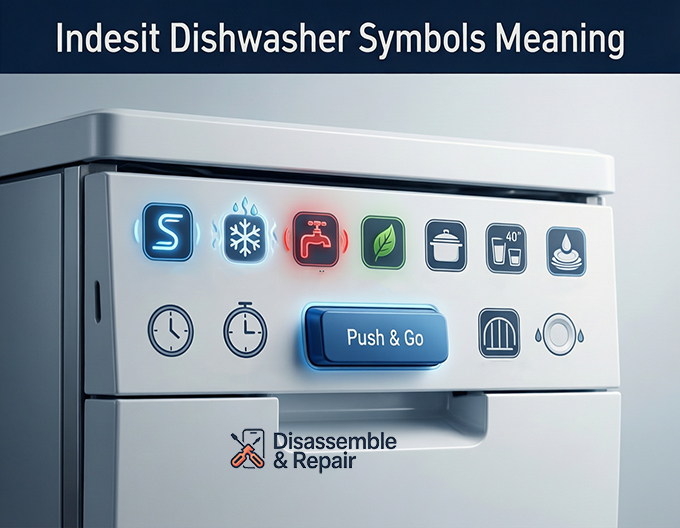
Warning and maintenance indicators
These lights are critical as they alert you to maintenance needs that affect cleaning performance.
- Salt Refill Symbol: This icon typically looks like a stylized “S” or a container with arrows. When this light illuminates, it indicates that the salt reservoir is empty. Dishwasher salt is vital for softening water; without it, you may notice limescale buildup on your heating element and cloudy glassware.
- Rinse Aid Indicator: Often represented by a snowflake or a sun-like starburst icon. This light signals that the rinse aid compartment needs topping up. Rinse aid breaks the surface tension of water, preventing water spots and helping your dishes dry faster.
- Water Tap Icon: This is a trouble alert. A flashing or solid tap symbol usually means the machine is not receiving water. This could be due to a closed water valve, a kinked inlet hose, or a clogged filter. If this appears, check your water supply immediately.
Wash cycle symbols
Your Indesit control panel offers various programs tailored to different loads. Selecting the correct one can save energy and time.
- Eco Program: Usually marked with the text “ECO” or sometimes a leaf symbol. This is the standard cycle for normally soiled tableware. It is the most efficient program in terms of combined energy and water consumption, though it often takes longer than standard cycles to complete.
- Intensive Cycle: Represented by a symbol of a pot or pan, or sometimes a plate with heavy lines above it. This program uses higher temperatures and stronger pressure to clean heavily soiled pots, pans, and dishes with dried-on food residues.
- Rapid Cycle: often depicted by two small glasses or a clock icon with “40′” or “30′”. This is a quick wash for lightly soiled dishes that do not require drying. It is perfect for when you need plates back in use quickly, such as during a dinner party.
- Pre-wash (Soak): A symbol showing a shower head or droplets over a dish. This is a short, cold rinse cycle used to prevent food from drying on dishes if you plan to run a full load later.
Special features and functions
Modern Indesit models come with specific features designed for convenience.
- Push & Go: This is often a distinct blue button rather than just a screen icon. Pressing and holding the Push & Go button for two seconds (when the machine is off) immediately starts a daily wash cycle (usually 50°C) without the need to manually select a program or press start. It is designed for everyday loads to make operation effortless.
- Half Load: Depending on your model, this might be a button marked “1/2” or an icon of a single rack. This function optimizes water and energy for smaller loads. On some “Multizone” models, it allows you to choose whether to wash only the upper or lower rack.
- Delay Timer: Indicated by a clock face or “h”. This allows you to set the wash cycle to start at a later time, such as during the night when energy tariffs might be lower.
Troubleshooting with your user manual
While these descriptions cover the standard icons, Indesit manufactures many different models with slight variations in their displays. If you see a symbol that blinks rapidly or in a specific pattern (error code), consult your user manual. The manual will often have a specific “Troubleshooting” section that maps these flashing lights to specific internal errors, such as drainage blocks or heating element faults.
Frequently asked questions
What should I do if the water tap symbol starts flashing?
If the water tap icon is flashing or solid, your dishwasher isn’t receiving water. You should immediately check if the water supply valve is fully open, ensure the inlet hose is not kinked or pinched, and verify that the water filter is not clogged.
How do I use the Push & Go feature?
The Push & Go feature is designed for easy, everyday use. Simply press and hold the dedicated blue button for two seconds while the machine is off. This will automatically launch a standard daily wash cycle at 50°C without requiring any further program selection.
Why is the “S” symbol illuminated on my control panel?
The “S” symbol is the Salt Refill indicator. It means your dishwasher is low on salt, which is necessary for softening water. Refilling the salt reservoir helps prevent limescale buildup and ensures your glassware doesn’t become cloudy.
Is the Eco program the fastest wash cycle available?
No, the Eco program is the most energy and water-efficient cycle, but it typically takes longer to complete than other programs. If you need a fast wash for lightly soiled items that do not require drying, you should select the Rapid cycle, which is usually marked with a clock or glass icon.


