

When your appliance display flashes the LG washing machine OL error, it immediately halts your laundry routine, signaling a critical issue with the motor or load capacity. This code stands for “Overload” and indicates that the Direct Drive motor is experiencing excessive strain or resistance that prevents it from rotating the drum correctly.
As a Senior SEO Specialist and appliance technician, I have compiled this professional guide to help you diagnose and resolve the OL error. We will explore the technical causes—from simple laundry load capacity issues to complex component failures like the Hall sensor—and provide specific solutions for both front load washers and top load washers.
Understanding the LG Washing Machine OL Error
The “OL” code is a protective mechanism. It stops the machine to prevent permanent damage to the Direct Drive motor or the control board. Unlike generic errors, this specific code points directly to the relationship between the motor’s power output and the physical resistance of the drum.
In modern LG washers, the machine detects this overload through a feedback loop involving the rotor and stator. When the control board sends power to the stator coils, it expects the rotor to spin at a specific speed. If the Hall sensor (also known as the Rotor Position Sensor) detects that the rotor is dragging, stuck, or moving too slowly for the amount of power supplied, the system triggers the OL error to prevent overheating.
Common Causes of the OL Code
While the error explicitly means “Overload,” the root cause is not always as simple as too many clothes.
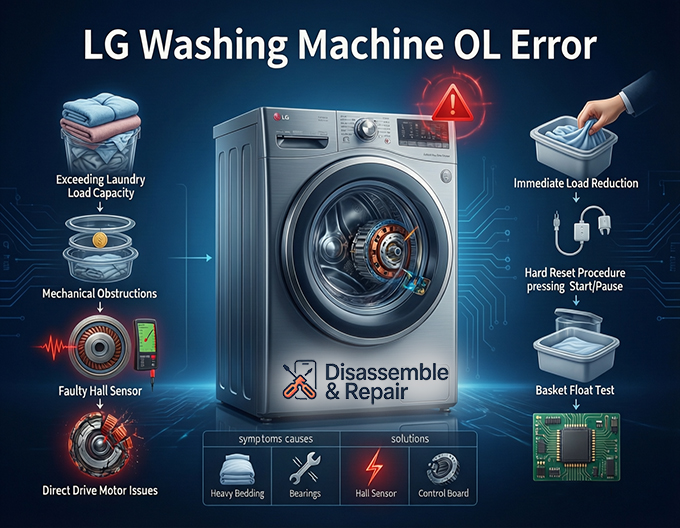
1. Exceeding Laundry Load Capacity
The most frequent cause is a physical overload. Wet laundry gets heavy. If you stuff the drum beyond its rated capacity, the weight creates too much torque for the motor to overcome. This is especially common when washing absorbent items like comforters, heavy towels, or rugs.
Read more How to reset LG washing machine no power
2. Mechanical Obstructions
If the drum cannot turn freely, the motor strains.
- Trapped Objects: A coin, wire, or small garment can get stuck between the inner tub and outer tub (common in top load washers) or jam the door seal (in front load washers).
- Bearing Failure: Worn-out tub bearings create immense friction, mimicking an overload condition.
3. Faulty Hall Sensor (Rotor Position Sensor)
The Hall sensor monitors the speed and position of the rotor. If this small electronic component fails, the control board loses track of the motor. It may incorrectly interpret a normal load as a “stalled” motor, triggering the OL code even when the drum is empty.
4. Direct Drive Motor Issues
Although rare, the rotor and stator themselves can fail. Cracked magnets on the rotor or damaged windings on the stator can disrupt the magnetic field required for rotation.
Troubleshooting the LG Washing Machine OL Error
Follow these professional troubleshooting steps to isolate the issue.
Read more LG washing machine UL error
Step 1: Immediate Load Reduction
If the error occurs mid-cycle:
- Pause the machine and power it off.
- Drain the water if the door is locked (use the emergency drain hose near the filter).
- Remove half of the laundry.
- Restart the cycle.
Note: If the error disappears, you simply exceeded the laundry load capacity.
Step 2: The Reset Procedure
A logical glitch in the control board can sometimes cause a false positive. Performing a hard reset clears the short-term memory.
Read more LG washing machine sound problem
- Unplug the washing machine from the power outlet.
- Press and hold the Start/Pause button for 5 seconds. This discharges any residual electricity in the capacitors.
- Wait for at least 5 to 10 minutes.
- Plug the machine back in and attempt a “Rinse + Spin” cycle with an empty drum.
Step 3: Check for “Basket Float” (Top Load Specific)
For top load washer owners, the OL error can occur if the basket does not float properly. The inner tub must float up slightly when filled with water to disengage from the drive hub.
- Test: Open the lid when there is water in the tub. You should be able to move the tub independently of the agitator.
- Cause: Debris or grime can cement the tub to the drive shaft, preventing it from floating. This mechanical friction triggers the overload.
Step 4: Inspect for Drag (Front Load Specific)
For a front load washer:
- Open the door and spin the empty drum by hand.
- It should spin smoothly and silently.
- Resistance? If it feels heavy or makes a grinding noise, you likely have a bad bearing or an object trapped between the tubs.
- Check the Gasket: Inspect the rubber door seal for small items like socks or coins that might be pressing against the spinning drum.
Advanced Diagnosis: Hall Sensor and Motor
If the drum spins freely by hand and the reset procedure fails, the issue is likely electrical.
Testing the Hall Sensor
The Hall sensor is mounted on the stator at the back of the machine (behind the rotor).
- Symptoms: The washer jerks, makes a shuddering noise, or displays OL/LE errors immediately upon starting.
- Diagnosis: A technician can test the sensor using a multimeter to check for resistance across its terminals. If the readings are outside the manufacturer’s range (typically 5–15k ohms, but varies by model), the sensor must be replaced.
Weight Sensor Calibration
Modern LG machines use the motor’s resistance to “weigh” the clothes; there is often no separate physical weight sensor. The machine rotates the drum dry to calculate inertia.
- Unbalanced Load: If the load is bunched up, the “weight” calculation fails. Always redistribute laundry evenly.
- Calibration: After replacing parts like the Hall sensor or control board, you must run the machine’s calibration mode (refer to your specific service manual) to reset the weight sensing logic.
Summary of Solutions
| Symptom | Likely Entity | Solution |
|---|---|---|
| Error with heavy bedding | Laundry load capacity | Remove items; wash heavy loads in batches. |
| Drum is hard to turn by hand | Rotor and stator / Bearings | Check for trapped objects; replace bearings. |
| Washer jerks then stops | Hall sensor | Replace the Rotor Position Sensor. |
| Error persists after reset | Control board | Inspect wiring harness or replace board. |
| Top loader tub won’t move | Top load washer mechanism | Clean drive shaft; ensure tub “floats”. |
By systematically checking the load, the mechanical movement, and the electronic sensors, you can effectively resolve the LG washing machine OL error. Always ensure you unplug the appliance before performing any physical repairs to the motor or internal components.
Frequently Asked Questions
What exactly does the OL code mean on my LG washer?
The OL code stands for “Overload.” It is a safety feature triggered when the Direct Drive motor detects too much physical resistance or weight, preventing the drum from spinning at the required speed. This protects the motor and the control board from overheating or permanent electrical damage.
Why is my washing machine showing an OL error even when it isn’t full?
If the drum is not overfilled, the error is likely caused by a faulty Hall sensor (Rotor Position Sensor) or a mechanical obstruction. A failed Hall sensor cannot accurately track the motor’s speed, leading the control board to “think” the motor is stalled. Alternatively, worn-out bearings or an object trapped between the inner and outer tubs can create enough friction to trigger the code.
Read more LG washing machine CL error
How do I reset my LG washer to clear the OL error?
To perform a hard reset, unplug the washing machine from the power source. Press and hold the Start/Pause button for approximately 5 seconds to discharge any remaining electricity. Wait about 10 minutes before plugging the machine back in. Once powered on, run a “Rinse + Spin” cycle with an empty drum to see if the code persists.
Can a top load washer have different causes for an OL error than a front load washer?
Yes. While both can suffer from motor or sensor issues, top load washers specifically rely on a “basket float” mechanism. If dirt, grime, or a mechanical failure prevents the inner tub from floating up when the machine fills with water, it won’t disengage properly from the drive hub, causing the motor to strain and trigger the OL error.
What should I do if the OL error happens during every heavy load?
If the error only occurs with heavy items like rugs or comforters, you are likely exceeding the machine’s laundry load capacity. Try washing these items in smaller batches or ensuring that heavy items are balanced evenly around the drum. If the machine is balanced and not overfilled but still fails, the weight sensing logic may need recalibration by a technician.


