

Dealing with an LG washing machine E3 error can be frustrating, especially when it interrupts your laundry routine unexpectedly. This specific error code typically indicates a malfunction in the drainage system, a load sensing issue, or a problem with the washing machine’s motor operation, depending on your specific model.
Understanding the LG Washing Machine E3 Error
The LG washing machine E3 error is not as universally standardized as the “OE” (Drain Error) or “UE” (Unbalanced Error) codes, meaning its definition can vary slightly between top-load washer models and front-load units. However, it predominantly points to two critical areas:
- Drainage Malfunction: The machine detects that water is not leaving the tub within the designated time frame. This is often due to a failure in the drain pump or a physical blockage.
- Motor or Load Sensing Issue: In some modern LG top-loaders, an E3 code appears when the motor assembly cannot rotate the drum properly due to an overload, clothing caught in the mechanism, or a failure in the Hall sensor (which monitors motor speed and position).
To accurately diagnose the issue, you must systematically check the components responsible for draining water and rotating the drum.
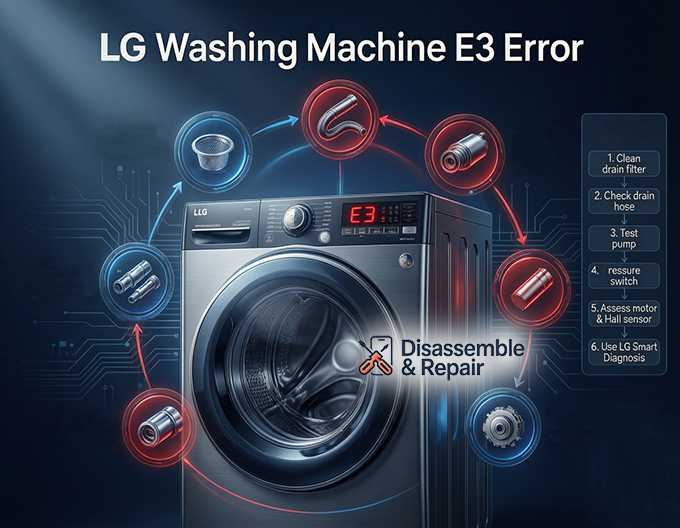
Common Causes of the E3 Error Code
Before attempting repairs, it is essential to identify the root cause. The following issues are the most frequent culprits:
- Clogged Drain System: A clogged drain is the most common trigger. Coins, lint, or small socks can obstruct the drain filter or the drain hose, preventing water from exiting.
- Faulty Drain Pump: If the impeller inside the drain pump is broken or the motor is burnt out, the machine cannot expel water, triggering the error.
- Pressure Switch Malfunction: The pressure switch (or water level sensor) monitors the water level. If it gives a false reading, the main control board may “think” the washer is still full of water when it isn’t, or vice versa.
- Hall Sensor Failure: For motor-related E3 errors, the Hall sensor on the stator might be defective, failing to report the motor’s activity to the main board.
- Frozen Components: In extremely cold climates, residual water inside the drain hose or pump can freeze, physically blocking the drainage path.
Step-by-Step Troubleshooting Guide
Follow these professional troubleshooting steps to resolve the LG washing machine E3 error.
1. Inspect and Clean the Drain Filter
The drain filter (often called a debris filter) is your first line of defense.
- Locate the access panel, usually at the bottom front of the machine.
- Place a shallow pan and towels underneath to catch residual water.
- Unscrew the filter counter-clockwise and remove it.
- Clean out any lint, hair, or foreign objects and rinse it under warm water.
- Reinsert the filter securely.
2. Check the Drain Hose for Obstructions
A kinked or blocked drain hose will immediately cause drainage errors.
- Pull the washer away from the wall.
- Ensure the hose is not twisted or crushed behind the machine.
- Disconnect the hose and run water through it to verify it is clear of clogs.
- Ensure the end of the drain hose is not submerged in water or sealed too tightly into the standpipe, as this can cause siphoning issues.
3. Test the Drain Pump
If the path is clear but the water won’t drain, the drain pump itself may be at fault.
Read more LG washing machine no power no lights
- Listen: When the machine enters the spin/drain cycle, listen for a humming sound. If it is silent, the pump motor may be dead. If it makes a grinding noise, the impeller might be damaged.
- Visual Check: If you are comfortable removing the back or bottom panel, inspect the pump for loose wiring.
- Multimeter Test: A technician can test the pump motor for continuity. If there is no continuity, the pump requires replacement.
4. Verify the Pressure Switch and Air Tube
The pressure switch relies on a clear air tube to detect water pressure.
- Locate the pressure switch (usually under the top panel).
- Check the clear plastic tube connecting the switch to the tub.
- Blow through the tube to ensure it isn’t clogged with gunk. A blockage here can trap air pressure, confusing the water level sensor.
5. Assess the Motor and Hall Sensor
If your E3 error occurs during the agitation or spin cycle rather than the drain cycle, it may be a motor issue.
Read more LG washing machine E4 error
- Overload Check: Ensure you are not overloading the top-load washer. Heavy loads can strain the motor.
- Hall Sensor: A faulty Hall sensor is a common failure point on LG direct-drive motors. If the sensor cannot communicate the rotor’s position to the main control board, the machine will halt to prevent damage. This repair typically requires a professional or a replacement of the sensor assembly attached to the motor stator.
Using LG Smart Diagnosis
Modern LG appliances feature LG Smart Diagnosis, a tool that can help pinpoint the exact nature of the E3 error.
- Download the LG ThinQ app on your smartphone.
- Power on the washing machine.
- Place your phone’s microphone near the “Smart Diagnosis” logo on the control panel.
- Press and hold the designated diagnosis button (often the “Temp” button) until the machine plays a sequence of tones.
- The app will analyze the tones and provide a specific diagnosis, confirming if the issue is drainage, motor, or sensor-related.
How to Perform an Error Code Reset
Sometimes, the E3 code is a temporary glitch caused by a power surge or a momentary sensor error. Performing a hard error code reset can clear the system.
- Power Down: Turn off the washing machine and unplug it from the wall outlet.
- Discharge Power: Press and hold the “Start/Pause” button for 5 to 10 seconds. This discharges any residual static electricity in the main control board.
- Wait: Leave the machine unplugged for at least 5 minutes.
- Restart: Plug the machine back in and run a “Rinse + Spin” cycle to see if the error persists.
When to Contact a Professional
If you have cleaned the drain filter, verified the drain hose is clear, and performed a reset, but the LG washing machine E3 error remains, the issue is likely a hardware failure. A failing main control board, a burnt-out drain pump, or a defective motor assembly are complex repairs.
Replacing internal components like the Hall sensor or the control board requires electrical safety knowledge. In these cases, contacting an authorized LG service technician is the safest and most effective solution to restore your appliance to working order.
Read more LG front load washing machine not filling with water
Frequently Asked Questions
What does the E3 error code mean on my LG washing machine?
The E3 error code typically indicates a problem with the drainage system or the motor’s ability to rotate the drum. In many models, it signifies that the washer is unable to drain water within a specific timeframe, or that the motor is struggling due to an overload or a faulty sensor.
How do I perform a hard reset to clear the E3 error?
To perform a hard reset, turn off the washer and unplug it from the power outlet. Press and hold the “Start/Pause” button for approximately 5 to 10 seconds to discharge residual power from the control board. Wait at least 5 minutes before plugging the machine back in and starting a new cycle to see if the code is cleared.
Can a clogged drain filter trigger the E3 error?
Yes, a clogged drain filter is a primary cause of drainage-related E3 errors. If lint, coins, or small clothing items obstruct the filter, the pump cannot effectively remove water from the tub. Regularly cleaning the debris filter located at the bottom front of your machine can prevent this issue.
What is a Hall sensor, and how does it relate to the E3 code?
The Hall sensor is a component that monitors the speed and position of the motor. If the E3 error appears during the agitation or spin cycle (rather than the drain cycle), it often indicates that the Hall sensor is failing to communicate with the main control board, or that the motor itself is obstructed.
When should I stop troubleshooting and call a professional?
If you have already cleaned the drain filter, checked the drain hose for kinks, and performed a power reset but the error persists, you likely have a hardware failure. Issues involving a burnt-out drain pump, a defective Hall sensor, or a malfunctioning main control board should be handled by an authorized LG service technician.


