

If your appliance display suddenly flashes the LG washing machine E5 error, it typically signals a disruption in the unit’s ability to monitor water levels or internal pressure. This specific alphanumeric code can be alarming, effectively halting your laundry routine and locking the door until the underlying issue is resolved. While LG washers are renowned for their reliability, sensor malfunctions and component failures can occur over time, triggering diagnostic codes that require attention.
In many cases, the E5 code is closely related to the “PE” error, indicating a malfunction with the water level sensing system, though it can occasionally be a misinterpretation of similar-looking codes like “tE” (heating error) on the digital display. This guide will walk you through the technical meaning of the error, the specific components involved, and professional steps to diagnose and fix the problem.
Understanding the LG Washing Machine E5 Error
The LG washing machine E5 error is technically interpreted as a fault in the pressure sensing circuit. Your washing machine relies on a precise balance of water and air pressure to determine how full the drum is. When the main computer cannot detect a valid signal from the sensors responsible for this measurement, it triggers the E5 or PE code to prevent potential overflowing or dry running.
Read more LG washer leaves clothes wet after spin
Unlike simple operational errors like an open door, this code usually points to a hardware issue rather than user error. It involves specific internal components that communicate with the Main control board. When this communication line is broken or sends erratic data, the machine enters a safety mode, drains any existing water, and displays the error.
It is also important to note that on certain Top-load washing machine models, digital segments can be difficult to read. A “tE” code, which relates to the Heating element or temperature sensors, can sometimes be misread as E5. Therefore, troubleshooting this error often requires inspecting both the pressure system and the heating system to ensure an accurate diagnosis.
Primary Causes: The Pressure System
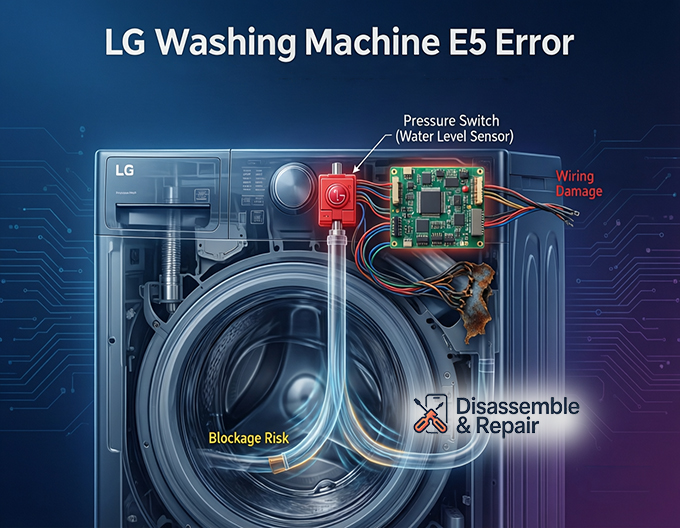
The most common culprit for this error lies within the water level monitoring system. This system is composed of three key entities: the sensor itself, the air tube, and the wiring.
Water Level Sensor and Pressure Switch
The Water level sensor, often referred to as the Pressure switch, is the heart of this system. It is usually located under the top cover of the machine. This switch uses a diaphragm and electromagnetic frequency to tell the control board exactly how much water is in the drum. If the Pressure switch fails electrically or gets stuck in one position, the machine cannot verify the water level, triggering the E5 alert.
The Pressure Tube
Connected to the pressure switch is a clear, slender hose known as the Pressure tube. This tube runs from the switch down to the bottom of the drum’s air chamber. As water fills the drum, air is pushed up this tube, increasing pressure on the switch.
- Blockages: Over time, detergent residue or lint can block the air chamber where the tube connects.
- Damage: Vibrations during the spin cycle can cause the tube to chafe, crack, or detach.
- Kinks: If the machine was recently moved, the tube might be pinched.
Any leak in the Pressure tube will cause the air pressure to escape, leading the sensor to read “empty” even when the tub is full, or causing the control board to detect a discrepancy and throw the error.
Secondary Causes: Heating and Inlet Issues
While less common, the E5 code can sometimes be linked to the heating circuit or water supply, especially if the code is a misread “tE” or if the Main control board is failing to interpret signals correctly.
Thermistor and Heating Element
In models equipped with internal water heaters, a Thermistor is used to monitor water temperature. If you suspect the code might actually be “tE” (Temperature Error), the issue likely lies here. The Thermistor changes resistance based on heat; if it gives an open or short circuit reading, the machine will stop. Similarly, a faulty Heating element that has burnt out or has an electrical leak can confuse the control logic. Using a multimeter to check the resistance (Ohms) of both the thermistor and heating element is a standard step in Appliance repair to rule out these components.
Water Inlet Valve
The Water inlet valve controls the flow of hot and cold water into the unit. While a valve failure usually triggers an “IE” (Inlet Error), a valve that is electrically compromised or “stuck” can sometimes create conflicts that register as sensor errors. If the valve fails to close and water continues to rise beyond the safety limit, the pressure sensor may trigger an error code to initiate an emergency drain sequence.
Electrical and Control Board Failures
If the mechanical sensors (pressure switch, thermistor) and tubes are intact, the problem may be electrical.
Wiring Harness
The Wiring harness acts as the nervous system of your washer, transmitting signals from the sensors to the brain (the control board). The constant vibration of a washing machine can cause wires to rub against the metal chassis, leading to frayed insulation or broken connections. A corroded connector at the water level sensor is a frequent cause of the LG washing machine E5 error. Inspecting the harness for continuity and physical damage is essential before replacing expensive parts.
Read more LG washing machine E7 error
Main Control Board
The Main control board (PCB) is the final decision-maker. If the board’s interpretation logic is corrupted, or if a relay responsible for the pressure switch circuit is blown, it may display the E5 error permanently. This is often the last resort in diagnosis, as PCBs are the most expensive component to replace.
Diagnostic Steps and LG ThinQ
Modern LG appliances offer smart diagnostic tools to assist in identifying these complex errors.
Using LG ThinQ
If your machine is Wi-Fi enabled, the LG ThinQ app can be a powerful ally. By pairing your phone with the washer, you can run a “Smart Diagnosis.” The app communicates directly with the machine’s internal computer and can often provide a more detailed explanation of the error than the simple two-digit code on the display. It might confirm if the sensor data is out of range (indicating a bad pressure switch) or if the circuit is open (indicating a wiring issue).
How to Perform an Error Code Reset
Before opening the machine for repairs, always attempt a hard reset to clear any temporary electronic glitches.
- Power Down: Turn off the washing machine and unplug it from the wall outlet.
- Discharge Power: Press and hold the “Start/Pause” button for 5 to 10 seconds to dissipate any residual static electricity in the capacitors.
- Wait: Leave the machine unplugged for at least 10 minutes.
- Restart: Plug the machine back in and attempt to run a small “Rinse & Spin” cycle.
If the Error code reset works, the issue may have been a momentary voltage spike. If the code returns immediately, physical repair is necessary.
Step-by-Step Repair Guide
If you are comfortable with DIY Appliance repair, follow these steps to inspect the critical components. Always ensure the machine is unplugged and the water supply is turned off before proceeding.
Read more LG washer taking too long to finish
Inspecting the Pressure Switch (Top-Load and Front-Load)
- Access the Interior: For a Top-load washing machine, remove the control panel screws at the back. For front-loaders, remove the top lid.
- Locate the Switch: Look for a round plastic component with a small rubber hose and a wire connector attached to it.
- Check the Tube: Disconnect the Pressure tube from the switch. Blow through it gently. You should feel air moving freely into the drum. If you feel resistance, the chamber is clogged.
- Check Connections: Unplug the Wiring harness from the switch. Clean the contacts with electrical contact cleaner if they look corroded.
- Replace if Needed: If the tube is clear and wires are good, the Pressure switch itself is likely the faulty part and needs replacement.
Checking the Heating System (If suspected tE/E5 confusion)
- Access the Heater: On front-loaders, this is usually at the bottom rear of the tub, accessible by removing the back panel.
- Test Continuity: Disconnect the wires to the Heating element and Thermistor. Use a multimeter to ensure the heating element has continuity (usually 10-30 Ohms) and the thermistor shows a resistance value that changes when you hold it (warm it up).
Conclusion
Resolving the LG washing machine E5 error requires a systematic approach, starting with the water level monitoring components. By focusing on the Water level sensor, Pressure switch, and Pressure tube, you can address the most likely mechanical causes. However, keeping an eye on secondary possibilities like the Thermistor and Wiring harness ensures you don’t miss less obvious electrical faults. Whether you utilize LG ThinQ for a quick diagnosis or dive into a manual repair, understanding the interaction between these entities is key to restoring your appliance’s functionality. If the problem persists despite checking these systems, the Main control board may require professional service to ensure your washer returns to peak performance.
Frequently Asked Questions
What is the primary cause of the LG washing machine E5 error?
The E5 error is primarily caused by a malfunction in the pressure sensing circuit. This usually involves a faulty water level sensor (pressure switch), a blocked or damaged pressure tube, or a wiring connection issue that prevents the main control board from accurately monitoring the water level inside the drum.
Is the E5 error code the same as the PE or tE codes?
The E5 code is technically synonymous with the PE (Pressure Error) code, as both point to the water level sensing system. However, on some digital displays, the E5 code can be easily misread as “tE,” which actually indicates a heating or temperature sensor error. If troubleshooting the pressure system doesn’t work, it is worth checking the thermistor and heating element.
How can I perform a hard reset to clear the E5 error?
To perform an error code reset, power down the machine and unplug it from the wall. Press and hold the “Start/Pause” button for 5 to 10 seconds to drain any residual electricity. Wait at least 10 minutes before plugging the unit back in and attempting to run a new cycle.
Can the LG ThinQ app help diagnose the E5 error?
Yes, if your washing machine is Wi-Fi enabled, you can use the LG ThinQ app to run a “Smart Diagnosis.” The app communicates with the machine’s internal computer to provide a more specific explanation of the fault, helping you determine if the problem is a mechanical blockage in the pressure tube or an electrical failure in the sensor.
Why does my washing machine automatically drain when the E5 error appears?
When the main control board loses its signal from the water level sensor, it triggers a safety mode. Because the machine cannot confirm how much water is in the tub, it automatically initiates an emergency drain sequence to prevent potential flooding or overflowing.


