

Encountering an LG washing machine E7 error can be a confusing experience, as this code often points to two distinct issues depending on your specific appliance model. In the first 2 sentences of this guide, we have established that the LG washing machine E7 error typically indicates a communication or sensor fault that prevents the cycle from starting. For most standard units, this error is closely linked to the water level sensing system, while in LG SideKick™ pedestal washers, it signifies a stacking detection failure.
This guide focuses on diagnosing and repairing the issue with a specific emphasis on the pressure sensing components, as indicated by the entities you are troubleshooting.
Understanding the LG Washing Machine E7 Error and Frequency Issues
On many LG front load and top load washer models, the E7 code functions similarly to the “PE” (Pressure Error) code. It indicates a Frequency error within the water level detection system.
The Main control board relies on a precise frequency signal sent by the pressure sensor to determine how much water is in the drum. If this frequency signal drops below or exceeds the expected range (typically due to a hardware fault), the PCB assembly triggers the E7 error to prevent overfilling or dry running.
Read more LG washing machine PE error
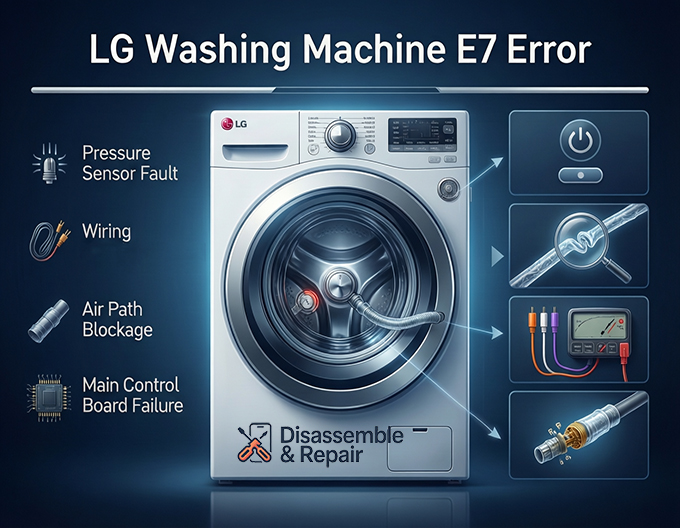
Primary Causes of the E7 Error
- Defective Sensor: The Pressure sensor (also known as the Water level sensor) has failed internally and is sending invalid data.
- Wiring Issues: The Wiring harness connecting the sensor to the main board is damaged, corroded, or loose.
- Air Path Blockage: The Pressure switch hose is clogged with debris, kinked, or punctured.
- Board Failure: The Main control board is unable to process the frequency signal correctly.
Step-by-Step Troubleshooting Guide
Follow this professional Troubleshooting guide to isolate the root cause of the error.
Step 1: Preliminary Reset
Before opening the machine, perform a hard reset to clear any temporary logic glitches in the PCB assembly.
- Unplug the washer from the power outlet.
- Press and hold the Start/Pause button for 5 seconds.
- Plug the washer back in and attempt a rinse cycle.
- If the LG washing machine E7 error persists, proceed to hardware inspection.
Step 2: Inspect the Pressure Switch Hose
The Pressure switch hose is a clear tube that traps air as water fills the tub. If this air pressure cannot reach the sensor, the machine reports a frequency error.
- Access the Components: For an LG top load washer, remove the rear control console panel. For an LG front load washer, remove the top main cover by unscrewing the fasteners at the back.
- Locate the Hose: Find the clear plastic tube running from the tub to the Water level sensor.
- Check for Damage: Inspect the hose for kinks, holes, or abrasions. A puncture will prevent pressure buildup.
- Clear Blockages: Remove the hose from the sensor end and blow through it toward the tub. You should hear bubbling water. If there is resistance, the air chamber at the bottom may be clogged with detergent buildup.
Step 3: Test and Inspect the Wiring Harness
The Wiring harness transmits the frequency signal (measured in kHz) to the control board.
- Visual Inspection: Follow the wires from the pressure sensor back to the Main control board. Look for signs of wear, burn marks, or corrosion on the connectors.
- Continuity Check: If you have a multimeter, check the continuity of the three wires (usually Orange, White, and Violet) between the sensor plug and the board connector.
- Secure Connections: Ensure the harness is firmly seated on both the sensor and the PCB. Loose vibration-induced connections are a common cause of intermittent E7 errors.
Step 4: Pressure Sensor Replacement
If the hose and wiring are intact, the Pressure sensor itself is the most likely culprit. This is a common Sensor replacement procedure detailed in any standard Appliance repair manual.
Replacement Procedure:
- Disconnect the wire harness from the sensor.
- Squeeze the hose clamp and pull the Pressure switch hose off the sensor nipple.
- Release the locking tab or remove the mounting screw to detach the old sensor.
- Install the new sensor (ensure it is the correct part number for your model).
- Reattach the hose and secure it with the clamp.
- Reconnect the wiring harness.
Step 5: Main Control Board Diagnosis
If the sensor and hose are functioning correctly, the fault may lie with the Main control board. The board provides the DC voltage to the sensor and reads the returning frequency. If the board’s internal circuit is damaged, it will persistently display the E7 error regardless of the sensor’s condition. In this scenario, replacing the main PCB is necessary.
Special Case: LG SideKick™ Pedestal Washers
If you are experiencing the LG washing machine E7 error on a SideKick™ (mini washer) installed underneath a main unit, the meaning is different. In this context, E7 indicates a Stacking Switch issue.
- The Issue: The SideKick detects that the main washer is not properly “stacked” or seated on top of it.
- The Fix: Ensure the main washer is correctly aligned on the pedestal. Check the stacking switch (located on the top frame of the SideKick) to ensure it is being depressed by the weight of the washer above. If the switch is broken or the wiring is loose, it must be replaced.
Summary
Resolving the E7 error requires a systematic approach to the machine’s sensing electronics. Whether the issue stems from a blocked Pressure switch hose, a faulty Water level sensor, or a communication breakdown in the Wiring harness, early diagnosis is key to preventing further damage. By following this guide, you can accurately identify whether a simple cleaning or a complete Sensor replacement is required to restore your appliance to working order.
Frequently Asked Questions
What does the LG washing machine E7 error indicate?
The E7 error code typically indicates a frequency error within the water level detection system for standard front-load and top-load washers. It signifies that the main control board is receiving an incorrect signal from the pressure sensor. However, on LG SideKick™ pedestal washers, the E7 code specifically points to a stacking detection failure.
Read more LG washer tearing clothes
Can I fix the E7 error by resetting my washing machine?
In some cases, a hard reset can clear temporary logic glitches in the PCB assembly. To do this, unplug the washer, press and hold the Start/Pause button for five seconds, and then plug the machine back in. If the error persists after attempting a cycle, the issue likely involves a hardware component like the pressure sensor or wiring harness.
How do I know if the pressure switch hose is causing the problem?
The pressure switch hose should be inspected for physical damage such as kinks, holes, or punctures. You can test for blockages by disconnecting the hose from the sensor and blowing through it toward the tub; if you hear water bubbling, the air path is likely clear. If there is resistance, detergent buildup may be obstructing the air chamber.
What should I check if the E7 error appears on an LG SideKick™ pedestal washer?
For SideKick™ models, the E7 error usually means the unit does not detect the main washer sitting on top of it. You should ensure the main washer is correctly aligned and seated on the pedestal. Additionally, inspect the stacking switch on the SideKick’s top frame to ensure it is being depressed and that its wiring is secure.
Read more LG washing machine iE error


