

Is your LG washing machine start button not responding when you try to begin a laundry cycle? This frustrating issue can leave your wet clothes stranded, but it often stems from safety features or minor electronic glitches rather than a catastrophic failure.
When the start button fails to engage, the problem usually lies within the user interface, safety sensors, or the main power control system. Before calling a technician, you can diagnose and potentially fix the issue by systematically checking the Child Lock settings, performing a master reset, and inspecting key hardware components like the door latch assembly.
Common Reasons Why the Start Button Is Unresponsive
Understanding the root cause is the first step to a solution. In most cases, an unresponsive start button on an LG front load washer is caused by one of the following:
- Activated Child Lock: The most frequent “false alarm” where the control panel is intentionally locked.
- Software Glitch: The main PCB (Printed Circuit Board) may have frozen or encountered a logic error.
- Door Latch Failure: If the washer cannot confirm the door is locked, it will disable the start command for safety.
- Touch Panel Issues: Physical wear or moisture on the display board can prevent the sensor from registering your touch.
- Power Supply Issues: Inconsistent voltage can light up the display but fail to engage the motor or cycle logic.
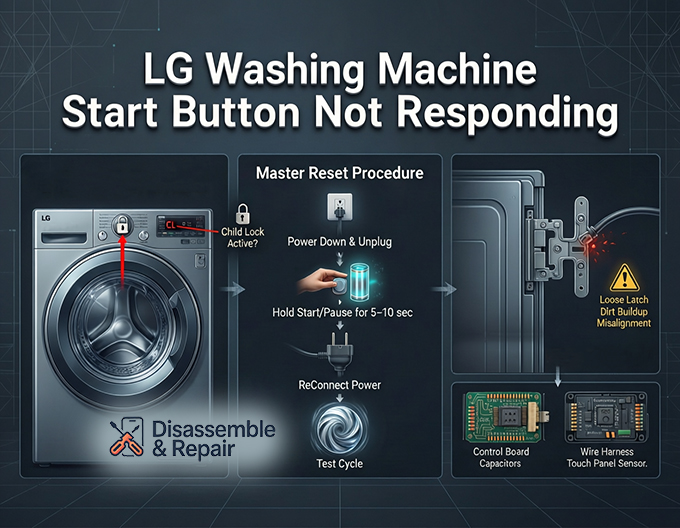
Check for the CL Error Code (Child Lock)
Before grabbing a screwdriver, look at your display board. If you see the letters “CL” flashing or remaining static, your machine is in Child Lock mode. This is a safety feature designed to prevent children from accidentally changing settings or starting the washer.
When Child Lock is active, the control panel becomes unresponsive. To fix this:
- Locate the Lock Icon: Look for a key or lock symbol on your control panel. It is usually printed between two buttons (e.g., Prewash + Rinse or Spin + Soil).
- Press and Hold: Press the two buttons linked by the lock line simultaneously and hold them for 3 to 5 seconds.
- Confirm Deactivation: You should hear a chime, and the “CL” code should disappear from the display. Try pressing the start button again.
If your model has a dedicated “Child Lock” button, simply hold that button alone for 3 seconds.
LG Washing Machine Start Button Not Responding: Perform a Master Reset
If the Child Lock is off and the button still won’t work, the system logic might be stuck. A Master Reset can clear the memory of the main PCB and resolve transient electronic glitches.
Follow this procedure to reset your machine:
- Power Down: Turn off the washing machine using the power button.
- Disconnect Power: Unplug the power cord from the wall outlet or flip the circuit breaker off. This completely cuts off the power supply.
- Discharge Energy: While the machine is unplugged, press and hold the Start/Pause button for 5 to 10 seconds. This drains any residual electricity stored in the control board capacitors.
- Reconnect: Plug the washer back in or switch the breaker on.
- Test: Turn the machine on and attempt to start a cycle. This often restores functionality to the touch panel.
Inspecting the Door Latch Assembly and Sensor
For a front load washer to start, the door must be securely locked. The door latch assembly contains a switch and a sensor that communicate with the main control board. If the sensor detects that the door is open (even if it looks closed), the start button will be ignored to prevent water leakage.
Read more LG washing machine UL error
How to Test the Door Switch Sensor:
- Listen for the Click: When you close the door, you should hear a firm mechanical click. If the latch feels loose, the mechanical hook may be broken.
- Check for Error Codes: Sometimes a “dE” (Door Error) code will appear, but not always.
- Clean the Contact Points: Dirt or lint can obstruct the sensor. Wipe the latch area with a damp cloth.
- Push the Door: Try pushing firmly on the door handle area while pressing the start button. If it starts, the door latch assembly is likely misaligned or wearing out and needs replacement.
If the mechanical latch is broken, you will need to replace the entire assembly. This involves removing the wire retention clamp around the door seal, peeling back the gasket, and unscrewing the lock mechanism to disconnect it from the wiring harness.
Diagnosing Control Board and Display Board Issues
If the door lock is functioning and the reset failed, the issue may be with the electronic components behind the console. The Control board (or Interface Board) and the Main PCB are the brains of the operation.
Touch Panel and Display Board Problems
The start button on modern LG washers is often part of a capacitive touch panel rather than a physical switch. These can fail due to:
Read more LG washing machine not filling
- Moisture Ingress: High humidity in laundry rooms can cause corrosion on the display board contacts.
- Physical Wear: Over time, the specific sensor for the start button may degrade.
If other buttons work but the start button does not, the issue is likely isolated to the Display board (User Interface). You may need to replace the interface PCB located directly behind the front panel.
Main PCB Failure
The Main PCB governs all washer functions. If it fails to send voltage to the door lock or motor, the start button will appear unresponsive. A clear sign of a Main PCB issue is if the machine behaves erratically, turns off randomly, or if the “Start” button press is registered (a beep sounds) but nothing happens.
Read more LG washer leaking water into drum
Testing the Control Board:
- Visual Inspection: Unplug the machine and remove the top cover. Inspect the main PCB (usually located in the back corner in a plastic housing) for burn marks, swollen capacitors, or loose wire harnesses.
- Connections: Ensure all cables connecting the display board to the main PCB are seated firmly. Vibration from the spin cycle can sometimes loosen these connections.
When to Call a Professional
While many of these steps can be performed by a homeowner, dealing with the internal electronics of a high-voltage appliance carries risks. You should consider professional repair if:
- You identify a burnt component on the Main PCB.
- Replacing the door latch assembly does not resolve the issue.
- You are uncomfortable using a multimeter to test the power supply or internal fuses.
By systematically ruling out the Child Lock, performing a master reset, and checking the door sensor, you can often resolve the “LG washing machine start button not responding” error without the expense of a service call. Regular maintenance, such as keeping the control panel dry and closing the door gently, will help prolong the life of these sensitive electronic components.
Frequently Asked Questions
What does the “CL” code on my display mean?
The “CL” code stands for Child Lock. This is a safety feature that disables the control panel to prevent children from accidentally starting the machine or changing settings. To deactivate it, locate the lock icon on your panel and hold the two buttons associated with it (often Prewash and Rinse) for 3 to 5 seconds until the code disappears and the machine chimes.
How do I perform a master reset on my LG washing machine?
To perform a master reset, power down the washer and unplug it from the wall outlet. While it is unplugged, press and hold the Start/Pause button for 5 to 10 seconds to discharge any remaining electricity in the control board. Plug the machine back in and try to start a cycle; this often clears minor electronic glitches or logic errors.
Why does the machine beep when I press Start, but the cycle won’t begin?
If the machine beeps but fails to start, it often indicates that the door latch assembly hasn’t successfully engaged. The washer’s safety sensors must confirm the door is locked before it will allow water to enter. Check for a “dE” (Door Error) code, ensure no laundry is caught in the seal, and try pushing firmly on the door while pressing the start button.
Can moisture affect how the start button responds?
Yes. Modern LG washers often use capacitive touch panels rather than physical buttons. High humidity or moisture ingress behind the console can interfere with these sensors or cause corrosion on the display board. If the start button is the only one not responding while other buttons work fine, the specific sensor for that button on the display board may be damaged and require replacement.


