

If you have started a cycle only to hear a low hum or nothing at all, finding your LG front load washing machine not filling with water can be a frustrating interruption to your laundry routine. This issue, often accompanied by an “IE” error code on the display, usually indicates a disruption in the water supply or a component failure within the intake system. While modern LG washers are sophisticated appliances, the reasons behind this malfunction are often logical and resolvable with methodical troubleshooting.
Read more LG washer not spinning but motor running
This guide provides a professional, step-by-step approach to diagnosing and fixing the problem, ranging from simple maintenance checks to advanced component testing.
Why is my LG front load washing machine Not filling with Water?
The root cause of an LG front load washing machine not filling with water typically falls into one of three categories: external water supply restrictions, mechanical component failure, or electronic communication errors.
When you start a cycle, the electronic control board sends a signal to the door lock assembly to secure the unit. Once locked, the board sends voltage to the solenoid valve (part of the water inlet valve assembly) to open it. Simultaneously, the pressure switch (or level sensor) monitors the water rising in the drum. If any link in this chain is broken—whether it is a closed faucet, a clogged filter, or a burnt-out valve—the machine will halt the cycle to prevent damage, often triggering the IE error code.
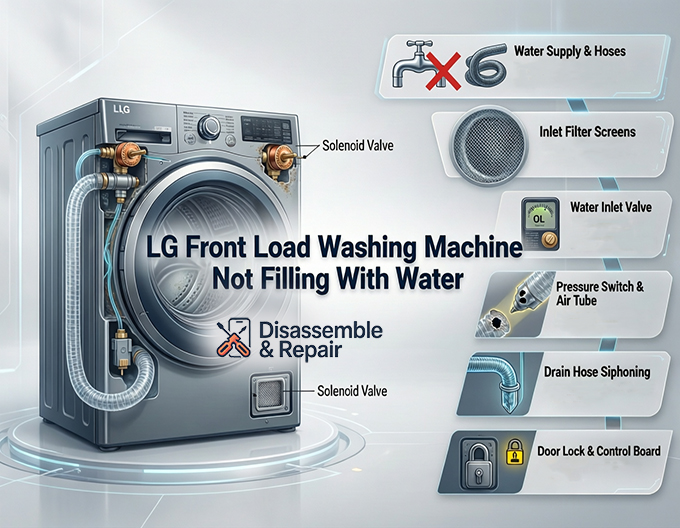
1. Preliminary Checks: Water Supply and Hoses
Before disassembling the machine, you must rule out the simplest external factors. The “IE” (Inlet Error) code specifically tells you the washer has failed to reach the target water level within a set time limit (usually 8 minutes).
- Check Water Faucets: Ensure both the hot and cold water supply faucets behind the washer are fully open. It is common for these to be accidentally nudged closed or for sediment to block the faucet itself.
- Inspect Water Supply Hoses: Pull the machine forward carefully and inspect the hoses. If a hose is kinked or pinched against the wall, water flow will be restricted. Additionally, verify you are not using “flood-safe” check valves, which can sometimes trip prematurely and cut off water flow to high-efficiency washers.
- Test Water Pressure: Your LG washer requires a minimum water pressure (typically around 20 psi) to operate the inlet valves correctly. If your home has low pressure, the valve may not open fully even if it is mechanically sound.
2. Cleaning the Inlet Filter Screens
The most frequent culprit for a slow fill or no fill situation is a blockage in the inlet filter screens. These small mesh filters are located inside the water inlet valve ports on the back of the machine, designed to catch sediment and debris from your water pipes.
Over time, calcium deposits, rust, and grit can completely coat these screens, physically blocking water from entering.
How to Clean the Screens:
- Turn off the water faucets and unplug the machine.
- Unscrew the water supply hoses from the back of the washer. Have a towel ready for residual water.
- Look inside the threaded inlet ports; you will see the colored plastic mesh screens.
- Use needle-nose pliers to gently pull the screens out.
- Rinse them under warm running water and use a soft brush to remove debris.
- Reinstall the screens, reconnect the hoses, and test the machine.
3. Diagnosing the Water Inlet Valve and Solenoid
If the filters are clean and water pressure is good, the water inlet valve itself is the next suspect. This component houses the solenoid valve coils that electrically open and close the water gates. If a solenoid fails, it cannot lift the plunger to let water in, regardless of the signal from the control board.
Testing the Solenoid Valve:
To test this, you will need a multimeter.
- Disconnect power to the washer and remove the top panel (usually secured by screws at the back).
- Locate the inlet valve assembly at the back corner where the hoses connect.
- Disconnect the wire harnesses from the solenoid coils.
- Set your multimeter to the Ohms (resistance) setting.
- Touch the probes to the terminals of each solenoid.
- Normal Reading: Depending on your specific LG model, a healthy valve usually reads between 500 to 1500 Ohms (consult your specific tech sheet if available).
- Faulty Reading: If the meter reads “OL” (Open Loop) or infinity, the solenoid coil is electrically open (burnt out) and the entire water inlet valve assembly must be replaced.
4. The Pressure Switch and Air Tube Issues
The pressure switch, also known as the water level sensor, acts as the brain’s eyes regarding water volume. It uses air pressure to determine how much water is in the drum. A clear vinyl tube runs from the bottom of the tub up to the pressure switch. As water rises, air is compressed in this tube, triggering the switch.
If the pressure switch is faulty, it may falsely signal to the electronic control board that the tub is already full, preventing the water valves from opening.
Troubleshooting the Level Sensor System:
- Check the Air Hose: Inspect the clear tube connecting the tub to the sensor. If it has a hole, is kinked, or is clogged with gunk (common in low-temperature wash habits), the air pressure will not build up.
- Verify Connections: Ensure the wire harness connected to the pressure switch is tight and free of corrosion.
- The “Blow” Test: Disconnect the tube from the switch and blow gently into the tube toward the tub. You should hear bubbling, indicating the airway is clear. If you cannot blow through it, the air chamber at the bottom of the tub is clogged.
5. Drain Hose Siphoning
A surprisingly common issue that mimics a “not filling” problem is drain hose siphoning. This occurs when the water drains out of the machine by gravity as fast as it fills. The washer is technically filling, but the water level never rises enough to satisfy the sensor, eventually triggering the IE error code.
Read more LG washer leaves clothes wet after spin
Signs of Siphoning:
- You can hear water filling, but the drum looks empty.
- The drain pump is not running, yet water is disappearing.
Correcting Installation:
Ensure your drain hose is not pushed too far down into the standpipe. There must be an air gap between the end of the drain hose and the water in the drain pipe. If the hose is taped airtight to the standpipe or inserted more than 4-6 inches down, it can create a siphon vacuum. Secure the drain hose so it sits at the proper height (usually between 30 and 40 inches from the floor) and allows air around it.
6. Door Lock Assembly and Electronic Control Board
In rare cases, the issue stems from the safety or control systems.
- Door Lock Assembly: For safety reasons, the electronic control board will not power the water valves until it receives a confirmation signal that the door is locked. If the door lock mechanism is broken or the switch inside it fails, the cycle will not start, and no water will enter. If you hear the lock clicking repeatedly or the “Lock” icon never illuminates, this assembly may need replacement.
- Electronic Control Board: If all other components (valves, pressure switch, door lock) test fine, the main control board might be failing to send the necessary voltage (120V AC) to the water valves. This is the most expensive repair and should be a diagnosis of last resort after verifying all other entities.
Summary of Solutions
| Component | Symptom | Solution |
|---|---|---|
| Inlet Filter Screens | Slow fill or no fill; IE error. | Remove and clean screens with a brush. |
| Water Inlet Valve | Humming sound but no water; infinite resistance on multimeter. | Replace the water inlet valve assembly. |
| Drain Hose | Water enters but immediately leaves (Siphoning). | Adjust hose depth in standpipe; ensure air gap. |
| Pressure Switch | Machine thinks it is full when empty. | Clear air tube blockage or replace sensor. |
| Door Lock | Door won’t click shut; cycle won’t start. | Replace door lock assembly. |
By methodically checking these components—starting with the inlet filter screens and water supply hoses before moving to the solenoid valve and pressure switch—you can identify why your LG washer is not filling. While the IE error code can be alarming, it is simply the machine’s way of guiding you toward the water intake system. If you are uncomfortable using a multimeter or working with live electricity, contacting a certified LG repair technician is recommended to avoid damaging the electronic control board or voiding your warranty.
Frequently Asked Questions
What does the “IE” error code mean on my LG washing machine?
The “IE” error code stands for Inlet Error. This occurs when the washing machine is unable to reach the required water level within a specific timeframe, typically about eight minutes. It is the machine’s way of signaling a problem within the water supply chain, such as a closed faucet, a kinked hose, or a clogged inlet filter.
Why is my washer filling with water, but the drum stays empty?
This is a classic sign of siphoning. If the drain hose is pushed too far down into the standpipe or is taped airtight, a vacuum is created that pulls water out of the machine by gravity as fast as it enters. To fix this, ensure the drain hose is only inserted 4-6 inches into the pipe and that there is an air gap around the hose to break the vacuum.
How often should I clean the water inlet filter screens?
It is recommended to check and clean the mesh inlet filters at least once a year, though you may need to do it more frequently if you have “hard water” or high mineral content. If you notice the machine is taking longer than usual to fill or if you see the “IE” error, cleaning these screens should be your first troubleshooting step.
Can a faulty door lock prevent the washer from filling?
Yes. For safety reasons, LG front load washers will not allow water to enter the drum until the door lock assembly has confirmed the door is securely closed and locked. If the lock mechanism is broken, or if the sensor inside the lock fails to send a confirmation signal to the control board, the water inlet valves will never be activated.


