

Is your LG top load washing machine not filling with water, leaving your laundry dry and your routine disrupted? This frustrating issue often triggers an IE error code, signaling that the appliance cannot detect sufficient water intake within the expected timeframe. While modern LG washers are reliable, issues with water supply components, sensors, or electronic controls can occasionally halt the wash cycle before it begins.
This professional guide will walk you through a systematic troubleshooting process to identify and resolve the problem. We will examine critical components such as the water inlet valve, lid switch, and water level sensor to help you restore your machine’s functionality.
Understand Error Code
On most LG top load washers, the IE error code stands for “Inlet Error.” This code appears on the display when the main control board detects that the water level has not increased effectively after a set period (typically 8 to 10 minutes).
Read more LG washer not spinning but motor running
The error is a protective measure. If the washer continued to run without water, it could damage the motor or clothes. The presence of this code confirms that the issue is strictly related to the filling system, allowing you to rule out drainage or spinning problems immediately. Before diving into complex repairs, always perform a simple reset: unplug the washer for 30 seconds, plug it back in, and attempt a cycle. If the issue persists, proceed with the hardware checks below.
LG Top Load washing machine Not filling with water: Preliminary Checks
Before disassembling the machine, start with the external water supply and simple maintenance tasks. These are the most common reasons for filling issues.
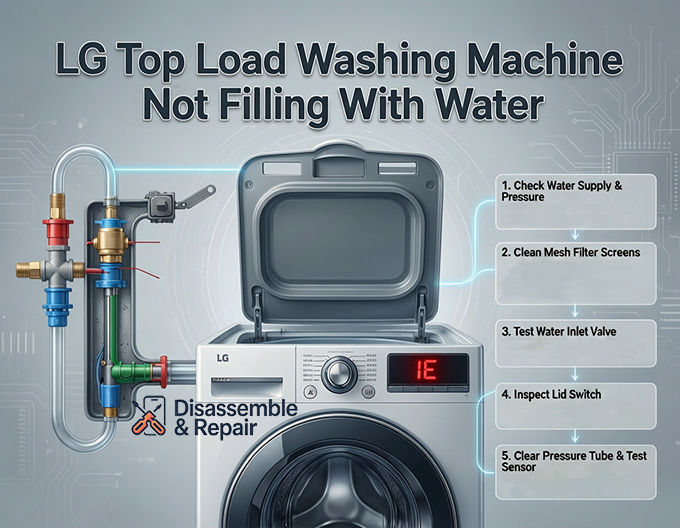
1. Inspect Water Supply and Pressure
The most obvious culprit is often overlooked: the water supply itself.
- Check the Taps: Ensure both the hot and cold water tap are fully open. If you recently moved the washer or had plumbing work done, a valve might have been accidentally closed.
- Verify Water Pressure: Your LG washer requires a minimum water pressure (usually around 20 psi) to open the internal solenoid valve. To test this, turn off the taps, disconnect the inlet hoses from the back of the machine, and place them in a bucket. Turn the taps on briefly to verify a strong, steady stream of water. If the flow is weak, the issue lies with your home’s plumbing, not the machine.
- Inspect Inlet Hoses: Check the hoses for kinks, crimps, or heavy bends. A pinched hose can severely restrict flow, causing the washer to time out and display the IE code.
2. Clean the Mesh Filter Screens
Sediment and mineral deposits are silent killers of water flow. Inside the connection port where the inlet hoses attach to the washer, there are small plastic or metal mesh filter screens.
- The Problem: Over time, sediment buildup from your water pipes can clog these screens, turning a strong flow into a trickle.
- The Fix:
- Turn off the water supply and unscrew the hoses from the washer.
- Use a pair of needle-nose pliers to gently pull the mesh screens out of the water inlet valve ports.
- Rinse them under warm running water. Use a soft brush to remove stubborn debris.
- Reinsert the screens, reconnect the hoses, and test the machine.
Advanced Troubleshooting: Internal Components
If the water supply is adequate and the filters are clean, the problem likely lies within the machine’s internal components. You will need a multimeter and standard tools (screwdriver, pliers) for these steps.
3. Testing the Water Inlet Valve
The water inlet valve is the electromechanical gatekeeper of your washer. It uses solenoids to open and close internal plungers, allowing water to flow into the tub.
Read more LG washer spinning too fast
- Mechanical Failure: If the valve is receiving power but not opening, the internal solenoid may be seized or the diaphragm damaged.
- Electrical Failure: If the valve solenoids have open electrical circuits (no continuity), they cannot activate.
How to Test:
- Unplug the washer and remove the top or back panel to access the valve assembly.
- Set your multimeter to the lowest Ohms (resistance) setting.
- Disconnect the wire harnesses from the solenoid valve terminals.
- Probe the terminals of each solenoid. You should typically see a reading between 500 and 1500 Ohms.
- Result: If the reading is “OL” (Open Loop) or infinite resistance, the solenoid is defective, and the entire valve assembly must be replaced.
4. Inspecting the Lid Switch Assembly
In many modern top-load designs, the lid switch does more than just lock the door. It acts as a safety interlock that permits the main board to send power to the water valves. If the machine thinks the lid is open, it will not fill.
- Symptoms: The washer powers on, but when you press start, nothing happens, or it clicks repeatedly without filling.
- Diagnosis:
- Locate the lid switch (often near the front right corner under the top panel).
- Check the mechanical striker on the lid to ensure it isn’t broken.
- Test the switch for continuity using a multimeter. With the lid closed (or the switch manually depressed), there should be continuity. If there is no continuity, the switch is faulty and preventing the fill cycle.
5. Water Level Sensor (Pressure Switch) Issues
The water level sensor, also known as the pressure switch, tells the main control board how much water is in the tub. It operates using air pressure transmitted through a pressure switch tube.
Common Failures:
Read more LG washer showing error but no code
- Clogged Tube: If the clear plastic tube connecting the tub to the sensor is clogged with gunk or kinked, the sensor cannot read the air pressure accurately. This might cause the machine to think it is already full (preventing filling) or empty (causing overfilling).
- Electrical Fault: A bad sensor will send incorrect frequency signals to the board.
Troubleshooting Steps:
- Locate the pressure switch (usually a round disc with a hose attached, mounted near the top console).
- Inspect the pressure switch tube for any cracks, holes, or blockages. Disconnect the tube from the sensor and blow through it towards the tub. You should hear a bubbling sound, indicating the line is clear.
- Inspect the electrical connector on the sensor for corrosion.
- If the tube is clear and the wiring is secure, but the washer still refuses to fill (or displays a PE error code specifically for the sensor), the sensor itself likely requires replacement.
6. The Main Control Board
The main control board is the brain of the operation. It sends voltage to the inlet valves and monitors the sensors. If you have verified that the water pressure is good, the valves function electrically, the filters are clean, and the lid switch is working, the fault may lie with the board itself.
- Voltage Test: To confirm this, a technician would typically measure the voltage reaching the water inlet valve connectors during the fill cycle. If the board is not sending 120V (or 12V DC depending on the model) to the valves despite the cycle being active, the control board has likely failed.
- Visual Inspection: Look for burn marks, swollen capacitors, or loose connections on the board. Replacing the main board is a more expensive repair and should be considered a last resort after eliminating other possibilities.
Summary of Solutions
| Component | Symptom | Solution |
|---|---|---|
| Mesh Filter Screens | Slow fill, IE Error | Remove and clean screens with a brush. |
| Inlet Hoses | No water, Kinked lines | Straighten hoses or replace if damaged. |
| Water Inlet Valve | Hum noise but no water | Test solenoids with multimeter; replace valve. |
| Lid Switch | Washer won’t start/fill | Test continuity; replace switch assembly. |
| Water Level Sensor | No fill or Overfill | Clear pressure tube; replace sensor. |
Conclusion
Resolving an LG top load washing machine not filling with water usually involves a process of elimination. Start with the basics: clean the mesh filter screens and ensure your cold water tap is fully open. If these simple fixes don’t clear the IE error code, proceed to test the water inlet valve and lid switch. By methodically checking these entities, you can often identify the failed component and avoid the cost of a full appliance replacement. Always remember to unplug your machine before performing any internal tests to ensure your safety.
Frequently Asked Questions
What does the IE error code mean on my LG washing machine?
The LG washing machine IE error code stands for “Inlet Error.” This code is triggered when the main control board determines that the water level in the tub has not reached the required amount within a specific timeframe (usually 8 to 10 minutes). It is a protective measure designed to prevent the motor from running dry or damaging your laundry.
How can I quickly reset my LG washer to clear a filling error?
Before performing any mechanical repairs, try a simple electronic reset. Unplug the washing machine from the power source for 30 seconds, then plug it back in. Select a new cycle and press start. If the error was caused by a temporary communication glitch in the control board, this may resolve the issue.
Why are the mesh filter screens important, and how do I clean them?
The mesh filter screens are located inside the connection ports where the inlet hoses attach to the back of the washer. They prevent sediment and mineral deposits from entering the internal valves. If they become clogged, water flow will be severely restricted. To clean them, turn off the water, disconnect the hoses, and use needle-nose pliers to remove the screens. Rinse them under warm water with a soft brush before reinstalling.
Can a faulty lid switch really stop the water from filling?
Yes. In many LG top load models, the lid switch serves as a safety interlock. If the switch is broken or if the “striker” on the lid doesn’t engage properly, the machine will assume the lid is open. For safety reasons, the control board will not allow the water inlet valves to open while it perceives the lid to be unclosed.
What should I do if my washer is making a humming noise but no water is entering?
A humming noise often indicates that the water inlet valve is receiving electricity and attempting to open, but is mechanically stuck or blocked. First, ensure your water taps are fully open and the hoses aren’t kinked. If the water supply is fine, the internal solenoid or diaphragm within the valve has likely failed, and the valve assembly will need to be replaced.


