

It is frustrating when you find your LG washing machine not spinning right when you need fresh laundry. This common issue can leave clothes soaking wet and disrupt your household routine, but it is often resolvable without buying a new appliance. As a Senior appliance repair expert, I have compiled a comprehensive guide to diagnosing and fixing this problem, covering everything from simple error codes to complex mechanical failures.
Understanding error codes when your LG washing machine is not spinning
Before tearing apart your machine, look at the digital display. LG washers are designed to tell you why they are malfunctioning through specific error codes.
- UE / uE (Unbalance Error): This is the most common reason for an LG washing machine not spinning. It means the load is unevenly distributed. The drum cannot reach high spin speeds safely.
- OE (Outlet Error): This indicates a draining issue. If the water cannot leave the drum, the machine will not enter the spin cycle to prevent flooding.
- LE (Locked Motor Error): This points to a problem with the drive system, often involving the drive motor, stator assembly, or Hall sensor.
- DE (Door Error): If the door latch or lid switch assembly fails to engage, the machine’s safety protocols will prevent the drum from moving.
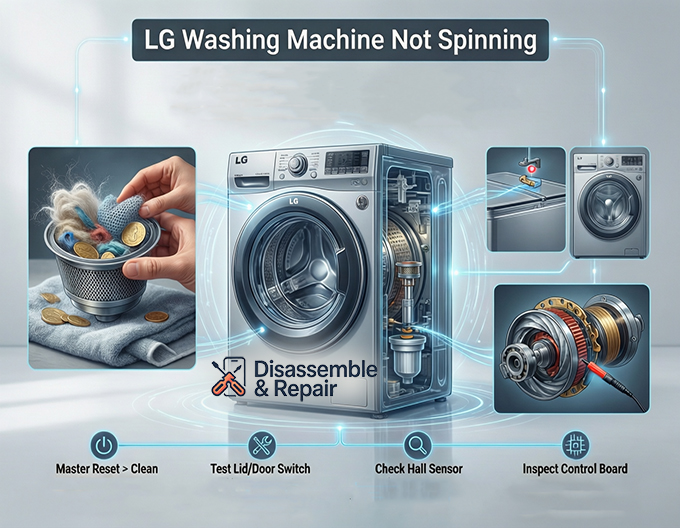
Common Causes for LG Washing Machine Not Spinning
If your machine is not displaying a code, or if you need to understand the physical cause behind the error, investigate the following components.
1. Drainage System Failures
A washer cannot spin if it is full of water. The spin cycle relies on centrifugal force to extract water, but if the main volume of water hasn’t drained, the drum will not accelerate.
Read more LG washing machine OL error
- Drain Pump: The drain pump is responsible for expelling water from the tub. If the pump’s impeller is broken or jammed with debris (like coins or socks), the water remains, and the spin cycle never triggers. You can often hear a humming sound if the motor is trying to run against a jam.
- Drain Hose: Sometimes the issue is external. Check the drain hose for kinks, twists, or clogs. If the hose is positioned too high or is blocked, the water will flow back into the machine or fail to drain promptly, triggering an OE error and halting the spin.
2. Door and Lid Safety Switches
Safety is paramount in washer design. The drum spins at high velocities, so if the machine thinks the door is open, it will cut power to the motor.
- Lid Switch Assembly (Top Loaders): On top-loading models, a small plastic tab on the lid presses a switch when closed. If this switch is broken or misaligned, the machine will agitate but will not spin. You can test this for continuity using a multimeter.
- Door Latch (Front Loaders): Front-loading LG washers use a more complex door latch assembly that locks electronically. If the latch fails to send the “locked” signal to the control board, the machine will sit idle. Mechanical failure of the latch hook is also possible.
3. Direct Drive System Issues (Stator and Rotor)
Most modern LG washers use a Direct Drive system, meaning there is no belt. The motor is attached directly to the back of the drum.
- Hall Sensor (Rotor Position Sensor): This is a critical component in LG Direct Drive washers. The Hall sensor monitors the position and speed of the rotor. If it malfunctions, the control board loses track of the motor’s operation and halts the cycle to prevent damage, often displaying the LE code.
- Stator Assembly: The stator is the stationary part of the motor with copper windings. If these windings are damaged or if the plastic housing cracks (often due to heavy unbalanced loads), the electromagnetic field required to spin the rotor cannot be generated.
- Drive Motor: While less common, the motor itself can burn out. If the motor hums but doesn’t turn, or if it turns freely by hand but not under power, the internal windings may be compromised.
4. Belt and Coupling Issues (Non-Direct Drive Models)
While LG is famous for Direct Drive, some older models or specific top-load configurations may still use traditional drive mechanisms.
- Drive Belt: If you have a belt-driven model, a worn or broken drive belt is a prime suspect. Over time, belts can stretch, causing them to slip on the pulley during the high-torque spin cycle. If the belt snaps completely, the motor will run, but the drum will remain stationary.
- Motor Coupling: This component connects the motor to the transmission. It is designed to break if the washer is overloaded to save the motor. If the coupling shears, you will hear the motor running, but the machine will not agitate or spin.
5. Suspension and Balance Components
If your LG washing machine not spinning is accompanied by loud banging before it stops, the issue is likely suspension-related. The machine detects the violent shaking and stops the spin to prevent self-destruction.
- Shock Absorbers: In front loaders, shock absorbers connect the outer tub to the base frame. If they wear out, the tub will bounce uncontrollably. The control board will sense this instability (via the Hall sensor or vibration sensor) and abort the spin.
- Suspension Rods: Top loaders use suspension rods to hold the tub. If the springs in these rods lose tension, the tub will lean to one side, constantly triggering the UE error.
Advanced Troubleshooting: The Control Board
If all mechanical components check out—the pump works, the door locks, and the motor has continuity—the problem may lie with the control board.
Read more LG washer taking too long to finish
The control board is the brain of the washer. It sends voltage to the drive motor and drain pump. If the relays on the board that control the spin cycle are fried, the machine will appear to function normally (filling and washing) but will simply stop when it’s time to spin. Inspect the board for burn marks or blown capacitors.
Step-by-Step Repair Guide
Here is a professional approach to fixing the issue based on the likely culprits.
Step 1: Master Reset
Sometimes the computer just needs a reboot.
- Unplug the washer.
- Press and hold the Start/Pause button for 5 seconds.
- Plug the washer back in.
- Run a “Rinse & Spin” cycle to test.
Step 2: Clean the Drain Filter
Located at the bottom front of most LG front loaders.
- Open the small access door.
- Unscrew the debris filter (have a towel ready for water).
- Remove any lint, coins, or buttons.
- Check if the impeller inside spins freely.
Step 3: Test the Lid Switch / Door Latch
- Top Loaders: Use a magnet to simulate the lid closing on the switch area. If it spins with the magnet but not the lid, the mechanical striker on the lid is broken.
- Front Loaders: inspect the latch for physical damage. If it clicks but doesn’t lock, the electronic assembly needs replacement.
Step 4: Check the Hall Sensor (LE Error)
This requires removing the back panel.
- Unplug the machine.
- Remove the rear panel screws.
- Remove the large center bolt holding the rotor (the round metal magnet housing).
- Remove the rotor to expose the stator (the coils).
- The Hall sensor is a small plastic part clipped onto the stator.
- Use a multimeter to check for resistance. If it is “open” or has no continuity, replace the sensor.
Conclusion
Diagnosing an LG washing machine not spinning requires a systematic approach. Start with the drainage system and error codes, as these are the most frequent and easiest to fix. If the machine drains well but refuses to ramp up speed, focus on the balance system (shock absorbers) or the drive system (Hall sensor and stator). By identifying the specific entity causing the failure, you can often perform a DIY repair for a fraction of the cost of a service call. Always remember to unplug your appliance before attempting any internal repairs.
Frequently Asked Questions
What does it mean if my LG washer displays a UE or uE error code?
A UE or uE code stands for an Unbalance Error. This is the most common reason an LG washing machine won’t spin. it indicates that the laundry load is distributed unevenly, preventing the drum from safely reaching high speeds. You can usually fix this by manually redistributing the clothes or adding/removing items to balance the weight.
Why is my washing machine still full of water and refusing to spin?
If your washer is full of water, it will not enter the spin cycle to prevent potential flooding. This is often accompanied by an OE (Outlet Error) code. The most likely causes are a clogged drain filter, a kinked drain hose, or a drain pump that is jammed with debris like coins or small clothing items.
How do I perform a master reset on my LG washing machine?
If your machine is experiencing a temporary electronic glitch, a master reset may resolve the issue. Unplug the washer from the power outlet, then press and hold the Start/Pause button for five seconds. Plug the machine back in and run a “Rinse & Spin” cycle to see if the functionality has returned.
What is a Hall sensor and how does it affect the spin cycle?
The Hall sensor, also known as a rotor position sensor, monitors the speed and position of the Direct Drive motor. If this sensor malfunctions, the washer’s control board will lose track of the drum’s movement and stop the cycle for safety, often displaying an LE (Locked Motor) error.
Why does my washer bang loudly and then stop before it starts spinning?
This is typically caused by worn-out suspension components, such as shock absorbers in front loaders or suspension rods in top loaders. When these parts fail, the tub bounces excessively. The machine’s sensors detect this violent movement and abort the spin cycle to prevent the appliance from damaging itself.


