

Experiencing a situation with the door not opening in lg washing machine can be a frustrating halt to your laundry routine. While LG appliances are renowned for their reliability, the safety mechanisms inherent in a front load washer can sometimes cause the door to remain locked due to software logic, water issues, or mechanical failure. This guide serves as a technical resource for diagnosing and resolving the issue, ranging from simple user errors to complex component failures.
Reasons for the Door Not Opening in LG Washing Machine
When you encounter the issue of the door not opening in lg washing machine, it is rarely a random occurrence. The machine is programmed with a series of fail-safes designed to prevent flooding or injury. Understanding the logic behind these safety features is the first step in troubleshooting.
The locking system in a modern LG washer is controlled by the control board, which communicates with various sensors throughout the unit. If any sensor detects a condition that makes opening the door unsafe—such as high water temperature, a spinning drum, or high water level—the interlock mechanism will remain engaged. Below, we break down the primary causes for this malfunction.
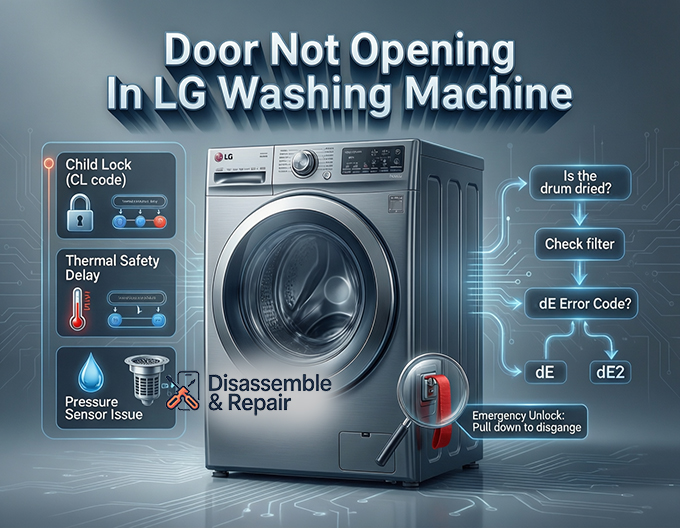
1. The Child Lock Feature
One of the most common, yet easily overlooked reasons for a stuck door is the Child Lock function. This safety feature is designed to prevent children from altering cycle settings or opening the door during operation.
When the Child Lock is active, a “CL” code typically appears on the display. In this state, the controls are disabled, and the door remains electronically locked.
- Solution: Locate the Child Lock button sequence on your panel (often marked with a lock icon between two buttons, such as “Pre-wash” and “Rinse”). Press and hold these buttons simultaneously for 3 to 5 seconds until the “CL” code disappears and the lock icon extinguishes.
2. Thermal Safety Protection
LG washers utilize a thermal delay system in their door lock assembly. If you have just completed a high-temperature wash cycle (such as Sanitary or Allergiene), the internal temperature of the drum and the door glass may be dangerously hot.
To prevent burns, the door latch will not disengage until the internal temperature drops to a safe level. This is a passive safety feature.
Read more LG washing machine not filling
- Solution: Do not force the door. Wait approximately 5 to 10 minutes for the unit to cool down. Once the internal sensor registers a safe temperature, the mechanism should click open.
3. Water Detection and the Pressure Sensor
The washer door is designed to stay locked if the pressure sensor (also known as the water level switch) detects water inside the drum. Opening the door while water is present would cause an immediate flood.
If the cycle has finished but the door remains locked, verify if there is water visible in the drum. If water remains, the issue is likely related to the drainage system rather than the door itself.
Read more LG washer light blinking
4. Mechanical Binding
Sometimes, the issue is physical rather than electronic. The clothes inside the front load washer can sometimes shift and pile up against the door glass, placing outward pressure on the door. This pressure can jam the door latch, preventing it from retracting even if the solenoid tries to release it.
Troubleshooting Drainage Issues
If your washer has not drained completely, the control board will strictly enforce the lock. You must address the water level issue before the machine will release the door.
Inspecting the Drainage Pump filter
The most common culprit for retained water is a clogged debris filter, which protects the drainage pump. Coins, lint, or small items can block the flow of water, causing the cycle to stop with water still in the drum.
- Power Off: Unplug the washing machine.
- Locate Filter: Find the access panel at the bottom front corner of the washer.
- Drain Water: Use the small drain hose located next to the filter to drain the excess water into a shallow bucket.
- Clean Filter: Unscrew the debris filter, clean it thoroughly, and check the pump housing for obstructions.
- Test: Reassemble and run a “Spin Only” cycle. Once the pressure sensor confirms the drum is empty, the door should unlock.
Analyzing the dE Error Code
When the washer detects a fault specifically with the door system, it will often display a dE error code. This code can appear as dE, dE1, or dE2, depending on the specific model and the nature of the fault.
Read more why does the lg thinq take so long to dry
Interpreting the dE Variations
- dE: Generic door error. The door is not closed properly, or the sensor is not reading “closed.”
- dE1: This usually indicates a failure in the locking mechanism itself or a misalignment of the door.
- dE2: This often points to a latch release failure or an issue with the electrical circuit engaging the lock.
To troubleshoot a dE error:
- Check for obstructions between the door gasket and the glass.
- Push the door firmly to ensure the door latch engages.
- Perform a hard reset by unplugging the washer for 5 minutes.
- If the code persists, the door lock assembly likely requires replacement.
Hardware Failures: The Door Lock Assembly
The door lock assembly is a critical component that secures the door during operation. It contains electrical components (solenoids or wax motors) and mechanical parts (latches and springs). Over time, these components can wear out.
Symptoms of a Faulty Lock Assembly
- The washer displays the “Lock” icon, but the door opens easily.
- The washer does not start because it cannot register that the door is locked.
- The cycle finishes, but the door handle feels loose or offers no resistance, and the door stays shut.
If the door handle moves freely but does not trigger the latch, the linkage inside the door assembly may be broken. Conversely, if the handle is rigid and the door won’t open, the interlock mechanism inside the machine body is likely jammed in the locked position. In either scenario, the assembly usually requires professional replacement.
How to Use the Emergency Release
If the electronics fail, or if there is a power outage while the door is locked, you may need to manually open the washer to retrieve your laundry. Most LG front load washer models are equipped with an emergency release mechanism.
WARNING: Before attempting this, ensure the drum has stopped spinning and the water has cooled. Do not use the emergency release if the water level is above the bottom of the door frame, as this will cause hot water to flood your floor.
Step-by-Step Emergency Unlocking:
- Unplug the Machine: Safety first. Disconnect the power to prevent the machine from starting unexpectedly.
- Open the Service Panel: Locate the small door at the bottom front of the washer (where the drain pump filter is located).
- Drain the Drum: If water is present, use the black rubber drain tube to empty the drum first.
- Locate the Release: Look for a plastic strap or ring (often red, orange, or white) located near the filter housing. This is connected to the door lock assembly.
- Pull the Strap: Pull the emergency release strap straight down. You should hear a mechanical click as the door latch disengages.
- Open the Door: While holding the strap down, pull the door handle to open the unit.
Advanced Diagnosis: Control Board and Wiring
If you have ruled out the Child Lock, drainage issues, and the mechanical lock assembly, the problem may lie deeper within the machine’s electronics.
The control board sends a voltage signal to the door lock assembly to engage or disengage the lock. If the board has a blown relay or a damaged circuit, it may fail to send the “unlock” signal even when the cycle is complete.
Read more LG washing machine LO error
Checking the Connections
Vibrations from the spin cycle can sometimes cause wire harnesses to loosen. A technician will typically check the continuity between the main PCB and the door lock assembly.
- If the lock assembly receives voltage but does not unlock, the lock is the problem.
- If the lock assembly never receives the signal to unlock, the control board is the likely point of failure.
Preventing Door Lock Issues
Preventative maintenance is key to avoiding the panic of a stuck washer door. By caring for the components, you can extend the life of the interlock mechanism and door handle.
- Gentle Closing: Never slam the washer door. This can damage the door latch alignment and the plastic housing of the lock assembly.
- Keep the Gasket Clean: Wipe down the door seal regularly. Debris caught in the seal can prevent the door from closing fully, leading to dE error code issues.
- Regular Filter Cleaning: Clean the drainage pump filter once a month to ensure water drains quickly and does not trigger the pressure sensor safety lock.
- Air It Out: Leave the door slightly ajar when not in use. This prevents mold but also reduces constant compression on the door seal and latch spring.
Conclusion
Finding your door not opening in lg washing machine is a manageable issue if you approach it systematically. Start by checking the Child Lock and ensuring the drum is drained of water. If basic troubleshooting fails to resolve the issue, use the emergency release to recover your clothes and investigate the door lock assembly for mechanical failure. By understanding the interaction between the control board, pressure sensor, and mechanical latches, you can effectively diagnose the problem and determine if a DIY fix or professional repair is required.
Read more LG washer overflowing with soap
Frequently Asked Questions
Why is there a “CL” code on my LG washer display and why won’t the door open?
The “CL” code indicates that the Child Lock feature is active. This safety setting disables the control panel and keeps the door locked to prevent children from interrupting a cycle or opening the machine. To deactivate it, locate the two buttons on your panel marked with a lock icon (typically “Pre-wash” and “Rinse”) and press and hold them simultaneously for 3 to 5 seconds.
What should I do if the cycle is finished but the door is still locked?
First, check for water inside the drum. If water is visible, the pressure sensor will keep the door locked to prevent flooding; you must drain the water by cleaning the drainage pump filter. If there is no water, the machine may be in “Thermal Safety” mode after a high-temperature cycle. Wait 5 to 10 minutes for the unit to cool down, and the interlock mechanism should release automatically.
How can I manually open the door during a power failure?
If the machine loses power, you can use the emergency release. Open the service panel at the bottom front of the washer and use the small black hose to drain any remaining water into a bucket. Once the water is removed, locate the plastic strap (usually red or orange) and pull it straight down. This will mechanically disengage the door latch, allowing you to pull the handle and retrieve your laundry.
What does a dE error code mean?
A dE error code (including dE1 or dE2) signifies a door-related fault. This usually means the door is not closed properly, the latch is misaligned, or the door lock assembly has failed. You can attempt to fix this by checking for obstructions in the gasket, ensuring the door is pushed firmly shut, or performing a hard reset by unplugging the washer for five minutes. If the code persists, the lock assembly may need professional replacement.


