

Understanding the nuances of every Samsung washer cycle is the key to extending the lifespan of your wardrobe and maintaining the efficiency of your appliance. Whether you own a high-efficiency front-load model or a spacious top-load unit, selecting the correct Samsung washer cycle ensures optimal cleaning performance while protecting delicate fabrics from damage. Modern Samsung washing machines are equipped with sophisticated technology and a variety of settings designed to handle everything from heavy bedding to sensitive garments. By leveraging these specific cycles, users can achieve a professional-grade clean right at home.
A Comprehensive Guide to Every Samsung Washer Cycle
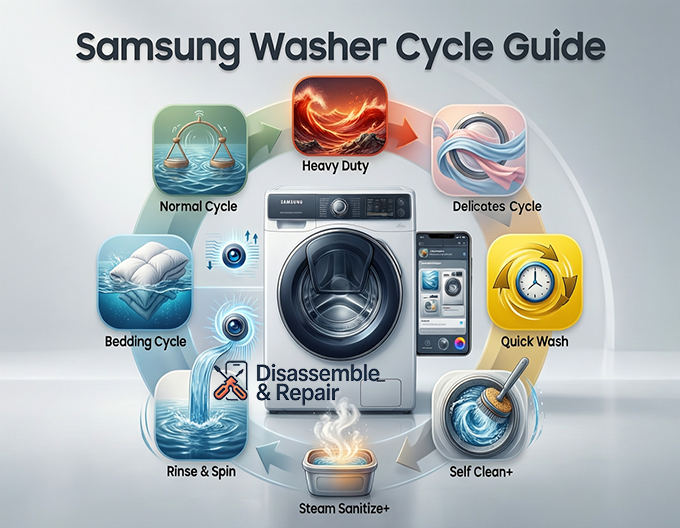
Modern appliances offer far more than just “Start” and “Stop.” To get the most out of your investment, it is crucial to understand what each setting does. Below, we break down the most common cycles found on current Samsung models, detailing their intended use and mechanical operations.
Normal Cycle
The Normal Cycle is the standard setting for everyday laundry items, such as cottons, linens, and mixed loads. It is the go-to option for most households because it balances agitation and soak time to remove average dirt levels without being overly aggressive. When using the Normal Cycle, the machine uses AI or weight sensors to determine the size of the load and adjusts the water level accordingly. This cycle is often the most energy-efficient choice for standard laundry needs, utilizing warm water and a high spin speed to extract moisture, thereby reducing drying time.
Read more Samsung washer Steam cycle
Heavy Duty
When dealing with sturdy fabrics that are heavily soiled, the Heavy Duty cycle is essential. This setting is engineered for items like colorfast jeans, towels, and workwear that require more rigorous agitation to dislodge stubborn dirt and grime. The Heavy Duty cycle typically utilizes a longer wash time and higher water temperatures to break down stains effectively. It also employs a vigorous tumble or agitation pattern, ensuring that thick fabrics are thoroughly penetrated by detergent and water.
Delicates
On the opposite end of the spectrum is the Delicates cycle. This setting is specifically designed for sheer fabrics, lingerie, silks, and other items that require gentle handling. During a Delicates wash, the drum moves slowly with reduced agitation to prevent stretching, snagging, or tearing of sensitive fibers. It uses a low spin speed to minimize wrinkling and protect the structural integrity of the garments. When using this cycle, it is often recommended to use a mesh laundry bag for an added layer of protection.
Read more How to flush Samsung washer hoses
Bedding Cycle
Washing bulky items like comforters, sheets, and duvet covers can be challenging without the right settings. The Bedding Cycle is programmed to handle large, buoyant items that might otherwise cause the machine to become unbalanced. This cycle uses a unique washing motion that helps keep bulky items submerged and prevents them from balling up. It often includes a thorough rinse phase to ensure no detergent residue remains trapped within the thick layers of bedding materials.
Quick Wash
For those moments when you need a lightly soiled outfit cleaned in a hurry, the Quick Wash cycle is a lifesaver. Depending on the model, this cycle can clean a small load (usually under 4-5 lbs) in as little as 20 to 30 minutes. The Quick Wash utilizes a rapid agitation pattern and an accelerated spin cycle to get clothes clean and ready for the dryer in record time. However, because the cycle is so short, it is not recommended for heavily stained items or large loads, as the detergent may not have enough time to fully break down complex soils.
Rinse & Spin
Sometimes, laundry doesn’t need a full wash. The Rinse & Spin cycle is perfect for loads that just need a quick freshening up or for items like swimwear that need to be rinsed of chlorine or salt water. This cycle bypasses the wash phase entirely, filling the tub with clean water to rinse the garments before engaging a high-speed spin to extract excess moisture. It is also an excellent utility cycle if you have hand-washed items and simply want to use the machine to wring them out.
Advanced Features and Customization
Beyond the standard presets, Samsung washers allow for granular control over the washing process. Understanding how to manipulate these variables allows you to tailor the Samsung washer cycle to the exact needs of your laundry load.
Adjusting Soil Level and Spin Speed
Most cycles allow you to manually adjust the Soil Level and Spin Speed.
- Soil Level: This setting controls the duration of the wash portion of the cycle. A higher Soil Level adds more time for the detergent to work on tough stains, while a lower level saves time for lightly worn clothes.
- Spin Speed: Adjusting the Spin Speed is vital for fabric care. High speeds extract more water, reducing drying time, but can cause more wrinkles. Lower speeds are gentler and better suited for items that you intend to hang dry.
AI OptiWash
One of the flagship features in premium Samsung models is AI OptiWash. This intelligent system takes the guesswork out of doing laundry. It uses turbidity sensors to detect the weight of the laundry and the level of soil in the water. Based on this real-time data, AI OptiWash automatically dispenses the precise amount of water and detergent needed. If the sensors detect that the clothes are still dirty, the machine will extend the wash cycle or add an extra rinse. This ensures a perfect clean without wasting resources or over-washing fabrics.
Steam Sanitize+
For households concerned with allergens or bacteria, the Steam Sanitize+ cycle provides a deep, hygienic clean. This feature injects steam directly from the bottom of the tub, saturating the load as it washes. The high temperature of the steam eliminates 99.9% of bacteria and common allergens such as pollen and dust mites. Steam Sanitize+ is particularly useful for pet owners, parents with infants, or anyone suffering from seasonal allergies. It ensures that fabrics are not just visually clean, but microbially clean as well.
Maintenance and Smart Connectivity
To ensure every Samsung washer cycle performs as intended, regular maintenance and smart management are required.
Self Clean+
Over time, residue from detergent, fabric softener, and dirt can accumulate inside the drum and diaphragm, leading to mold and unpleasant odors. Samsung addresses this with the Self Clean+ cycle. This maintenance cycle is designed to clean the drum without the use of harsh chemicals. It uses high-speed spinning, soaking, and pulsating water to remove dirt and bacteria from inside the washer tub and the gasket. Newer models will even remind you via the display panel after every 40 cycles that it is time to run Self Clean+, ensuring your machine stays fresh and sanitary.
SmartThings App Integration
Modern laundry is connected laundry. The SmartThings App allows you to monitor and control your washer remotely. Through the app, you can start or pause a cycle, receive notifications when the laundry is done, and even download specialized cycles that may not be available on the physical dial. The SmartThings App also offers “Laundry Recipe,” a feature where you input the fabric types and color of your load, and the app recommends the optimal Samsung washer cycle for those specific items. This connectivity ensures that you are always using the most efficient and effective settings for your clothes.
Conclusion
Navigating the array of buttons and dials on a modern appliance can be daunting, but mastering the Samsung washer cycle options available to you will revolutionize your laundry routine. From the intelligent sensing capabilities of AI OptiWash to the hygiene-focused Steam Sanitize+ and the essential maintenance of Self Clean+, these features are designed to provide superior care for your garments. By utilizing settings like Heavy Duty for work clothes, Delicates for fine fabrics, and customizing your Soil Level and Spin Speed, you ensure that your clothes look newer for longer. Furthermore, integrating the SmartThings App into your routine brings a level of convenience and precision that takes the guesswork out of chore day. Proper utilization of these cycles not only protects your fabrics but also maximizes the energy efficiency and longevity of the machine itself.
Frequently Asked Questions
Which Samsung washer cycle is best for everyday laundry?
The Normal Cycle is the most versatile and energy-efficient choice for standard household laundry, such as cottons and mixed loads. It uses weight sensors to determine the correct water level and balances agitation to clean effectively without being too harsh on fabrics.
When should I use the Quick Wash setting?
The Quick Wash cycle is designed for small loads (typically under 5 lbs) that are only lightly soiled. It can complete a wash in 20 to 30 minutes, making it ideal for refreshing an outfit quickly. However, it should not be used for heavily stained items, as the short duration may not allow detergent to fully break down tough grime.
Read more Samsung Tub Clean cycle instructions
How often should I run the Self Clean+ cycle?
To prevent the buildup of mold, bacteria, and detergent residue, you should run the Self Clean+ cycle approximately every 40 washes. Most modern Samsung washers will provide a notification on the display panel to remind you when it is time to perform this maintenance.
What are the benefits of using the Steam Sanitize+ feature?
The Steam Sanitize+ cycle is designed for deep hygiene. By injecting high-temperature steam into the load, it eliminates 99.9% of bacteria and common allergens like dust mites and pollen. This is an excellent option for washing baby clothes, bedding, or items belonging to allergy sufferers.
How does the SmartThings App help with choosing a wash cycle?
The SmartThings App includes a “Laundry Recipe” feature that takes the guesswork out of laundry. By inputting the fabric types and colors of your load, the app recommends the most effective Samsung washer cycle. It also allows you to monitor the cycle’s progress and download specialized cycles not found on the physical dial.