

Regular maintenance is the cornerstone of keeping your home appliances functioning at peak performance. Proper Samsung washer drain pump filter cleaning is essential to prevent drainage issues, eliminate odors, and extend the lifespan of your machine. Neglecting this simple task can lead to mechanical failures and frustrating error codes that interrupt your laundry routine.
As a Senior appliance maintenance expert, I have compiled this comprehensive guide to assist you. We will cover everything from identifying error codes to the specific steps required to clear debris from your machine’s critical components.
Understanding the Importance of the Debris Filter
The debris filter, often referred to as a drain pump filter or coin trap, acts as a protective barrier for your washing machine. Its primary function is to catch foreign objects—such as coins, buttons, lint, and hair—before they can enter the drain pump system. When this filter becomes clogged, water cannot exit the drum effectively.
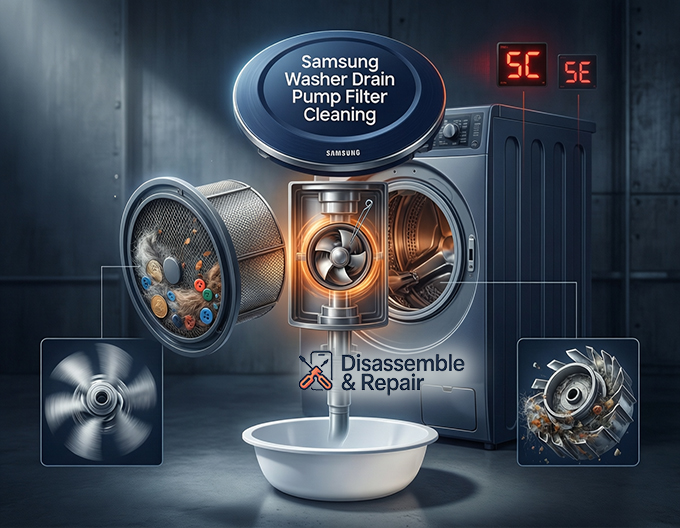
This blockage often triggers the Samsung 5C error code or the 5E error code on your digital display. While these codes differ slightly depending on the model year of your front-load washing machine or top-loader, they both indicate a drainage error. Ignoring these warnings can place excessive strain on the pump motor, potentially leading to costly repairs. Therefore, routine cleaning is not just about hygiene; it is a critical aspect of washer maintenance.
Read more How to clean Samsung washer drain pump
Signs Your Filter Needs Immediate Attention
Before diving into the cleaning process, it is helpful to recognize the symptoms of a clogged filter. Aside from the digital error codes mentioned above, look for these physical signs:
- Wet Clothes: If clothes are dripping wet after the spin cycle, the water is not draining fast enough.
- Standing Water: Visible water remaining in the drum after the cycle finishes.
- Unpleasant Odors: A buildup of organic matter in the filter can cause a mildew smell.
- Unusual Noises: A buzzing or humming sound might indicate debris is interfering with the pump impeller.
Step-by-Step Guide to Samsung Washer Drain Pump Filter Cleaning
Performing a Samsung washer drain pump filter cleaning is a straightforward process, but it requires precision to avoid water spills. Follow these detailed steps to ensure the job is done safely and effectively.
Step 1: Safety and Preparation
Before touching any internal components, safety must be your priority. Turn off your washing machine and unplug it from the power outlet. Water conducts electricity, and you will be working with residual water.
Locate the access panel on your machine. On most front-load models, this is a small rectangular door located at the bottom right corner of the unit. You may need a flathead screwdriver or a coin to gently pry the panel open.
Step 2: Managing Residual Water
Once the access panel is open, you will see two main components: a small rubber hose and a large circular cap. The small hose is the emergency drain tube. Do not open the large cap yet, or water will flood your floor.
- Place a shallow bowl and some absorbent towels underneath the access area.
- Pull the emergency drain tube out from its holding clip.
- Position the end of the tube over your bowl.
- Remove the cap from the end of the tube and allow the residual water to flow out.
- You may need to empty the bowl multiple times. Be patient; this ensures the main chamber is empty.
- Once the water stops flowing, replace the cap on the tube and secure it back into its clip.
Step 3: Removing and Cleaning the Filter
Now that the water has been drained, you can safely remove the main filter.
- Locate the filter cap (the large circular knob).
- Twist the cap counter-clockwise (to the left). It may be stiff if it hasn’t been opened in a long time.
- Pull the filter straight out.
- Inspect the filter for debris. You will likely find lint, hair, or small objects.
- Wash the filter thoroughly under warm running water. Use a soft brush (an old toothbrush works well) to scrub away slime or mold buildup.
Step 4: Cleaning the Drain Pump Housing
The job isn’t finished just by cleaning the removable filter. You must also inspect the drain pump housing—the cavity where the filter sits.
Use a flashlight to look inside the housing. Check for any debris that might have slipped past the filter. This area houses the pump impeller, which is a small fan-like mechanism that propels water out of the machine.
Reach in carefully and verify that the impeller spins freely. If you feel resistance or see an obstruction (like a bobby pin or coin) wedged near the impeller, carefully remove it with needle-nose pliers. An obstructed impeller is a common cause of the 5E error code.
Read more How to clean Samsung AddWash compartment
Step 5: Reassembly and Testing
Once the housing is clear and the filter is clean:
- Insert the debris filter back into the housing.
- Turn the filter cap clockwise (to the right) until it is tight. It must be secure to prevent leaks, but avoid over-tightening to the point of cracking the plastic.
- Ensure the emergency drain tube is securely clipped in place.
- Close the access panel.
- Plug the machine back in.
- Run a “Rinse and Spin” cycle to verify there are no leaks and that the water drains correctly.
Troubleshooting Common Issues Post-Cleaning
Even after performing a standard cleaning, you may encounter lingering issues. Here is how to troubleshoot them professionally.
Persistent Leaks
If you notice water pooling near the bottom of the machine after cleaning, the issue is likely with the filter cap. If the cap is cross-threaded or not tightened sufficiently, water will escape the pressurized system. Remove the cap and re-thread it carefully. Also, ensure the rubber seal on the cap is clean and free of debris, as even a single strand of hair can break the watertight seal.
Recurring 5C or 5E Error Codes
If the error code persists despite a clean filter, the blockage may be located further down the line. Check the main drain hose connected to the back of the washer. Ensure the hose is not kinked, crushed behind the machine, or clogged with lint. If the hose is clear and the filter is clean, but the water still won’t drain, the drain pump motor itself may have failed and might require professional replacement.
Stuck Filter Cap
In some instances, the debris filter may be stuck due to infrequent maintenance. If the cap will not turn, do not force it with heavy tools, as the plastic handle can break off. You may need to remove the entire drain pump assembly to access the filter from the inside, which is a more advanced repair task.
Best Practices for Washer Maintenance
To avoid emergency situations and the panic of a flooded laundry room, integrate these habits into your household routine.
Frequency of Cleaning
For standard usage, perform the Samsung washer drain pump filter cleaning every two months. If you wash heavily soiled items, pet bedding, or wool frequently, increase this frequency to once a month. Regular cleaning prevents the buildup of biofilm and mold.
Pre-Wash Checks
The most effective way to protect your drain pump housing is to stop debris from entering it in the first place. Always check pockets for coins, keys, and receipts before loading the washer. Use mesh laundry bags for small items like baby socks or lingerie, which can easily slip into the drainage system.
Tub Maintenance
Run a “Self Clean” or “Pure Cycle” (available on most Samsung models) once a month using a commercial washer cleaner or vinegar. This helps dissolve detergent residue that can contribute to clogs in the drain hose and pump system.
Conclusion
Taking care of your appliances does not always require a technician. Mastering the art of Samsung washer drain pump filter cleaning is a valuable skill that saves money and ensures your laundry routine runs smoothly. By understanding the components—from the emergency drain tube to the pump impeller—and recognizing critical alerts like the Samsung 5C error code, you can address issues proactively.
Remember that the debris filter is the kidney of your washing machine; keep it clean, and your washer will reward you with years of reliable service.
Frequently Asked Questions
How often should I perform a Samsung washer drain pump filter cleaning?
For standard household use, it is recommended to clean the filter every two months. However, if you frequently wash pet bedding, wool, or heavily soiled items, you should increase the frequency to once a month to prevent odors and clogs.
What is the difference between the 5C and 5E error codes?
Both codes indicate a drainage failure, meaning the washer cannot empty the water within the allotted time. The 5E code is typically found on older Samsung models, while the 5C code is the standard version used on newer digital displays.
Can I run my washing machine without the debris filter installed?
No. The debris filter is a necessary component that seals the drain pump system. Operating the machine without it will cause significant water leaks through the housing and will likely lead to flooding in your laundry room.
What should I do if the filter cap won’t turn or is stuck?
If the cap is stuck due to infrequent maintenance or debris, do not use heavy tools to force it, as you may break the plastic handle. You may need to remove the entire drain pump assembly to access the filter from the inside or contact a professional for assistance.
How can I tell if my drain pump filter is clogged before an error code appears?
Early warning signs include clothes remaining soaking wet after a spin cycle, visible standing water in the drum after the wash finishes, unusual humming noises during the drainage phase, or a persistent mildew-like odor.