

Encountering a Samsung washing machine ND error can be a frustrating experience, particularly when your cycle stops mid-wash leaving your clothes soaking wet. This specific alphanumeric code is Samsung’s way of alerting you that the appliance is experiencing a “No Drain” condition, meaning water is failing to evacuate from the drum within a specific time limit. While modern appliances are designed for convenience, drainage issues are among the most common faults owners face. Fortunately, the ND error is often resolvable without requiring expensive professional repair services, provided you understand the underlying mechanics of your front load washer.
This guide acts as a resource for diagnosing and fixing the drainage issues associated with this error. We will examine the critical components of your machine’s drainage system, including the drain pump, debris filter, and drain hose, to get your appliance back in working order.
Understanding the ND Error Code
To effectively repair the machine, one must first understand what the logic board is communicating. The ND error stands strictly for “No Drain.” When the wash cycle reaches a drain phase (either between rinses or at the end of the cycle), the control board sends a signal to the drain pump to activate. Simultaneously, the water level sensor (also known as the pressure switch) monitors the water level inside the drum.
If the sensor does not detect a drop in water level to the “empty” state within approximately 15 minutes, the machine halts operation to prevent flooding or pump burnout and displays the ND code.
Related Error Codes: 5E and 5C
It is worth noting that Samsung error codes can vary depending on the model year and region. The 5E error code and 5C error code are functionally identical to the ND error. If you consult your manual or search online, solutions for 5E or 5C will apply directly to the ND error. They all point toward a failure in the drainage system caused by blockages, mechanical failure, or sensor glitches.
Safety Precautions Before Troubleshooting
Before attempting any diagnostics or repairs, safety must be your priority. Working with an appliance that combines electricity and water requires caution.
- Disconnect Power: Always unplug the washing machine from the wall outlet or flip the circuit breaker.
- Water Supply: Turn off the water supply valves behind the machine to prevent accidental intake while working.
- Prepare for Water: Since the error implies standing water in the drum, you must be prepared for spillage. Have a bucket and several old towels ready.
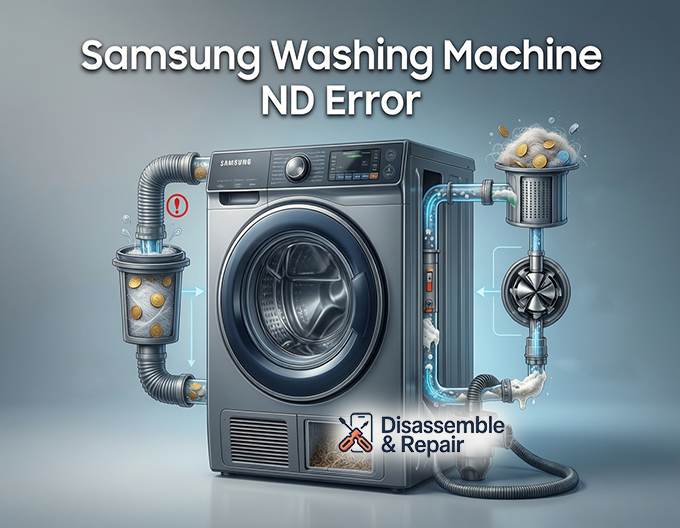
Common Causes of the Samsung Washing Machine ND Error
While the error code tells you what is happening (not draining), it does not tell you why. The issue generally stems from one of four areas: a clogged drain path, a blocked filter, a mechanical pump failure, or a sensor issue.
Read more Samsung washing machine not washing
1. The Clogged or Kinked Drain Hose
The most innocent cause of an ND error is an external restriction. The drain hose carries waste water from the pump to your home’s plumbing. If the machine was recently moved, the hose might be kinked or pinched against the wall. Additionally, if the hose is inserted too far into the standpipe, it can create a siphoning effect or vacuum lock, preventing proper flow.
Read more Samsung washing machine 3E1 error
2. The Blocked Debris Filter
Samsung front load washers are equipped with a debris filter (sometimes called a coin trap) located at the bottom front of the machine. This filter protects the drain pump from foreign objects like coins, lint, buttons, and hair. If this filter becomes completely obstructed, water cannot pass through to the pump, triggering the ND code immediately.
3. Drain Pump Failure
If the path is clear, the drain pump itself may be the culprit. Over time, the impeller inside the pump can break, or the motor can burn out. Sometimes, a small object bypasses the filter and physically jams the impeller, preventing it from spinning even if the motor is energized.
4. Water Level Sensor or Wiring Issues
In rarer cases, the drainage system is working perfectly, but the “brain” of the machine is confused. If the pressure switch (water level sensor) is faulty, it may continue to report that the drum is full of water even after it has drained. Alternatively, damaged wiring between the pump and the control board can prevent the signal to drain from ever reaching the pump.
Read more Samsung washer not spinning
Step-by-Step Troubleshooting Guide
Follow these steps in order, moving from the easiest external fixes to more complex internal repairs.
Step 1: Inspect the Drain Hose
Slide the washer out carefully to inspect the back. Ensure the drain hose is not twisted or flattened. Check the end of the hose where it enters your home’s standpipe or sink. Debris often accumulates at the exit point.
- Height Check: The drain hose must be supported at a proper height (usually between 18 and 30 inches from the floor). If it is too low, water may siphon out prematurely; if it is too high, the pump may struggle to push the water up, leading to a timeout and the ND error.
Step 2: Emergency Draining and Filter Cleaning
This is the most common solution for the Samsung washing machine ND error.
- Locate the Access Panel: Look for a small door on the bottom front of the washer. Open it to reveal the debris filter cap and a small emergency drain tube.
- Drain the Standing Water: Do not unscrew the large filter cap yet. Instead, pull out the small black emergency drain tube. Remove the stopper and let the water flow into a shallow container. You will likely need to empty the container multiple times. This safely removes the standing water from the drum.
- Remove the Filter: Once the flow stops, turn the large round filter cap counter-clockwise. Pull it out.
- Clean and Inspect: Remove any lint, coins, or sludge. Shine a flashlight into the housing to ensure the impeller (the spinning fan blades of the pump visible at the back of the housing) is not obstructed.
- Test: Reassemble everything, run a “Rinse + Spin” cycle, and see if the code clears.
Step 3: Inspecting the Drain Pump Connection
If the filter was clean but the machine still won’t drain, the obstruction might be in the rubber hose connecting the tub to the pump assembly.
- The Tub-to-Pump Hose: This internal hose often has an “accordion” shape, which is prone to trapping socks or small garments. Accessing this usually requires removing the back panel or tipping the machine (consult your specific model’s manual). Squeeze the hose to feel for solid blockages.
Step 4: Testing the Drain Pump
If there are no blockages, the drain pump motor may have failed. If you are comfortable with a multimeter, you can test the pump for continuity.
- Access the pump (usually from the bottom or back).
- Disconnect the wire harness from the pump motor.
- Set your multimeter to Ohms (resistance).
- Place probes on the pump terminals. A functional pump typically reads between 10 and 20 Ohms (consult your tech sheet for exact specs). If it reads infinity (open loop), the motor is burnt out and the pump must be replaced.
Step 5: The Pressure Switch and Air Chamber
If the machine hums and sounds like it is draining, and the water actually leaves the drum, but the ND error persists, the issue is likely the pressure switch.
This sensor relies on a thin rubber tube that connects to the bottom of the tub. As water rises, air pressure in the tube increases. If this tube is clogged with “gunk” or suds, the pressure reading gets “stuck.”
- The Fix: Locate the pressure switch (usually under the top panel). Disconnect the clear tube and blow through it toward the tub. You should hear a bubbling sound, indicating the airway is clear. If the sensor itself is faulty, it is an inexpensive part to replace.
Wiring and Control Board Issues
If the pump works, the water drains, the sensor is fine, but the error remains, you may be looking at a wiring fault or a control board failure. Vibration from the spin cycle can sometimes chafe wires, causing a short or a break in the connection.
Read more Samsung washing machine BE1 error
Inspect the wiring harness running from the main board to the drain pump. Look for broken insulation or loose connectors. If the wiring is intact, the relay on the main control board responsible for the drain pump may be damaged. In this scenario, replacing the main PCB (Printed Circuit Board) is usually required, though this can be costly.
Preventing Future ND Errors
Once you have resolved the Samsung washing machine ND error, proactive maintenance is key to preventing a recurrence.
- Regular Filter Cleaning: Clean the debris filter once a month. This is the single most effective way to protect your drain pump.
- Check Pockets: Coins, keys, and bobby pins are the enemies of a front load washer. Ensure all pockets are empty before loading.
- Use High-Efficiency (HE) Detergent: Excess suds can confuse the water level sensor and trigger drainage errors. Use the correct amount of HE detergent.
- Washer Clean Cycles: Run a self-clean cycle with a washing machine cleaner monthly to prevent sludge buildup in the drainage system and pressure switch tube.
Conclusion
The Samsung washing machine ND error is an inconvenience, but it is rarely a fatal blow to your appliance. In the vast majority of cases, the issue is a simple clog in the debris filter or a kinked drain hose. By systematically checking the drainage path, draining the standing water, and inspecting the drain pump, you can usually resolve the issue within an hour.
However, if you have cleared all blockages and replaced the pump but the error persists, the issue likely lies within the electrical components or the control board. At this stage, contacting a certified Samsung technician is recommended to ensure the longevity of your machine. Regular maintenance is your best defense, ensuring your laundry routine remains uninterrupted by cryptic error codes.
Frequently Asked Questions
What does the ND error code on a Samsung washer indicate?
The ND error stands for “No Drain.” It means the washing machine’s logic board has detected that water is failing to evacuate from the drum within a specific timeframe (usually about 15 minutes). This halts the cycle to prevent potential flooding or damage to the pump.
Are the 5E and 5C error codes different from the ND error?
No, these codes are functionally identical. Depending on your specific Samsung model’s region or year of manufacture, the machine may display 5E or 5C instead of ND. Troubleshooting steps for drainage blockages and pump failures apply to all three codes.
How do I safely remove standing water from the washer to fix the error?
Before unscrewing the main debris filter, you should use the small emergency drain tube located behind the access panel at the bottom front of the machine. Place a shallow container under the tube, remove the stopper, and allow the water to flow out. This prevents a large mess when you eventually remove the debris filter for cleaning.
What should I check if the machine drains water but the ND code still appears?
If the water is physically leaving the machine but the error remains, the issue is likely the water level sensor (pressure switch). This sensor uses a thin tube to monitor air pressure; if the tube is clogged with sludge or suds, it may send a “stuck” signal to the control board, falsely indicating that the drum is still full.
How often should I perform maintenance to prevent drainage issues?
To keep the drainage system clear, you should clean the debris filter (coin trap) at least once a month. Additionally, ensure you are using the correct amount of High-Efficiency (HE) detergent and running a monthly self-clean cycle to prevent the buildup of sludge and debris in the hoses.


