

Encountering a Samsung washing machine DC error can be a frustrating interruption to your laundry routine, often leaving wet clothes trapped inside the appliance. This specific code is your washer’s safety mechanism triggering to indicate that the unit cannot balance the laundry load correctly during the spin cycle. While modern appliances are designed for convenience, sensitive electronics and safety sensors mean that even a minor imbalance can halt operation to prevent catastrophic damage to the motor or the surrounding area.
As a Senior appliance diagnostic expert, I have compiled this detailed guide to help you understand, diagnose, and resolve the issue. Whether you are dealing with a standard top-load washer or a high-efficiency front-load model, the principles of load balancing remain the primary focus. By following these professional protocols, you can often clear the code without the expense of a service technician.
Understanding the Nature of the DC Code
Before attempting repairs, it is crucial to understand what the system is communicating. The DC code (sometimes displayed as dc, dC, or related to error code UE on specific models) stands for an unbalanced load.
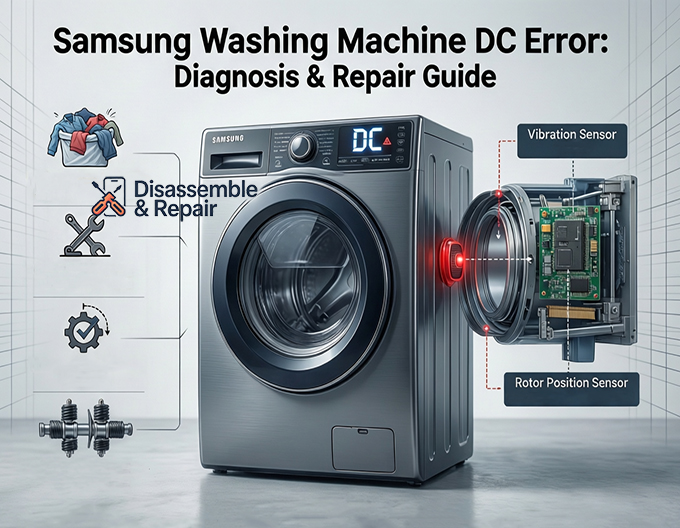
Inside your appliance, a vibration sensor monitors the movement of the washing machine drum. When the drum begins to spin at high speeds to extract water, the centrifugal force must be distributed relatively evenly. If the sensor detects excessive wobbling or banging, the logic board interrupts the cycle and displays the Samsung washing machine DC error to protect the internal components.
While the error almost always points to a balance issue, the root cause can range from user error regarding laundry distribution to mechanical failures involving suspension rods or the damper assembly.
Read more Samsung washer blinking not starting
Step 1: Immediate Load Redistribution
The most frequent cause of this error is simply how the laundry was loaded. If the machine detects an unbalanced load, it may attempt to fill with water and agitate to untangle the clothes. If this fails, the DC error appears.
Handling Heavy Bedding and Bulky Items
Washing heavy items is the primary trigger for balance errors. Items like comforters, weighted blankets, or heavy bedding absorb massive amounts of water, becoming incredibly heavy. If a single heavy towel or blanket is washed alone, it will stick to one side of the drum, causing violent shaking.
Corrective Action:
- Pause the machine or power it off.
- Open the door or lid.
- Manually untangle the clothes.
- If washing a single heavy item, add two or three dry towels to the drum to counterbalance the weight.
- Restart the spin cycle to see if the error clears.
Step 2: Inspection of Leveling Legs
If your laundry load is perfectly balanced but the machine still vibrates excessively, the issue likely lies with the appliance’s foundation. For the vibration sensors to work correctly, the washer must be perfectly level on the floor.
Adjusting the Leveling Legs
Every Samsung washer comes equipped with adjustable leveling legs (feet). If one leg is shorter than the others, or if the locking nut has vibrated loose, the machine will rock back and forth.
Procedure:
- Place a carpenter’s spirit level on top of the washing machine. Check the level from left to right and front to back.
- Identify which corner is not making solid contact with the floor.
- Use a wrench or pliers to loosen the locking nut on the leveling leg.
- Rotate the leg clockwise to shorten it or counter-clockwise to extend it until the machine is perfectly stable.
- Once level, tighten the locking nut flush against the base of the washer to prevent it from shifting during future cycles.
- Run a test spin to verify the fix.
Step 3: Calibrating the Washer
Modern Samsung washers utilize a software feature known as calibration mode. This mode allows the washing machine to “learn” the weight of the empty drum and reset the internal load sensors. If you have recently moved the washing machine or adjusted the leveling legs, you must run this mode.
How to Run Calibration Mode:
Read more Samsung washing machine keeps filling and draining
- Remove all laundry from the washing machine drum; it must be completely empty.
- Turn the washing machine off.
- Hold down the “Temp” and “Delay End” buttons simultaneously (buttons may vary slightly by model, check your manual), then press the Power button.
- The display should show “Cb” or “CLB”.
- Press the Start/Pause button to begin calibration.
- The drum will rotate back and forth for approximately 3 minutes. When finished, the machine will turn off automatically.
- Attempt a wash cycle to see if the Samsung washing machine DC error persists.
Step 4: Diagnosing Mechanical Failures
If you have redistributed the load, leveled the machine, and calibrated the sensors, but the error remains, you are likely facing a hardware failure. The components responsible for dampening vibration differ depending on whether you have a top-loader or a front-loader.
Top-Load Washers: Suspension Rods
In a top-load washer, the tub hangs from four suspension rods. These rods act as springs to absorb the movement of the tub. Over time, these rods lose their tension or the plastic mounts crack.
Symptoms of Bad Rods:
- The washer shakes violently even with small loads.
- You can press down on the tub, and it bounces up and down like a pogo stick rather than settling firmly.
- The tub physically bangs against the metal cabinet during the spin.
If these symptoms are present, the suspension rods must be replaced as a full set of four. Replacing only one will result in continued imbalance.
Front-Load Washers: Shock Absorbers and Damper Assembly
Front-load washers utilize shock absorbers attached to the bottom of the outer tub and the base frame, along with a damper assembly. These work similarly to the shocks on a car, preventing the drum from bouncing.
Symptoms of Bad Shocks:
- A loud banging noise coming from the bottom of the washer.
- The machine “walks” or shifts position across the floor during high-speed spins.
- Oil leaking from the shock absorber pistons.
To test this, push the drum down firmly and release it. It should rise back up and stop immediately. If it bounces more than once, the shock absorbers are worn out and require replacement.
Advanced Troubleshooting and Sensor Issues
In rare instances, the Samsung washing machine DC error is caused by a failure in the electronic monitoring system rather than a physical imbalance.
Vibration Sensor Malfunction
The vibration sensor (MEMS sensor) sends data to the main control board. If this sensor is defective or if the wiring harness connecting it to the board is loose, the machine may think it is off-balance when it is actually stable. Accessing this sensor usually requires removing the top or back panel of the washer. Professional continuity testing with a multimeter is recommended to confirm if the sensor is sending the correct voltage signals.
Rotor Position Sensor (Hall Sensor)
While less common for the DC error specifically, a failing Hall sensor (which monitors the speed and position of the motor) can sometimes send erratic data that the computer interprets as a balance issue. If the washer struggles to maintain speed or jerks during the spin, this sensor may be the culprit.
Summary of Solutions
To effectively resolve the DC error, follow this logical hierarchy of repairs:
- User Intervention: Redistribute the laundry. ensure no single heavy items are causing an unbalanced load.
- Environment Check: Ensure the floor is solid and the leveling legs are adjusted so the machine is dead level.
- Software Reset: Perform the calibration mode to reset the weight sensors.
- Hardware Inspection: Check suspension rods (top-load) or shock absorbers (front-load) for wear and lack of tension.
- Professional Repair: Diagnose the vibration sensor or main control board.
Conclusion
The Samsung washing machine DC error is a protective feature designed to extend the life of your appliance, but it requires prompt attention. By understanding the interaction between the washing machine drum, the suspension system, and the electronic sensors, you can diagnose the problem accurately.
Start with the basics—load distribution and leveling—before moving on to mechanical replacements. Regular maintenance, such as checking the stability of the feet and avoiding overloading the unit with heavy bedding, will prevent the error from recurring. If the problem persists despite checking the suspension and calibration, it is advisable to contact a certified Samsung technician to inspect the wiring and control modules, ensuring your washer returns to peak performance safely.
Read more Samsung washing machine stuck on spin cycle
Frequently Asked Questions
What exactly does the DC error code mean on a Samsung washer?
The DC code (sometimes displayed as UE, dC, or dc) indicates an unbalanced load. It is a safety feature that triggers when the machine’s vibration sensor detects excessive wobbling or banging during the spin cycle. The washer stops operating to prevent potential damage to the motor or the internal drum assembly.
How can I quickly clear the DC error and finish my laundry?
The most effective quick fix is to pause the cycle and manually redistribute the clothes inside the drum. This error is often caused by heavy bedding or a single bulky item sticking to one side. If you are washing one heavy item, try adding two or three towels to help balance the weight, then restart the spin cycle.
What is Calibration Mode and when should I use it?
Calibration Mode is a software reset that allows the washer to “learn” the weight of its empty drum and reset the internal load sensors. You should perform a calibration if you have recently moved the machine, adjusted the leveling legs, or if the DC error continues to appear even when the laundry load is balanced.
How do I know if the DC error is caused by a mechanical failure?
If the washer shakes violently even with a small, balanced load, or if the drum bounces repeatedly when you push down on it and release, the mechanical supports are likely worn out. In top-load washers, this usually means the suspension rods have lost tension; in front-load washers, the shock absorbers or damper assembly may need replacement.
Can the surface the washing machine sits on cause this error?
Yes. For the vibration sensors to function correctly, the washer must be perfectly level on a solid floor. If one of the leveling legs is not making firm contact with the ground, the machine will rock during high-speed spins, triggering the DC error. You should use a carpenter’s level and adjust the feet until the unit is completely stable.


