

If your appliance has suddenly halted mid-cycle and flashed a code on the display, you are likely dealing with the Samsung washing machine LC error. This specific error code serves as a critical warning system, indicating that the unit’s internal moisture detection sensors have been triggered. While seeing an error code can be frustrating, understanding its technical roots—ranging from simple hose misalignments to complex sensor faults—is the first step toward a solution.
This comprehensive troubleshooting guide will examine the mechanics behind the LC error (often displayed as LC1 on some Front load washer models), identify common culprits like the leakage sensor or drain pump, and provide actionable steps to restore your machine’s functionality.
Read more Samsung washer drain pump reset
What Does the LC Error Code Mean?
At its core, the Samsung washing machine LC error indicates a “Leakage Check” failure. Samsung washers are equipped with a safety mechanism located at the very bottom of the unit, known as the base tray. Inside this tray sits a sensitive leakage sensor.
When this sensor detects moisture, the machine’s main control board immediately interrupts the wash cycle to prevent potential flooding. The system will typically force the drain pump to run continuously, attempting to expel any water remaining in the drum. This is a failsafe designed to protect your home’s flooring and the machine’s internal components.
It is important to note that the presence of this error does not always mean a catastrophic leak has occurred. In some cases, high humidity, a small spill, or even a software glitch can trigger a false positive. However, treating the alert seriously is essential to avoid water damage.
Common Causes of the Samsung Washing Machine LC Error
To effectively troubleshoot the issue, you must first isolate the source of the moisture. The following components are the most frequent points of failure.
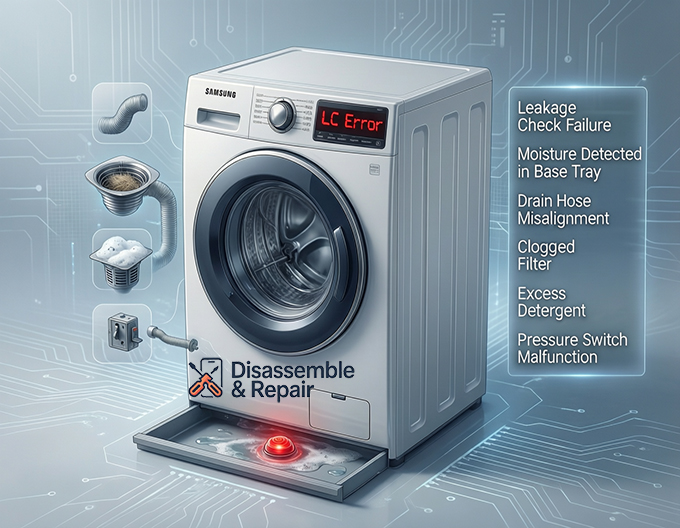
1. Drain Hose Issues
The drain hose is responsible for expelling wastewater from the machine. If this hose is cracked, punctured, or loosely connected to the back of the washer, water can seep out and trickle down into the base tray. Additionally, if the drain hose is inserted too far into the standpipe, it can cause a siphoning effect, where water flows back into the machine or leaks onto the floor.
2. The Drain Filter and Debris
A clogged drain filter is another common offender. If the filter is obstructed by lint, coins, or small objects, water pressure can build up within the system. This internal pressure may force water past seals and gaskets, leading to a slow drip that eventually pools enough water to trigger the leakage sensor.
3. Excess Detergent and Suds
Modern high-efficiency washers require specific amounts of detergent. Using excess detergent or non-HE (High Efficiency) soap can create an overwhelming amount of suds. This foam can rise higher than the water level, overflowing the internal tub and spilling into the chassis of the machine. Once the suds condense back into liquid, they pool in the base tray and activate the moisture detection system.
Read more Samsung washer won’t turn on
4. Water Level Sensor and Pressure Switch Failures
The water level sensor (often working in tandem with a pressure switch) dictates how much water enters the drum. If the pressure switch is faulty or the air tube connecting to it is blocked, the machine may fail to recognize that it is full. This can lead to overfilling, where excess water spills over the top of the outer tub and directly onto the leakage sensor below.
Step-by-Step Troubleshooting Guide
Before attempting any repairs, ensure safety by unplugging the machine from the power source. This resets the electrical components and prevents shock hazards.
Step 1: Perform a Hard Reset
Sometimes, the error is a temporary glitch in the control board.
- Power off the washing machine.
- Unplug it from the wall outlet.
- Wait for at least 15 minutes to allow the capacitors to discharge.
- Plug the machine back in and power it on.
If the Samsung washing machine LC error persists immediately, the issue is physical, not digital.
Step 2: Inspect the Drain Hose and Connections
Pull the washer forward carefully to access the rear panel.
- Check the connections: Ensure the drain hose and water supply hoses are tightly screwed onto the machine.
- Inspect for damage: Look for any visible cracks or wet spots along the length of the hoses.
- Positioning: Verify that the drain hose is not kinked or crushed behind the machine.
Step 3: Check the Drain Filter
Located on the front bottom corner of most units, the drain filter should be cleaned regularly.
- Open the small access door.
- Locate the emergency drain tube and drain the remaining water into a shallow bowl.
- Unscrew the drain filter cap (counter-clockwise).
- Remove any debris, rinse the filter under warm water, and reinsert it securely.
Note: If water rushes out when you open this filter, it confirms that the machine was not draining properly, which may have contributed to the leak.
Step 4: Examine the Detergent Drawer
Remove the detergent drawer completely by pressing the release tab. Check the cavity for any mold, residue, or blockage that might be causing water to spray backward into the machine instead of flowing into the drum. Clean the drawer thoroughly to prevent future overflow.
Step 5: Dry the Base Tray
If the sensor is wet, the error will not clear until it is dry.
- Tilt Method: If you are physically able and have help, slightly tilt the machine backward (about 45 degrees) to allow water trapped in the base tray to drain out. Place towels on the floor beforehand.
- Air Dry: Alternatively, you can remove the back panel (if comfortable doing so) and use a fan or hairdryer (on cool setting) to dry the bottom of the chassis where the moisture detection sensor is located.
Advanced Diagnostics: Pressure Switch and Internal Leaks
If the external checks do not resolve the issue, the problem may lie deeper within the machine’s internal components.
Testing the Water Level Sensor
A malfunctioning pressure switch can cause the machine to overfill significantly before the cycle starts. If you notice the water level rising unusually high before the error triggers, the pressure switch or its air hose may be compromised.
- Access the top panel of the washer.
- Inspect the thin tube connecting the tub to the pressure switch for holes or blockages.
- If the tube is clear but the overfilling persists, the sensor itself likely needs replacement.
Internal Tub Hoses
Inside the machine, several smaller hoses connect the detergent dispenser to the tub and the tub to the drain pump. The constant vibration of a front load washer can sometimes cause these spring clamps to loosen. Removing the top or rear panel allows for a visual inspection. Look for “rust trails” or white calcium deposits, which are tell-tale signs of a slow, long-term leak.
Preventing Future Errors
Once you have resolved the immediate issue, preventative maintenance is key to avoiding a recurrence of the Samsung washing machine LC error.
- Use the Correct Detergent: Always use HE detergent and strictly follow the manufacturer’s recommended dosage. This prevents suds-related overflows.
- Monthly Maintenance: Clean the drain filter and run a “Self Clean” or “Pure Cycle” once a month to keep internal hoses free of debris.
- Check Hose Integrity: Inspect your water supply and drain hoses every 6 months. Rubber degrades over time, and catching a small crack early can prevent a flooded laundry room.
- Level the Machine: Ensure your washer is perfectly level. An unbalanced machine vibrates excessively, which can loosen internal hose clamps and lead to leaks.
When to Contact Samsung Support
If you have performed all the steps above—dried the sensor, cleared the filter, checked hoses, and reset the power—and the error remains stubborn, it is likely a hardware failure. The leakage sensor itself may be corroded or faulty, or the main PCB (Printed Circuit Board) may be misinterpreting signals.
At this stage, professional intervention is recommended. Contact Samsung support or a certified appliance repair technician. Be sure to provide them with the specific model number and mention that you have already attempted the standard troubleshooting guide steps for the LC error. This information will help them bring the correct replacement parts, such as a new sensor assembly or drain pump, ensuring a faster repair.
By systematically addressing each potential cause, you can confidently diagnose and often repair the issue, extending the lifespan of your appliance and ensuring your laundry routine returns to normal.
Read more Samsung washer stuck on rinse cycle
Frequently Asked Questions
What does the LC error code mean on my Samsung washer?
The LC error code (sometimes displayed as LC1) stands for “Leakage Check.” It indicates that the moisture sensor located in the base tray at the bottom of the machine has detected water. This triggers a safety protocol that halts the wash cycle and forces the drain pump to run continuously to prevent potential flooding.
Why is my washing machine draining constantly when the LC code is displayed?
This is a built-in failsafe mechanism. When the leakage sensor is triggered, the control board assumes there is a leak and activates the drain pump to expel all remaining water from the drum. This is designed to protect your flooring and the machine’s internal electrical components from water damage.
Can using too much detergent trigger an LC error?
Yes. Using non-HE detergent or excessive amounts of high-efficiency soap creates a surplus of suds. These suds can overflow from the internal tub and settle into the machine’s chassis. Once the foam condenses back into water in the base tray, it activates the moisture sensor, resulting in a “false” leakage error.
How do I clear the LC code if I don’t see any water on the floor?
If there is no external leak, the sensor inside the machine may still be damp. You can try performing a hard reset by unplugging the machine for 15 minutes. If the code remains, you may need to tilt the machine backward at a 45-degree angle (with towels ready) to drain any trapped water from the base tray, or use a fan to dry the internal sensor area.
Read more Samsung washer leaking when draining
Is the LC error the same as a drainage issue?
Not necessarily, though they are related. While a drainage issue (like a 5C or ND error) means the machine cannot get rid of water, the LC error specifically means water has escaped the intended plumbing and is touching the internal safety sensors. However, a clogged drain filter can cause internal pressure that forces water out of seals, eventually leading to an LC error.


