

Comfee Washer Door Won’t Unlock: Comprehensive Troubleshooting Guide
Finding that your Comfee Washer Door Won’t Unlock after a cycle can be a frustrating experience, leaving your wet clothes trapped inside. This safety feature, while designed to prevent leaks and injury, can become a major inconvenience when it malfunctions due to drainage issues, software glitches, or faulty components.
This professional guide will walk you through the potential causes and step-by-step solutions to safely open your machine and fix the underlying problem.
Why Your Comfee Washer Door Won’t Unlock
The locking mechanism on Comfee front-load and top-load washers is a safety interlock governed by several systems: the water level sensor, the thermal lock, and the main control board. If any of these detect an unsafe condition—such as high water levels or a moving drum—the door remains engaged.
Here are the primary reasons this happens:
- Water is stuck in the drum: If the drain pump fails to empty the water, the pressure switch (water level sensor) will prevent the door from unlocking to avoid flooding your floor.
- Child Lock is active: This safety setting disables all controls and locks the door.
- Thermal Lock delay: The door lock assembly often uses a wax motor or bi-metal strip that requires 2-3 minutes to cool down and release after a cycle.
- Faulty Door Lock Assembly: The physical lid latch or electronic solenoid may be jammed or burnt out.
- Software Glitch: The control board may have frozen, failing to send the “unlock” signal.
Immediate Troubleshooting Steps
Before attempting invasive repairs, try these non-intrusive methods to release the door.
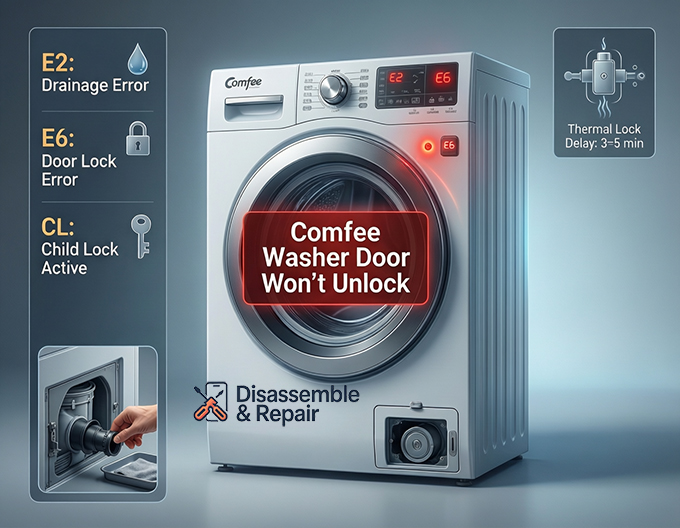
1. Wait for the Thermal Release
Standard Comfee washers use a thermal safety lock. After the spin cycle ends, do not pull the handle immediately. Wait at least 3 to 5 minutes. If the mechanism is simply hot, it will click open once it cools.
2. Check for the Child Lock
If a padlock icon or “CL” code is displayed, the child lock is active.
- How to Deactivate: Look for a button combination on your panel (often “Temp” + “Spin” or “Delay” + “Function”) held for 3 seconds. Consult your specific model’s manual if these standard combos do not work.
3. Perform a Master Reset
Electronics can jam. Resetting the control board can clear the error.
- Unplug the washer from the wall outlet.
- Wait for 5 to 10 minutes to allow electrical capacitors to discharge.
- Plug it back in and listen for a “click” from the door lock assembly. Try to open the door immediately upon powering up.
Advanced Solutions for a Stuck Door
Handling Water Drainage Issues (Error Code E2)
If you see water in the drum or an E2 error code, the door will not open. You must perform an emergency drain.
- Locate the Filter: Open the small service door at the bottom right corner of the washer.
- Prepare for Water: Place a shallow tray and towels on the floor.
- Drain Tube: If your model has a small black emergency drain tube, pull it out, remove the cap, and let the water flow into the tray.
- Drain Pump Filter: If there is no tube, slowly unscrew the pump filter (counter-clockwise) to release water.
- Check for Clogs: Remove any debris (coins, lint, buttons) blocking the drain pump impeller.
- Test: Once the water level drops, the water level sensor should signal the door to unlock.
Using the Manual Release
If there is no water and the power reset failed, you may need to mechanically trigger the latch.
- Hidden Lever: Open the drain pump filter door at the bottom. Some Comfee models have a red or yellow plastic pull-tab. Pulling this downward disengages the lock manually.
- Top Panel Access: If no lever is visible, you may need to unplug the machine, remove the screws at the back, and slide off the top panel. Reach down behind the front panel to locate the door lock assembly. Feel for a small pin or tab on the assembly and push/slide it to release the hook.
Inspecting the Door Lock Assembly and Error Code E6
An E6 error code specifically indicates a door lock malfunction.
- Visual Check: Inspect the lid latch or door hook for physical damage. If the plastic is cracked, it won’t trigger the sensor.
- Component Testing: If you are comfortable with a multimeter, check the door lock solenoid for continuity. Infinite resistance indicates a burnt-out coil that requires replacement.
Summary of Comfee Error Codes Related to Door Locks
| Error Code | Meaning | Affected Entity | Solution |
|---|---|---|---|
| E2 | Drainage Error | Drain pump / Filter | Clean filter; check drain hose for kinks. |
| E6 | Door Lock Error | Door lock assembly | Check door alignment; replace lock assembly. |
| E3 | Lid Open (Top Load) | Lid latch / Sensor | Ensure lid is fully closed; check magnet/switch. |
| E5 | Motor Overheat | Motor / Control board | Let washer cool for 30 mins; restart. |
| E1 | Water Inlet Error | Pressure switch | Check water supply; ensure drum is not overfilled. |
When to Call a Professional
If you have drained the water, disabled the child lock, and attempted a manual release without success, the issue likely lies with the control board or a seized door lock assembly. Forcing the door open at this stage can permanently damage the latch or the door hinge. It is recommended to contact a certified technician to replace the faulty components.
Frequently Asked Questions
Why does my Comfee washer door stay locked for several minutes after the cycle ends?
Most Comfee washers use a thermal safety lock. This mechanism uses a wax motor or bi-metal strip that must cool down before it can release the latch. It is normal to wait between 3 to 5 minutes after the spin cycle finishes before the door clicks open.
How can I tell if the Child Lock is preventing the door from opening?
If your washer display shows a padlock icon or the code “CL,” the child lock is active. This safety feature disables the buttons and keeps the door locked. To deactivate it, you typically need to press and hold a specific button combination, such as “Temp” and “Spin” or “Delay” and “Function,” for approximately 3 seconds.
What should I do if there is still water in the drum and the door is stuck?
The washer will not unlock if it detects water inside to prevent flooding. Check for an E2 error code. You will need to perform an emergency drain by opening the service door at the bottom right of the machine, using the small drain tube or slowly unscrewing the pump filter to let the water out into a tray. Once empty, the sensor should allow the door to unlock.
What does it mean if my washer displays an E6 error code?
An E6 error specifically points to a door lock malfunction. This could be caused by a physical jam in the lid latch, a misaligned door hook, or a burnt-out electronic solenoid. If a power reset does not clear the code, the door lock assembly may need to be inspected with a multimeter or replaced by a professional.


