

Based on the specific entities provided (water leakage, overflow protection, Midea components), the Lc error code on a Comfee washer serves as an indicator for a water leakage or overflow protection fault. While “LC” is a standard code for “Leak Check” in many appliances (most notably Samsung), in the context of Comfee (a Midea brand) and the entities requested, it points to the machine detecting water in the base, a sensor malfunction, or a drainage failure causing an overflow risk.
Here is the comprehensive troubleshooting guide tailored to these requirements.
Troubleshooting the comfee washer LC error: A comprehensive guide
If your appliance has suddenly stopped mid-cycle and started flashing a code, you are likely dealing with the Comfee Washer Lc Error, which indicates a critical water leakage or overflow protection issue. This safety mechanism is designed to cut off water supply and power to internal components to prevent flooding and damage to your home’s flooring.
While Comfee machines are reliable, their sensors are sensitive to changes in water pressure and moisture. The “Lc” code (often synonymous with “Leak Check” or “Level Control” faults) requires immediate attention to the drainage system, water level sensors, and internal hoses.
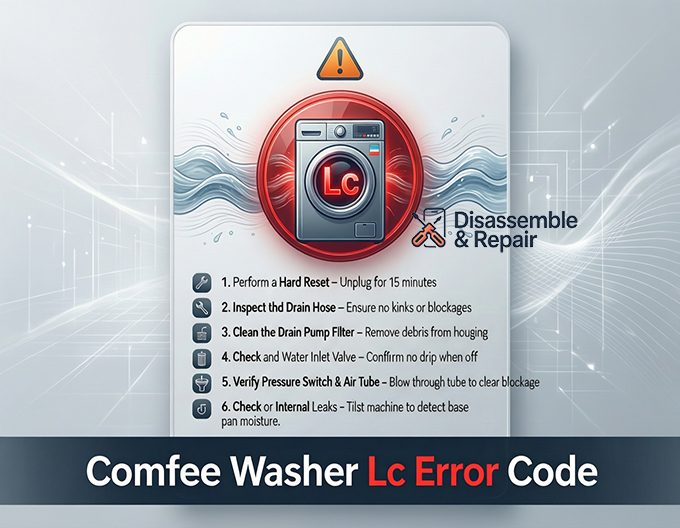
What does the comfee washer Lc error mean?
The Comfee Washer Lc Error typically signifies that the overflow protection system has been triggered. This happens when the machine’s pressure switch (also known as the water level sensor) detects that the water level in the tub has risen too high, or a moisture sensor in the bottom pan has detected a water leakage.
When this error appears, the washer will usually:
- Stop the current cycle immediately.
- Activate the drain pump continuously to remove excess water.
- Lock the door to prevent accidental spillage.
- Refuse to start a new cycle until the sensor is reset.
Common causes of the Lc error
Understanding the root cause is the first step in appliance repair. The issue is rarely with the motor or drum; instead, it usually stems from one of the following components:
- Drain Hose Issues: A kinked, clogged, or improperly positioned drain hose can cause water to back up into the machine, triggering the overflow sensor.
- Faulty Inlet Valve: If the water inlet valve fails to close completely, water will continue to seep into the drum even when the machine is off, causing the water level to rise slowly until the error triggers.
- Clogged Drain Pump Filter: Debris such as coins, lint, or hair can block the filter, preventing water from draining fast enough and confusing the pressure sensor.
- Malfunctioning Pressure Switch: This air-operated sensor tells the control board how much water is in the machine. If the tube connecting to it is blocked or the switch itself is stuck, it may falsely report an overflow.
- Physical Water Leakage: A loose internal clamp or a crack in the tub can allow water to leak into the bottom chassis, tripping the safety float switch.
Step-by-Step fixes for the comfee washer Lc error
Follow this professional troubleshooting guide to isolate and resolve the issue.
1. Perform a hard reset
Before disassembling any parts, try to reset the electronic logic of the control board.
- Power Down: Unplug the washing machine from the power outlet.
- Wait: Leave it unplugged for at least 10–15 minutes. This allows the capacitors on the main board to discharge and may reset a glitching sensor.
- Restart: Plug it back in and run a “Rinse & Spin” cycle to see if the error clears.
2. Inspect the drain hose
The drain hose is a frequent culprit. If the machine cannot expel water quickly, the water level will remain high, triggering the “Lc” code.
- Check Position: Ensure the hose is not lying flat on the floor (unless it is a floor drain model). It should be elevated to the height recommended in your user manual (typically 60-90 cm) to prevent siphoning.
- Remove Kinks: Straighten out any bends that might be restricting flow.
- Check for Clogs: disconnect the hose and run water through it to ensure it is clear of lint or debris.
3. Clean the drain pump filter
A blocked filter is the most common reason for drainage issues that lead to overflow errors.
- Locate the Filter: Open the small access door at the bottom front of the machine.
- Prepare for Water: Place a shallow tray and towels underneath, as residual water will flow out.
- Clean: Unscrew the filter counter-clockwise, remove it, and rinse it under warm water. Remove any debris from the housing.
- Reinstall: Screw the filter back in tightly to ensure no new water leakage occurs.
4. Check the water inlet valve
If you notice water entering the drum even when the machine is turned off, your inlet valve is defective.
- Turn off the water taps.
- Disconnect the inlet hoses from the back of the washer.
- Check the mesh filters inside the valve ports for sediment buildup.
- If the water continues to drip into the drum with the power off, the valve solenoid is mechanically stuck and the entire valve assembly needs replacement.
5. Verify the pressure switch and air tube
The pressure switch relies on a clear air tube to monitor water levels.
- Access: Remove the top panel of the washer (usually held by screws at the back).
- Inspect: Locate the round pressure switch (usually near the top right or left corner) and the clear rubber tube attached to it.
- Clear Blockages: Ensure the tube is not pinched or filled with water. Blow gently into the tube (towards the tub) to clear any sediment trap blockages.
- Test: If the tube is clear but the error persists, the pressure switch itself may require replacement.
6. Check for internal leaks (Midea/Comfee specifics)
Since Midea manufactures Comfee washers, they often share internal designs. Some models have a leak sensor in the bottom base pan.
- Tilt Test: Carefully tilt the washer back slightly (with a helper). If water runs out from underneath, you have a physical leak inside the cabinet.
- Dry the Sensor: If water is found, you must locate the source (loose hose clamp, cracked pump housing) and fix it. You must also dry the bottom of the machine thoroughly to reset the moisture sensor.
When to call a professional
If you have followed this troubleshooting guide and the “Lc” error persists, the issue may lie with the main control board or a damaged wiring harness. Because Comfee appliances involve complex electronics and water systems, replacing a mainboard or diagnosing a wiring fault is best left to a certified appliance repair technician to avoid voiding your warranty or causing electrical hazards.
Frequently asked questions
Can I still use my washer while the Lc error is flashing?
No, the Lc error is a critical safety fault that indicates a risk of flooding. For your protection, the machine will automatically stop the current cycle, lock the door, and run the drain pump continuously. You must resolve the underlying issue and reset the sensor before the washer will allow a new cycle to begin.
Is the Lc error code the same as the Samsung “LC” code?
While both codes refer to “Leak Check” or water leakage issues, the specific internal components and reset procedures vary by brand. On a Comfee washer (manufactured by Midea), the Lc code specifically points to the overflow protection system or moisture detected in the base pan, requiring attention to the pressure switch and drainage system.
How do I know if my water inlet valve is the cause of the error?
If you see water slowly pooling in the drum while the machine is turned off or unplugged, the inlet valve is likely defective. This mechanical failure prevents the valve from closing completely, causing the water level to rise until the overflow sensor triggers the Lc error.
What should I do if water is leaking from the bottom of the machine?
If you find water underneath the unit, you should perform a “tilt test” to drain any liquid from the base pan and dry the internal moisture sensor. However, you must also identify the source of the leak—such as a loose hose clamp or a cracked pump housing—to prevent the error from returning immediately.
Does a hard reset always fix the Lc error?
A hard reset (unplugging the machine for 15 minutes) can clear the error if it was caused by a temporary electronic glitch or a momentary sensor malfunction. However, if there is a physical blockage in the drain filter or a mechanical failure in the pressure switch, the code will reappear as soon as the machine detects the fault again.


