

If you are frustrated by your Comfee Washer Not Filling With Water, you are likely dealing with a disruption to your daily laundry routine that needs immediate attention. This common issue can stem from simple obstructions in the water supply to more complex component failures within the machine itself.
When a Comfee top load washer fails to fill, it often triggers specific error codes or simply hums without action. Understanding the interplay between the water supply, internal valves, and electronic sensors is key to diagnosing the problem. This guide provides a professional, step-by-step approach to troubleshooting and resolving these filling issues.
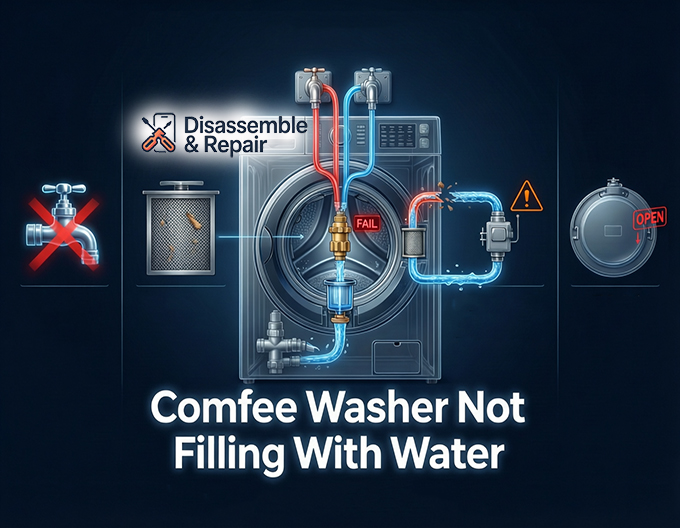
Primary Causes for a Comfee Washer Not Filling With Water
Diagnosing a Comfee Washer Not Filling With Water requires a systematic check of the water path, starting from the source and moving into the machine’s internal components.
Water Supply and Inlet Hoses
The most frequent culprits are often the simplest. If the water supply faucet is not fully open, the washer will not receive adequate water pressure to trigger the fill cycle. Furthermore, the inlet hoses connecting your home’s plumbing to the washer can easily become kinked or twisted, especially if the machine has been pushed back too far against a wall. Kinked hoses physically restrict flow, causing the machine to time out and display an error.
Clogged Filter Screens
Over time, sediment and mineral deposits from your water pipes can build up. Comfee washers differ from some other brands by having small filter screens located inside the connection port of the water inlet valve. If these screens become blocked with debris, water flow is significantly reduced or stopped completely, preventing the tub from filling within the allotted time.
Faulty Water Inlet Valve
The water inlet valve is the gatekeeper of your washing machine. It utilizes a solenoid valve to open and close the water flow based on signals from the control board. If the solenoid coils fail electrically or the valve becomes mechanically stuck, water cannot enter the tub. This is a primary mechanical failure point in units that are older or have been subject to hard water.
Lid Switch Malfunction
For safety reasons, a top load washer will not fill or agitate if the machine believes the lid is open. The lid switch detects whether the door is secured. If this switch is broken or the magnet is misaligned, the control board will prevent the cycle from starting, and no water will fill the drum.
Troubleshooting Error Codes and Electronic Issues
Modern Comfee appliances are equipped with self-diagnostic systems. When the machine detects a filling anomaly, it will typically halt operation to prevent damage.
Deciphering the E1 Error Code
The E1 error code is the most specific indicator of a water filling issue on Comfee models. This code appears when the washer has not reached the preset water level within a specific timeframe (usually 15 to 30 minutes). When you see E1, it confirms that the control board is calling for water, but the pressure switch is not detecting a rising water level.
The Role of the Pressure Switch
The pressure switch (or water level sensor) monitors how much water is in the tub. It uses a small air tube connected to the bottom of the drum. As water rises, air pressure in the tube increases, triggering the switch. If this tube is disconnected, punctured, or clogged, the switch will not activate, and the machine may either overfill or refuse to fill at all because it cannot verify the water level.
Control Board Failures
If all mechanical parts (valves, switches, and hoses) function correctly, the issue may lie with the main control board. The board sends the voltage signal to the solenoid valve to open. If a relay on the board has failed, the valve will never receive the command to open.
Step-by-Step Repair Guide
Follow these steps to isolate and fix the problem. Always ensure the machine is unplugged and the water supply is turned off before performing any maintenance.
Step 1: Inspect Water Supply and Hoses
- Check Faucets: Ensure both hot and cold water supply faucets are turned all the way on.
- Examine Hoses: Pull the washer forward and inspect the inlet hoses. Straighten any kinked hoses.
- Verify Pressure: Disconnect the hoses from the washer end and place them in a bucket. Turn the faucets on briefly to verify you have strong house water pressure.
Step 2: Clean the Filter Screens
- Locate the water inlet ports on the back of the washer where the hoses connect.
- Use a pair of needle-nose pliers to gently pull out the small mesh filter screens.
- Rinse them under running water to remove sand, rust, or calcium buildup.
- Reinsert the screens carefully and reconnect the hoses.
Step 3: Test the Water Inlet Valve
If water pressure is good and screens are clean, the valve itself may be bad.
- Multimeter Test: You can test the solenoid valve coils for continuity. Set your multimeter to the Ohms (Ω) setting.
- Access the valve by removing the back panel or top console.
- Touch the probes to the terminals of the solenoid. A reading of “Infinity” or no change indicates an open electrical circuit, meaning the valve solenoid is dead and the entire valve assembly must be replaced.
Step 4: Check the Lid Switch
- Inspect the plastic striker on the lid to ensure it is not broken.
- Listen for a faint “click” when the lid is closed.
- If the washer allows you to select a cycle but does nothing when you press start, the lid switch is a prime suspect. A continuity test with a multimeter can confirm if the switch is closing the circuit when engaged.
Step 5: Inspect the Pressure Switch System
- Locate the clear plastic air tube connecting the pressure switch (usually in the control console) to the side of the tub.
- Ensure the tube is not loose or falling off.
- Check for holes or kinks in the tube.
- Remove the tube from the switch end and blow into it; you should hear bubbles in the tub or feel no resistance. If it is blocked, clear the obstruction.
Summary of Solutions
| Component | Symptom | Solution |
|---|---|---|
| Water Supply Faucet | No water, no sound. | Turn valves fully open. |
| Filter Screens | Slow fill, E1 Error. | Remove and clean mesh screens. |
| Inlet Hoses | No water, visible bends. | Straighten or replace kinked hoses. |
| Lid Switch | Machine silent, won’t start. | Replace faulty switch. |
| Water Inlet Valve | Hum sound but no water. | Replace solenoid valve assembly. |
| Pressure Switch | Overfilling or E1 Error. | Reconnect air tube or replace switch. |
By systematically checking these entities—from the external water supply faucet to the internal control board—you can identify why your Comfee washer is failing to fill. Regular maintenance, such as checking filter screens and ensuring hoses remain unkinked, can prevent many of these issues from recurring.
Frequently Asked Questions
What does the E1 error code mean on my Comfee washer?
The E1 error code is a specific notification indicating that the washer is not filling correctly. It is triggered when the machine fails to reach the designated water level within a set timeframe, usually between 15 and 30 minutes. This is typically caused by closed faucets, kinked hoses, or clogged filter screens.
Why is my washer humming but no water is entering the tub?
If you hear a humming sound, it usually means the water inlet valve’s solenoid is attempting to open but is failing to do so. This can happen if the valve is mechanically stuck, if the internal solenoid coils have failed, or if the mesh filter screens are completely blocked by sediment.
Can a faulty lid switch prevent the washer from filling?
Yes. Comfee top load washers are designed with a safety feature that prevents the machine from filling or agitating if the lid is detected as open. If the lid switch is broken or the magnetic sensor is misaligned, the washer will remain idle and won’t initiate the water flow even if the hoses are connected properly.
How do I clean the filter screens in my Comfee washer?
To clean the screens, turn off the water supply and disconnect the inlet hoses from the back of the machine. Use needle-nose pliers to gently remove the small mesh filters from inside the water inlet ports. Rinse them under running water to clear away any mineral deposits or debris, then reinsert them before reconnecting the hoses.
What should I check if my washer is overfilling?
If the washer does not stop filling, the issue is likely related to the pressure switch system. Check the clear plastic air tube connected to the switch for any holes, kinks, or disconnections. If the tube cannot send the correct air pressure signal to the switch, the machine will not know when to shut off the water.


