If your appliance is beeping or displaying strange characters, understanding GE refrigerator troubleshooting codes is the first step toward a solution. These alphanumeric signals are your unit’s way of communicating specific internal failures, ranging from simple power interruptions to complex component malfunctions.
This guide provides a professional breakdown of these codes, diagnostic procedures, and testing methods for critical components like the control board and thermistors.
Common GE Refrigerator Error Codes
Modern GE refrigerators, including the GE Profile series, use specific codes to indicate the status of the system. Below are the most frequent codes you may encounter:
Power and General Faults
- PF (Power Failure): This code indicates that the power supply to the refrigerator has been interrupted. It often appears after a power outage or if the power cord is loose.
- FF (Freezer Fan): The main control board has detected a problem with the evaporator fan motor in the freezer. This fan is critical for circulating cold air; if it fails, you may notice rising temperatures.
- CC (Check Controls): This suggests the temperature within the refrigerator is rising above safe limits. It can be caused by a door left open, dirty condenser coils, or a failing compressor.
- CI (Check Ice Maker): The ice maker is not operating correctly. This could be due to a jammed ice mold, a faulty water valve, or a bridge of ice blocking the mechanism.
Defrost and Sensor Faults
- dE (Defrost System Error): The defrost cycle has not run for more than 48 hours. This usually points to a failure in the defrost heater, the bi-metal thermostat, or the main control board.
- E1 – E9 (Sensor Errors): These codes typically point to open or shorted thermistors (temperature sensors).
- E1: Refrigerator thermistor fault.
- E2: Freezer thermistor fault.
- E5: Defrost sensor fault.
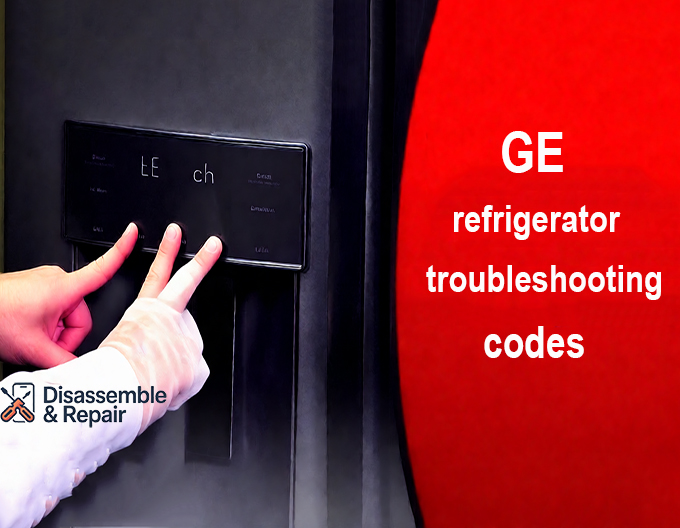
GE Refrigerator Troubleshooting Codes and Diagnostic Mode
To accurately diagnose a problem, you often need to go beyond the surface error codes and enter the refrigerator’s service test mode. This allows you to manually activate components like the evaporator fan or compressor to verify their operation.
Entering Diagnostic Mode
The method to access this mode varies by model. Do not simply press buttons randomly; follow the specific sequence for your unit type.
Standard Side-by-Side Models
- Ensure the display is active (press any pad to wake it).
- Press and hold all four temperature pads (Freezer Colder/Warmer and Refrigerator Colder/Warmer) simultaneously for approximately 3 seconds.
- A flashing “0” or “00” should appear, indicating you have entered diagnostic mode.
GE Profile and French Door Models
For many GE Profile units with touchscreens:
- Press and hold the Water, Crushed Ice, and Cubed Ice buttons simultaneously for 3 seconds.
- Alternatively, some models require holding Water, Autofill, and Ice buttons.
- The display will change to show a test mode (often “00”). Use the temperature adjustment buttons to scroll through test numbers and the “Set” or “Enter” button to activate them.
Key Diagnostic Tests
Once in diagnostic mode, you can run specific tests to isolate the faulty entity:
- Thermistor Test (Often Test 02 or 05): Checks the integrity of the temperature sensors. A “P” indicates a pass, while “0” or “S” indicates an open or shorted circuit.
- Fan Speed Test (Often Test 11): Forces the evaporator fan and condenser fan to run. Listen for the hum of the motors to confirm they are spinning.
- Defrost Heater Test (Often Test 14): Activates the defrost heater. In a quiet kitchen, you may hear a sizzling sound as the heater melts frost on the evaporator coils, confirming it is working.
Troubleshooting Key Entities
When a code points to a specific system, use the following procedures to inspect and repair the issue.
1. Main Control Board and Power Board
The main power board (often located on the back of the fridge) is the brain of the appliance.
- Symptoms: If you hear a rapid “clicking” noise coming from the back of the fridge, or if the display is dead despite the unit having power, the control board has likely failed.
- Visual Inspection: Unplug the refrigerator and remove the rear access panel. Inspect the board for burnt resistors, melted solder joints, or capacitors that are bulging (domed on top). Any visual damage requires a board replacement.
2. Thermistor and Temperature Sensor
The thermistor is a variable resistor that changes resistance based on temperature. The control board uses this data to regulate cooling.
- Testing: If you suspect a bad temperature sensor, you can test it with a multimeter. At room temperature (approx. 72°F / 22°C), a standard GE thermistor should read roughly 6.1k to 6.2k Ohms. If the reading is infinite (open) or zero (short), the sensor must be replaced.
3. Evaporator Fan
The evaporator fan pulls air over the cold coils and circulates it through the freezer and fresh food compartments.
- Diagnosis: If you hear a loud growling noise or if the fresh food section is warm while the freezer is cold, the fan may be iced up or the motor may have failed.
- Check: Remove the freezer back panel. If the fan blade is stuck, try to spin it by hand. If it does not spin freely, or if the motor windings show no continuity on a multimeter, replace the fan motor.
4. Defrost Heater
A failed defrost heater leads to excessive frost buildup on the rear freezer wall, eventually blocking airflow.
- Testing: Locate the heater (a glass tube or aluminum rod) beneath the evaporator coils. Use a multimeter to check for continuity. If there is no continuity (infinite resistance), the heater is burnt out and needs replacing.
5. Compressor and Condenser Coils
The compressor is the heart of the cooling system.
- Maintenance: Dirty condenser coils force the compressor to work harder, triggering “CC” codes or premature failure. Clean these coils every 6–12 months.
- Unplug the refrigerator.
- Remove the bottom toe grill or rear access panel.
- Use a coil brush and vacuum to remove thick dust and pet hair.
- Failure Signs: If the compressor is hot to the touch but the fridge is warm, and you hear a clicking sound (the overload relay tripping), the compressor or its start relay may be defective.
GE Refrigerator Reset Procedure
Sometimes, an error code is a glitch caused by a power surge rather than a permanent part failure. Before ordering parts, perform a system reset.
Hard Reset (Power Cycle)
- Unplug the refrigerator from the wall outlet.
- Wait for at least 5 minutes. This allows the capacitors on the main power board to discharge completely.
- Plug the refrigerator back in.
- Allow the unit to run for 24 hours to stabilize temperatures.
Resetting via Diagnostic Mode
If a code persists on the display (like “PF” after a power outage), you may need to clear it manually:
- Enter the diagnostic mode as described earlier.
- Navigate to the “Exit” or “Reset” test code (often Test 15 or Test 16 depending on the model).
- Activate this test to reboot the software and clear the error history.
Conclusion
Mastering GE refrigerator troubleshooting codes allows you to distinguish between a simple maintenance task, like cleaning the condenser coils, and a critical repair, like replacing a main control board. Always prioritize safety by unplugging the unit before accessing internal components. If a diagnostic code indicates a sealed system failure (compressor or refrigerant leak), professional service is highly recommended. By methodically testing the thermistors, fans, and heaters, you can restore your GE refrigerator to peak performance.
Frequently Asked Questions
What should I do if my GE refrigerator displays the “PF” error code?
The “PF” code stands for Power Failure and indicates that the power supply to the unit was recently interrupted. In most cases, you can clear this code by pressing any button on the display or by performing a hard reset—unplugging the refrigerator for five minutes and then plugging it back in.
What does the “CC” code mean and how can I fix it?
The “CC” code (Check Controls) appears when the temperature inside the refrigerator has risen above safe levels. To resolve this, first ensure the doors are closed properly and that there are no obstructions to airflow. If the code persists, you should clean the condenser coils located at the bottom or back of the unit to ensure the compressor can cool efficiently.
How can I tell if a temperature sensor (thermistor) is actually broken?
You can verify a thermistor’s health using a multimeter to check its resistance. At a standard room temperature of approximately 72°F (22°C), a functioning GE thermistor should show a reading between 6.1k and 6.2k Ohms. A reading of zero (shorted) or infinity (open) indicates the sensor is faulty and requires replacement.
How do I access the diagnostic test mode on a GE Profile model?
For most GE Profile and French Door units, you can enter diagnostic mode by pressing and holding the Water, Crushed Ice, and Cubed Ice buttons simultaneously for three seconds. Once the display shows “00,” you can navigate through various component tests, such as the fan or defrost heater tests, using the temperature adjustment buttons.