

Unexpected power outages or appliance malfunctions can leave you stranded with a drum full of water, forcing you to learn how to drain LG washing machine with no power immediately. When the electrical supply is cut off, the automatic drain pump cannot function, requiring a manual intervention to remove standing water safely and prevent structural damage or mold growth.
This guide provides a comprehensive, professional walkthrough for manually draining both front-load and top-load LG washers. We will cover the necessary safety protocols, the tools required, and the specific procedures for utilizing the emergency drain hose and gravity drainage methods.
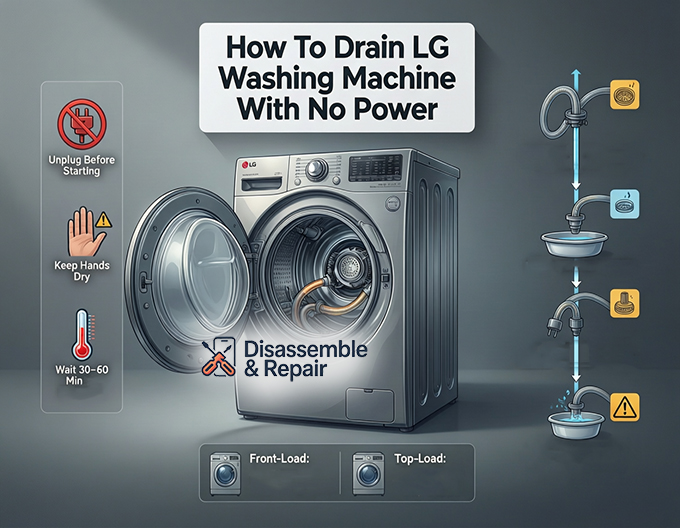
Safety Precautions Before You Begin
Before attempting any manual drainage, it is imperative to secure the area and the appliance to prevent injury or further damage. Appliance maintenance involving water and electricity requires strict adherence to safety standards.
Electrical Safety
Even if you believe the power is out, you must treat the machine as if it were live.
- Unplug the Unit: Completely disconnect the power cord from the wall outlet. If the plug is inaccessible, switch off the corresponding circuit breaker in your home’s electrical panel. This prevents the machine from suddenly turning on if power is restored mid-process.
- Dry Hands and Environment: Ensure your hands are dry before touching the appliance. If water has already spilled onto the floor, wear rubber-soled shoes and avoid standing in the puddle while handling the machine.
Water Temperature and Volume
- Check Water Temperature: If the wash cycle was running on a “Hot” or “Sanitize” setting, the standing water inside the drum may be scalding. Allow the water to cool for at least 30 to 60 minutes before attempting to drain it to avoid burns.
- Assess Water Volume: A full drum can hold varying gallons of water depending on the model. Be prepared with adequate receptacles (buckets, deep pans) to handle the volume without causing a flood.
Tools and Equipment Required
To perform this task efficiently, gather the following items before starting. having these tools within reach will minimize mess and stress.
- Shallow Pan or Tray: Essential for front-load models with low clearance. A baking sheet or low-profile container works best.
- Large Bucket: For transferring water from the shallow pan or for gravity drainage on top-load models.
- Old Towels and Rags: Place these around the base of the machine to absorb inevitable spills.
- Flathead Screwdriver: May be needed to open the service door or access panel on some models.
- Pliers: Useful for manipulating stiff hose clamps if you need to remove the main drain hose.
- Flashlight: To illuminate the drain pump filter housing, which is often located near the floor in a shadowed area.
How to Drain LG Washing Machine with No Power: Front-Load Models
Front-load washers typically rely on an electric drain pump located at the bottom of the unit. However, LG engineers have incorporated a manual override feature specifically for these situations. This method utilizes the emergency drain hose located behind the service door (also known as the access panel).
Step 1: Locate and Open the Service Door
On most LG front-load washers, there is a small square or rectangular door located at the bottom-left or bottom-right corner of the machine’s face.
Read more LG washer PE error
- Identify the access panel.
- Open the door by pressing the release tab or using a flathead screwdriver to gently pry it open.
- Once open, you will see two main components: a large circular knob (the drain pump filter) and a small rubber tube with a plug (the emergency drain hose).
Step 2: Prepare the Drainage Area
- Place a thick layer of towels directly beneath the service door opening to protect your flooring.
- Position your shallow pan or container directly under the emergency drain hose. The clearance here is often tight, so a high-walled bucket will not fit.
Step 3: Drain via the Emergency Hose
This process relies on gravity and must be done patiently to avoid overflowing your shallow container.
- Unclip the small black emergency drain hose from its holding bracket.
- Pull the hose out as far as it will extend (usually about 6-10 inches).
- Hold the end of the hose over your shallow pan.
- Carefully remove the drain plug or cap from the end of the hose. Water will immediately begin to flow.
- Critical Step: When the pan is nearly full, quickly replace the drain plug into the hose to stop the flow. Empty the pan into a larger bucket or sink.
- Repeat this drain-stop-empty cycle until water ceases to flow from the hose.
Step 4: Check the Drain Pump Filter
After the bulk of the water has been removed via the small hose, a small amount of residual water will remain in the filter housing.
- Ensure the drain plug is securely reinserted into the emergency hose and clip it back into place.
- Place a towel under the large circular knob (the drain pump filter).
- Slowly turn the filter knob counter-clockwise. Do not remove it instantly; turn it slightly to release any remaining pressure and water.
- Once the flow stops, fully unscrew and remove the debris filter.
- Clean the filter of any lint, coins, or buttons that may have caused a blockage.
- Reinsert the filter, turning it clockwise until it is tight. Close the service door.
Manual Drainage for LG Top-Load Washers
Top-load models generally do not feature a front access panel or an emergency drain hose. For these units, you must utilize the principles of gravity drainage using the main drain hose located at the back of the machine.
Read more How to fix LG washing machine E7 error
Step 1: Access the Main Drain Hose
- Pull the washing machine away from the wall carefully. You need enough space to stand behind it.
- Locate the gray corrugated drain hose connected to the back of the washer.
- Disconnect the drain hose from the wall standpipe or laundry sink. Keep the end of the hose elevated above the height of the washing machine’s water level initially to prevent premature spilling.
Step 2: Establish a Gravity Siphon
- Place a large, heavy-duty bucket on the floor near the back of the washer. The bucket must be lower than the water level inside the drum for gravity drainage to work.
- Slowly lower the end of the drain hose into the bucket.
- As you lower the hose below the level of the water in the drum, gravity will naturally pull the standing water out of the machine.
- Control the Flow: If the bucket fills up, quickly raise the hose end above the height of the washer to stop the flow. Empty the bucket and repeat the process.
Step 3: Manual Bailing (If Necessary)
If the gravity method does not remove all water (perhaps due to an anti-siphon valve or internal blockage), you may need to remove water manually from the drum.
- Open the top lid.
- Use a pitcher or small bucket to scoop water out of the drum.
- Pour the water into a nearby sink or bathtub.
- Continue until the drum is empty enough to move the appliance safely or perform repairs.
Troubleshooting: Why Your Washer Won’t Drain
While a power outage is a clear cause for a non-draining washer, often the “no power” symptom is actually a “no function” result of an error code. Understanding these underlying issues is key to appliance maintenance.
The “OE” Error Code
If your LG washer has power but refuses to drain, you might see the “OE” error code. This indicates “Output Error” or drain issues.
- Clogged Debris Filter: The most common culprit. Coins, socks, or heavy lint buildup in the drain pump filter prevent the impeller from spinning.
- Kinked Drain Hose: If the machine was pushed back too hard against the wall, the hose might be crimped, physically blocking water flow.
- Frozen Pump: In extremely cold climates (garages or basements), residual water in the pump can freeze, seizing the motor.
Door Lock Issues
Modern LG washers have safety mechanisms that prevent the drain cycle if the door is not securely locked. If the door lock sensor fails, the machine may halt mid-cycle, leaving water in the drum and the door jammed shut. In this scenario, the manual drain method described above is the only way to release the water pressure and safely open the door.
Post-Drainage Maintenance and Reset
Once you have successfully drained the machine and power is restored (or the blockage is cleared), follow these steps to reset your appliance.
- Inspect the Hoses: Ensure the emergency drain hose cap is tight and the main drain hose is securely reinserted into the standpipe.
- Clean the Filter: Never miss the opportunity to clean the debris filter when the machine is empty. A clean filter prolongs the life of the drain pump.
- Power Cycle: Plug the machine back in. Press and hold the power button for 5 seconds to reset the electronic control board.
- Run a Test Cycle: Select a “Rinse + Spin” cycle to verify that the machine fills and drains correctly. Watch for leaks around the filter housing.
Conclusion
Knowing how to drain LG washing machine with no power is a critical skill for any homeowner. Whether facing a neighborhood blackout or a mechanical failure, the ability to manually remove water prevents flood damage and allows for easier troubleshooting. By familiarizing yourself with the service door, the emergency drain hose, and the principles of gravity drainage, you can manage this emergency calmly and professionally. Regular maintenance, such as checking the debris filter and ensuring hoses are free of kinks, will further reduce the likelihood of drainage issues in the future.
Frequently Asked Questions
Why won’t the door on my front-load LG washer open after the power went out?
LG washing machines feature safety mechanisms that keep the door locked when the drum is full of water or when there is no power to release the electronic lock. To open the door, you must first manually drain the standing water using the emergency drain hose located behind the service door at the bottom of the unit. Once the water pressure is removed, the lock should release.
What does the “OE” error code mean on my LG washing machine?
The “OE” error code stands for “Output Error,” which signifies that the machine is unable to drain water. This is frequently caused by a clogged debris filter (where coins, lint, or small items get stuck), a kinked drain hose at the back of the machine, or a malfunctioning drain pump.
How long should I wait before draining the water if I was running a hot cycle?
If your washer was mid-cycle on a “Hot” or “Sanitize” setting, the water inside may be scalding and could cause serious burns. You should wait at least 30 to 60 minutes for the water to cool down to a safe temperature before attempting to drain it manually.
Does a top-load LG washer have an emergency drain hose?
No, top-load models generally do not have the front-facing service door or emergency drain hose found on front-load models. To drain a top-load washer without power, you must use gravity by disconnecting the main drain hose from the wall and lowering it into a bucket on the floor, or manually bail the water out using a pitcher.
Read more LG washing machine rusting
How do I reset my LG washer after I have finished draining it and power is restored
Once the water is removed and the debris filter is clean, plug the unit back into the wall outlet. Press and hold the “Power” button for approximately 5 seconds to reset the electronic control board. It is recommended to run a “Rinse + Spin” cycle afterward to ensure everything is functioning correctly and there are no leaks.


