Learning how to flush Samsung washer hoses is an essential maintenance task that can extend the lifespan of your appliance and prevent costly repairs. If you neglect this procedure, sediment buildup and debris can restrict water flow, leading to frustrating error codes and inefficient wash cycles. As a homeowner, understanding the intricacies of your Samsung washing machine’s water supply and drainage systems ensures your laundry routine remains uninterrupted.
This guide provides a professional, step-by-step approach to maintaining your inlet and drain hoses. We will cover debris removal, cleaning mesh filter screens, and troubleshooting common water pressure issues associated with Samsung appliances.
Understanding the Importance of Hose Maintenance
Water quality varies significantly depending on your location. Hard water contains high levels of calcium and magnesium, while municipal water supplies often carry small amounts of sediment. Over time, these minerals and particulates accumulate within the inlet hoses and the delicate water supply valves of your washing machine.
When this flow is restricted, your Samsung washing machine may detect low water pressure. This often triggers the 4C error code (indicating a water supply issue) or, in drainage cases, the 5C error code (indicating a drain issue). Regular flushing removes these blockages, ensuring the machine receives the correct volume of water at the right speed.
Necessary Tools and Supplies
Before beginning the maintenance process, gather the following items to ensure a safe and effective clean:
- Slip-joint pliers or locking pliers.
- A medium-sized bucket.
- Old towels or rags to catch water spills.
- A soft-bristle brush (an old toothbrush works well).
- Distilled white vinegar (for the vinegar solution).
- A flashlight.
- Pipe cleaner or long bottle brush.
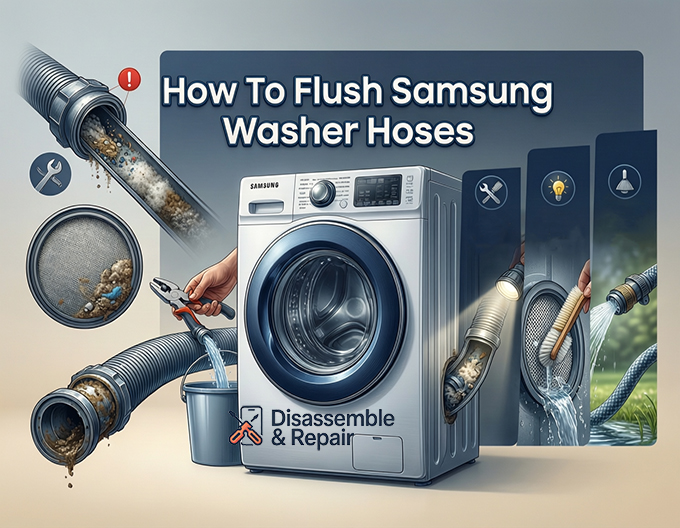
Step-by-Step Guide: How to flush Samsung washer hoses
The inlet hoses connect your home’s water supply to the washing machine. These are the most common points of failure regarding flow restriction. Follow this detailed procedure to flush them effectively.
1. Preparation and Safety Measures
Safety is paramount when working with electrical appliances and water. First, unplug your Samsung washing machine from the electrical outlet to eliminate any shock hazard. Next, locate the hot and cold water shut-off valves behind the washer and turn them clockwise to cut off the water supply completely.
2. Disconnecting the Inlet Hoses
Place a towel on the floor behind the machine. Using your pliers, carefully loosen the metal couplings of the inlet hoses where they connect to the wall faucets. There will be residual water pressure, so have your bucket ready. Once loosened, unscrew them by hand and drain the remaining water from the hoses into the bucket. Repeat this process for the connection points on the back of the washing machine.
3. Inspecting and Cleaning Mesh Filter Screens
Inside the water supply valve connections on the back of the Samsung washing machine, you will find small mesh filter screens. These are designed to catch debris before it enters the machine’s internal components.
- Use needle-nose pliers to gently pull the mesh filter screens out of the valve inlets.
- Rinse them under warm running water.
- If there is calcification or heavy sediment buildup, soak the screens in a vinegar solution (50% water, 50% white vinegar) for 15 to 30 minutes.
- Use a soft brush to gently scrub away any remaining particles.
- Reinsert the clean screens back into the water supply valves.
4. Flushing the Inlet Hoses
Now that the hoses are disconnected from both ends, take them to a utility sink or a bathtub.
- Visual Inspection: Look through the hoses with a flashlight to check for cracks, kinks, or internal obstructions.
- High-Pressure Flush: Run high-pressure water through one end of the hose to force out any trapped sediment.
- Vinegar Soak: If the hoses feel stiff or you suspect heavy mineral deposits inside, submerge the hoses completely in a bucket filled with the vinegar solution. Let them soak for an hour. The acidity will break down lime scale that restricts water pressure.
- Final Rinse: Rinse the hoses thoroughly with clean water.
5. Reconnection
Reattach the inlet hoses to the wall faucets and the washing machine. Ensure the connections are tight (hand-tight plus a quarter turn with pliers) to prevent leaks. Turn the water supply back on slowly and check for any dripping.
Managing the Drain Hose and 5C Error Codes
While flushing the inlet hoses solves water supply issues, the drain hose is equally important for expelling dirty water. A clogged drain hose is the primary culprit behind the 5C error code (or 5E on older models).
Inspecting the Drain Hose for Clogs
The drain hose carries lint, hair, and soap scum. Over time, this debris removal process can stall if the sludge becomes too thick.
- Disconnect: Remove the drain hose from the standpipe or utility sink.
- Straighten: Ensure the hose is not kinked behind the washer.
- Flush: If possible, detach the drain hose from the back of the washer (clamp removal may be required). Take it outside and use a garden hose with a spray nozzle to blast water through it, clearing out the sludge.
- Snake: If you cannot remove the hose entirely, use a plumber’s snake carefully to dislodge obstructions near the output end.
The Role of the Drain Pump Filter
Many users confuse flushing hoses with cleaning the drain pump filter (also known as the debris filter). On most front-load and some top-load Samsung washing machines, this filter is located behind a small access door at the bottom front of the unit.
While this does not strictly involve “flushing a hose,” it is the final checkpoint for water leaving your machine.
- Open the access cover.
- Locate the small rubber emergency drain hose. Uncap it and drain the residual water into a shallow pan.
- Unscrew the debris filter counter-clockwise.
- Remove the filter and clean it thoroughly under warm water. You will likely find coins, buttons, lint, and hair here.
- Clean the filter housing with a damp cloth to remove slime or mold.
- Reinsert the filter and tighten it securely.
Troubleshooting Water Pressure and Valve Issues
After you have completed the process of how to flush Samsung washer hoses, you must verify the system is working correctly.
Addressing the 4C Error Code
If you still receive a 4C error code after flushing the hoses and cleaning the mesh filter screens, the issue may lie with your home’s water pressure or the water supply valves themselves.
- Check Flow Rate: Disconnect the hose from the washer and run it into a bucket. The flow should be strong. If the water trickles out of the wall faucet, the plumbing in your home may be the issue, not the washer.
- Valve Solenoids: If the hoses are clear and water pressure is good, but the washer still won’t fill, the electronic water supply valves inside the machine may have failed and require replacement by a technician.
Addressing the 5C Error Code
If the 5C code persists after flushing the drain hose:
- Check the drain height. The drain hose must be installed properly—usually between 18 and 30 inches from the floor. If it is too low, water may siphon out; if it is too high, the pump may struggle to push water out.
- Listen to the pump. If you hear a grinding noise during the spin/drain cycle, the drain pump itself may be damaged by debris.
Preventive Maintenance Schedule
To avoid the hassle of emergency repairs, establish a routine maintenance schedule. You do not need to perform a deep flush every week, but periodic attention prevents sediment buildup from hardening.
Monthly:
- Run a “Self Clean” or “Pure Cycle” on your Samsung washing machine using a commercial washer cleaner or vinegar.
- Clean the drain pump filter to ensure proper debris removal.
Every 6 Months:
Read more Samsung washer maintenance tips long life
- Turn off the water supply and check the mesh filter screens. Even a small amount of sediment can reduce water pressure significantly over time.
- Inspect hoses for blisters, cracks, or wear.
Every 5 Years:
- Replace rubber inlet hoses with stainless steel braided hoses. Rubber degrades over time and is prone to bursting. Steel braided hoses are more resistant to water pressure fluctuations and physical damage.
Conclusion
Understanding how to flush Samsung washer hoses is a fundamental skill for maintaining the efficiency and longevity of your appliance. By regularly clearing the inlet hoses, cleaning the mesh filter screens, and maintaining the drain system, you prevent the common 4C and 5C error codes that disrupt laundry day.
This simple maintenance routine ensures that sediment buildup and hard water deposits do not compromise the water supply valves or the internal mechanics of your Samsung washing machine. With clean hoses and proper water pressure, your washer will continue to deliver the pristine cleaning results you expect.
Frequently Asked Questions
What do the 4C and 5C error codes mean on my Samsung washer?
The 4C error code (or 4E on some models) indicates a water supply issue, meaning the machine isn’t getting enough water through the inlet hoses or the mesh filters are clogged. The 5C error code (or 5E) indicates a drainage problem, usually caused by a kinked or clogged drain hose or a dirty drain pump filter.
How often should I perform maintenance on my washer hoses and filters?
For optimal performance, you should inspect and clean the mesh filter screens every six months. The drain pump filter should be cleaned monthly. If you live in an area with very hard water, you may need to flush the inlet hoses more frequently to prevent mineral buildup.
Can I use vinegar to clean the sediment out of my washer components?
Yes, distilled white vinegar is highly effective at breaking down calcium and lime scale. You can soak mesh filters in a 50/50 solution of water and vinegar for 15 to 30 minutes, or submerge the entire inlet hose in the solution for an hour if it has significant internal buildup.
Read more Samsung washer sanitize cycle
What is the difference between flushing the drain hose and cleaning the debris filter?
Flushing the drain hose involves clearing the long tube that carries water out of the machine to your home’s plumbing. Cleaning the debris filter (drain pump filter) involves removing the small plastic trap located behind an access panel on the front of the machine. Both are necessary to prevent drainage errors, but the filter is more likely to catch physical objects like coins and buttons.
When should I replace my Samsung washer hoses instead of just flushing them?
You should replace your inlet hoses every five years regardless of their appearance. It is highly recommended to upgrade from standard rubber hoses to stainless steel braided hoses, as they are much more resistant to bursting and can better handle water pressure fluctuations.