

Dealing with a washing machine that has suddenly stopped working or is flashing cryptic error codes can be incredibly frustrating. Learning how to reset comfee washing machine models is often the quickest way to clear these glitches and get your laundry routine back on track. Whether you are facing a stuck wash cycle, an unresponsive control panel, or a persistent error code, a proper reset procedure can act as a “fresh start” for your appliance’s electronic controller.
This guide covers the specific steps to reset Comfee top-loading and front-loading washers, troubleshoot common error codes, and handle power supply issues safely.
How to reset comfee washing machine: The master reset method
The most effective way to reset a Comfee washing machine is by performing a “Master Reset” or “Hard Reset.” This process drains residual electricity from the electronic controller, clearing temporary memory glitches that cause the machine to freeze.
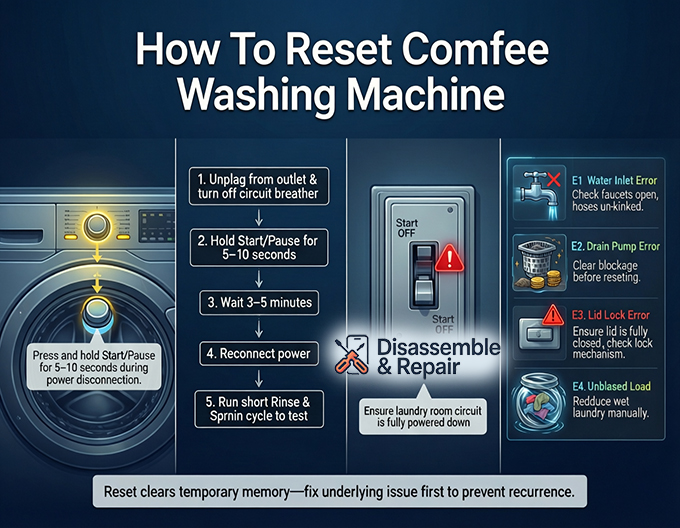
Step-by-Step power cycling procedure:
- Disconnect Power: Completely unplug the power cord from the wall outlet. If the plug is inaccessible, flip the circuit breaker dedicated to the laundry room to the “OFF” position.
- Discharge Residual Power: While the machine is unplugged, press and hold the Start/Pause button on the control panel for at least 5 to 10 seconds. This critical step helps dissipate any static electricity stored in the capacitors of the control board.
- Wait: Leave the machine disconnected for a full 3 to 5 minutes. This waiting period ensures the onboard computer completely shuts down.
- Reconnect: Plug the power cord back in or flip the circuit breaker back on.
- Test: Run a short “Rinse & Spin” cycle without any laundry to verify the machine has reset and is functioning correctly.
Resetting the control panel (Child lock issues)
Sometimes, users mistake a locked control panel for a system failure. If your Comfee washing machine is powered on but the buttons are unresponsive, the Child Lock feature might be active. This is not a technical fault but a safety setting that requires a specific “reset” to unlock.
How to deactivate child lock:
- Identify the Indicator: Look for a padlock icon or a “CL” code on the digital display.
- The Unlock Combination: On most Comfee models, press and hold the “Delay” and “Start/Pause” buttons simultaneously for 3 seconds.
- Alternative Method: Some compact models require holding the “Program” and “Water Level” buttons together. Consult your owner’s manual if the standard combination does not work.
- Confirmation: The machine should beep, and the lock icon will disappear, restoring full function to the buttons.
Clearing error codes with a reset
A reset is often required to clear error codes from the display. However, simply resetting the machine without fixing the underlying issue will usually result in the code reappearing. Here is how to handle the most common entities associated with these errors:
E1: Water inlet error
- The Issue: The washer is taking too long to fill.
- The Fix: Check that your water faucets are fully open and the inlet hoses are not kinked.
- The Reset: Once the water flow is restored, open and close the lid, then press Start/Pause to resume the cycle.
SEE MORE: How to fix Comfee washing machine error E1
E2: Drain pump error
- The Issue: The machine fails to drain water within a set time.
- The Fix: Inspect the drain pump filter (usually at the bottom front) for blockages like coins or lint. Ensure the drain hose is not positioned too high or bent.
- The Reset: After clearing the blockage, perform a Master Reset (power cycle) to clear the E2 code from the memory.
SEE MORE: How to fix Comfee washing machine error E2
E3: Lid lock error
- The Issue: The machine thinks the lid or door is open.
- The Fix: Ensure the lid is closed securely. Check the lid lock mechanism for debris or damage.
- The Reset: Close the lid firmly and press Start/Pause. If the error persists, the magnetic sensor or switch may be faulty.
SEE MORE: How to fix Comfee washing machine error E3
Unbalanced load (E4)
- The Issue: The wash load is uneven, causing violent shaking.
- The Reset: Manually redistribute the wet clothes in the drum. Close the lid and press Start/Pause to restart the spin cycle.
SEE MORE: How to fix Comfee washing machine error E4
Advanced troubleshooting: When a reset doesn’t work
If the Master Reset and error code fixes fail, the issue may lie within the hardware components.
The “Door Switch” reset technique
Some technicians suggest a manual signal reset for specific Comfee models that are stuck in a logic loop:
- Restore power to the machine.
- Within 10 seconds of powering on, raise and lower the lid (or open and close the door) 6 times consecutively.
- This action can sometimes signal the electronic controller to bypass a stuck software state.
Checking the power supply
If the machine is completely dead (no lights, no sound), the issue might not be the washer itself.
- Test the Outlet: Plug a hairdryer or lamp into the washer’s outlet to ensure it has power.
- Inspect the Cord: Check the power cord for fraying or burn marks.
- Circuit Breaker: Ensure the circuit breaker hasn’t tripped due to an overload.
Consulting the troubleshooting guide
Your owner’s manual is the best resource for model-specific reset features. If you have lost your manual, look for the model number on the sticker behind the machine or under the lid to find a digital copy online.
If the machine remains unresponsive after all these steps, the internal control board or the Start/Pause button interface itself may be damaged, requiring professional repair.
Frequently asked questions
How do I deactivate the Child Lock on my Comfee washing machine?
If your control panel is unresponsive and displaying a “CL” code or a padlock icon, the Child Lock is likely active. To unlock it, press and hold the “Delay” and “Start/Pause” buttons simultaneously for about 3 seconds. On some compact models, you may need to hold the “Program” and “Water Level” buttons instead.
Why does an error code like E2 keep reappearing after I reset the washer?
A reset only clears the machine’s temporary memory. If the underlying hardware issue is not fixed—such as a clogged drain pump filter for an E2 error or a kinked hose for an E1 error—the electronic controller will detect the problem again as soon as the cycle begins and trigger the code once more.
Is there a way to reset the washer if I can’t reach the power plug?
Yes. You can perform a Master Reset by going to your home’s electrical service panel and flipping the circuit breaker dedicated to the laundry room to the “OFF” position. Follow the same procedure of waiting 3 to 5 minutes before flipping the breaker back to “ON.”
What should I do if my Comfee washer has no power and won’t respond to a reset?
First, ensure the Child Lock isn’t the culprit. If the display is completely dark, test the wall outlet with another device (like a lamp) to ensure it is receiving electricity. Additionally, check your circuit breaker for a trip and inspect the machine’s power cord for any visible damage or fraying.


