

Learning how to reset LG washing machine no power issues is often the quickest way to resolve a sudden shutdown or an unresponsive appliance. If your washer has stopped working or refuses to turn on, performing a hard reset can clear the control board’s memory and restore functionality without the need for a technician.
Understanding the Hard Reset Process
A hard reset—often called a power cycle—is the primary method for troubleshooting an LG washer that appears dead. Modern washing machines rely on complex electronics, and like a computer, the control board can sometimes freeze or experience a glitch due to power surges or software errors.
Read more Why does the lg thinq take so long to dry
How to Reset LG Washing Machine No Power
Follow these precise steps to perform a hard reset on your machine. This process works for both a front load washer and a top load washer.
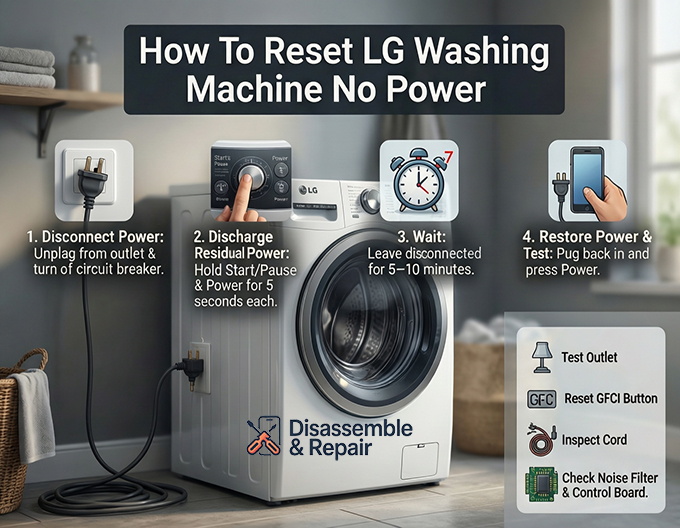
- Disconnect Power: Unplug the power cord completely from the electrical outlet. If the plug is inaccessible, locate your home’s main electrical panel and flip the circuit breaker for the laundry room to the “OFF” position.
- Discharge Residual Power: With the machine unplugged, press and hold the Start/Pause button for 5 seconds. Then, press and hold the Power button for another 5 seconds. This step is critical as it drains any electricity stored in the capacitors of the electronic control board.
- Wait: Leave the machine disconnected for at least 5 to 10 minutes. This ensures the system fully clears its temporary memory.
- Restore Power: Plug the washer back into the wall outlet or flip the circuit breaker back to “ON”.
- Test the Machine: Press the Power button to see if the lights turn on. If they do, run a short “Rinse + Spin” cycle to verify the machine is operating correctly.
Troubleshooting Power Issues When Reset Fails
If the hard reset does not restore power, the issue may lie in the external power supply or an internal component failure. Before calling a professional, inspect the following areas.
Read more LG washing machine CE error
1. Check the Electrical Outlet and Breaker
Sometimes the problem is not the washer but the power source itself.
- Test the Outlet: Plug a small appliance, such as a lamp or hair dryer, into the same electrical outlet to confirm it has power. If the lamp does not turn on, the outlet or the breaker is the issue.
- Circuit Breaker: Check your home’s breaker panel. Even if the switch looks like it is in the “ON” position, toggle it off and then back on to ensure it hasn’t tripped.
- GFCI Outlet: If your laundry room uses a GFCI outlet (the kind with “Test” and “Reset” buttons), ensure it has not tripped. Press the “Reset” button to restore power.
2. Inspect the Power Cord and Surge Protector
Examine the power cord for any visible damage, cuts, or burn marks. A damaged cord prevents electricity from reaching the machine safely. Additionally, LG recommends plugging washers directly into a wall outlet rather than using a surge protector or extension cord. These devices often cannot handle the high amperage required by a washing machine, leading to insufficient power delivery or nuisance tripping.
3. Diagnose the Noise Filter
The noise filter is an internal component designed to prevent electromagnetic interference. It is the first part the power cord connects to inside the machine.
Read more LG washing machine not starting but has power
- Symptoms of Failure: If you hear a buzzing sound when the machine is plugged in but see no lights, or if the breaker trips immediately upon plugging the washer in, the noise filter may be blown.
- Visual Check: If you are comfortable removing the top panel (refer to your user manual), you can visually inspect the noise filter assembly for burns or damage.
4. Examine the Main Control Board
The control board is the “brain” of the washer. If a power surge has occurred, the board may have shorted out.
- Signs of Damage: A burnt smell coming from the machine or visible blackened spots on the circuit board indicate a failure.
- Solution: A faulty control board usually requires replacement by a certified technician.
Using Smart Features for Diagnostics
If you successfully restore power but the machine acts erratically, you can use the LG ThinQ app to diagnose the root cause.
- Smart Diagnosis: Open the app and select the Smart Diagnosis feature. This allows the washer to communicate error codes directly to your phone, helping you identify if a specific sensor or motor issue caused the initial power loss.
- Preventative Alerts: The app can also notify you of power irregularities or maintenance needs before they become critical failures.
Summary
Knowing how to reset LG washing machine no power situations is a valuable skill that can save you time and money. By performing a simple power cycle—unplugging the unit and discharging the energy—you can often clear minor software glitches. However, if the machine remains unresponsive, systematically checking the breaker, outlet, and internal components like the noise filter will help you determine if professional repair is necessary. Always consult your user manual for model-specific instructions and safety warnings.
Frequently Asked Questions
How do I perform a hard reset on an LG washing machine with no power?
To perform a hard reset, unplug the power cord from the wall outlet. Press and hold the Start/Pause button for 5 seconds, then press and hold the Power button for another 5 seconds to drain any residual electricity. Wait about 5 to 10 minutes before plugging the machine back in and attempting to turn it on.
Why shouldn’t I use a surge protector or extension cord with my washer?
LG recommends plugging your washing machine directly into a wall outlet. Surge protectors and extension cords often cannot handle the high amperage required by the machine, which can result in insufficient power delivery or frequent tripping of the power supply.
Read more LG washing machine E4 error
What should I do if the hard reset does not restore power?
If a reset fails, check your home’s circuit breaker and the electrical outlet. Test the outlet by plugging in a different device, like a lamp, to ensure it is receiving electricity. Additionally, ensure that if you are using a GFCI outlet, the “Reset” button has been pressed.
How can I tell if the noise filter or control board is damaged?
A failing noise filter may cause a buzzing sound when the machine is plugged in or cause your circuit breaker to trip immediately. A damaged main control board may emit a burnt smell or show visible scorch marks on its surface. Both issues typically require inspection or replacement by a professional.
Can I use the LG ThinQ app to troubleshoot power problems?
Yes, once you have successfully restored power to the machine, you can use the Smart Diagnosis feature in the LG ThinQ app. This tool allows the washer to send specific error codes to your phone, helping you identify the exact cause of the initial malfunction or power loss.
Read more LG washing machine E1 error


