

Experiencing technical difficulties with your appliance can be frustrating, but effective Indesit dishwasher troubleshooting often requires just a few systematic checks. Whether you are dealing with flashing lights, drainage failure, or poor cleaning results, understanding the internal components of your machine can save you time and the cost of a professional call-out.
This comprehensive guide will walk you through the most common issues, decoding error signals and providing actionable solutions for maintaining your appliance’s performance.
Understanding indesit dishwasher error codes
Modern Indesit dishwashers are equipped with a self-diagnostic system that communicates specific faults through alphanumeric codes or flashing LED lights. Identifying these codes is the first step in precise Indesit dishwasher troubleshooting.
Common alphanumeric codes
If your model has a digital display, you may see the following codes:
- F01 (Anti-Flooding Overflow): This indicates that the float switch at the base of the unit has detected water. It usually means there is a leak in the sump or a hose connection. The machine will automatically activate the drain pump to prevent flooding.
- F02 (Water Inlet Valve Failure): The dishwasher is failing to fill with water within the expected time. This often points to a faulty water inlet valve, a kinked supply hose, or a closed water tap.
- F03 (Water Drain Failure): Perhaps the most common issue, this code means the machine cannot empty water. It is typically caused by a clogged drain pump, a blocked sink spigot, or dirty filters.
- F06 (Water Fill Timeout): Similar to F02, this indicates the machine is not detecting the correct water level. It can be caused by low water pressure or a blockage in the inlet hose.
- F10 (Heating Element Fault): If the water remains cold or the cycle hangs during the wash phase, the heating element may be open-circuit or the thermostat (NTC sensor) may be providing incorrect readings.
- F11 (Wash Pump Failure): This code points to the main circulation pump. If this fails, water will not be sprayed through the arms, and the dishes will remain dirty.
Interpreting flashing lights
On models without a digital display, error codes are often represented by a sequence of flashing LEDs (usually the program selection lights).
- Lights 1 and 3 flashing: This is frequently equivalent to F03 (Drainage failure).
- Rapid flashing of the Start/Pause light: This generally indicates a user error, such as the door latch not being engaged or the water supply being turned off, but can also signal a system reset requirement.
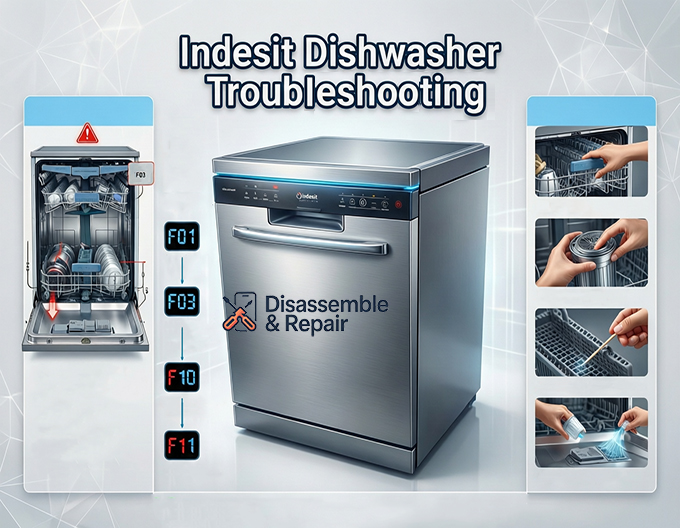
Master indesit dishwasher troubleshooting for draining issues
When your dishwasher fails to drain, it leaves dirty, standing water in the base of the tub. This is often an issue with the drain pump or the filtration system rather than a major mechanical failure.
1. Inspect and clean the filters
Your Indesit dishwasher has a multi-part filter system located at the bottom of the tub. This includes a central cylindrical filter and a flat mesh plate.
- Remove the lower basket to access the filter assembly.
- Twist the central cylinder counter-clockwise to lift it out.
- Separate the mesh filter and rinse all parts under hot running water.
- Check for food debris, broken glass, or labels that might be clogging the mesh. A blocked filter is the leading cause of drainage codes like F03 or A05.
2. Check the drain pump
If the filters are clean but water remains, the drain pump might be obstructed.
- Safety First: Ensure the appliance is unplugged.
- Remove the water from the sump using a sponge.
- In some models, you can access the pump impeller by removing a small cover inside the sump. Check for solid objects like olive pits or glass shards preventing the impeller from spinning.
- If the impeller moves freely but the pump does not run, the motor itself may need replacement.
Troubleshooting heating problems
If your dishes come out wet and cold, or if the detergent tablet fails to dissolve, you are likely facing a heating issue.
The heating element and thermostat
The heating element is responsible for heating the water to the temperature required for the selected cycle (usually between 45°C and 70°C).
- F10 Error: As mentioned, this specific code confirms a heating fault.
- Reset Procedure: Sometimes, a glitch in the control board can prevent the heater from engaging. Perform a hard reset by turning the machine off and unplugging it for 20 minutes.
- Visual Inspection: If you are comfortable removing the side panels (refer to your user manual for guidance), check the wiring leading to the heater. Burnt wires or loose connections are common culprits.
Improving cleaning performance
Poor cleaning results—such as grit on glasses or food residue on plates—often stem from maintenance oversights rather than component failure.
Spray arms maintenance
The spray arms rely on water pressure to rotate and clean your dishes. If the small nozzles become blocked with limescale or food particles, the water jet will be weak.
- Removal: most spray arms snap off or unscrew easily.
- Cleaning: Use a toothpick or tweezers to clear every nozzle hole. Rinse them under a tap to ensure water flows through freely.
- Rotation Check: Spin the arms manually before starting a cycle. If they hit a tall plate or cutlery, they will not wash the load effectively.
The salt reservoir and water hardness
Indesit dishwashers have a built-in water softener that requires regeneration salt. If you notice white streaks on your glassware, it indicates hard water deposits.
- Ensure the salt reservoir cap is tight. A loose cap can allow salty water to leak into the tub during the wash, causing rust on cutlery and poor washing results.
- Refill the reservoir if the salt indicator light is on. Stir the salt with a spoon to ensure the float sensor inside moves freely.
Fixing filling and leaking issues
A dishwasher that won’t fill or leaks water onto the floor requires immediate attention to prevent property damage.
Water inlet valve and float switch
- Water Inlet Valve: Located where the water supply hose connects to the machine, this valve opens electronically to let water in. If the screen inside the valve is clogged with sediment, the machine will time out (F02/F06). Clean the mesh screen gently with a pair of needle-nose pliers.
- Float Switch: This safety device is found in the base of the machine. If water leaks into the bottom tray, the float rises and activates the float switch, triggering the drain pump and locking the machine (F01). If your machine hums continuously even when off, this switch is likely activated. Tilt the machine backward (with towels ready) to drain the excess water and reset the switch, but you must find the source of the leak to prevent recurrence.
Door latch problems
If the cycle refuses to start and no lights are flashing, check the door latch. The machine will not run if it registers the door as open. Listen for a distinct “click” when closing. If the latch is misaligned or broken, the control board will never receive the signal to begin the cycle.
How to reset your indesit dishwasher
Many transient electrical glitches can be resolved with a proper reset. If you see flashing lights or the machine is stuck in a loop, follow this reset procedure:
- Press and hold the On/Off or Start/Reset button for approximately 3 to 5 seconds until the machine beeps or the lights go out.
- Unplug the dishwasher from the mains socket.
- Wait for at least 15 minutes. This allows the capacitors on the control board to discharge.
- Plug the machine back in and select a fresh cycle.
Conclusion
Successfully diagnosing appliance issues often comes down to observation and regular maintenance. By keeping the filters clean, ensuring the spray arms are unblocked, and monitoring the salt reservoir, you can prevent many common faults. However, if your Indesit dishwasher troubleshooting leads you to a complex electrical issue like a failed main PCB or a burnt-out heating element, consulting the user manual or contacting a certified professional is the safest course of action. Regular care will ensure your Indesit dishwasher remains a reliable helper in your kitchen for years to come.
Frequently asked questions
Why is my Indesit dishwasher not draining and showing error code F03?
Error code F03 (or flashing lights 1 and 3) indicates a drainage failure. This is most commonly caused by a blockage in the multi-part filter system at the bottom of the tub or a clogged drain pump. To fix this, remove and rinse the cylindrical and mesh filters under hot water, and check the pump impeller for any debris like food or broken glass.
How do I reset my Indesit dishwasher if it gets stuck or shows an error?
To perform a hard reset, press and hold the On/Off or Start/Reset button for 3 to 5 seconds until the lights turn off or the machine beeps. Unplug the appliance from the power socket and wait for at least 15 minutes. This allows the control board to discharge. After waiting, plug the machine back in and attempt to start a new cycle.
Why are my dishes coming out cold and wet at the end of a cycle?
If the water is not heating, your dishwasher likely has a fault with the heating element or the thermostat (often signaled by error code F10). This can prevent detergent from dissolving and leave dishes wet. While a reset may clear temporary glitches, persistent heating issues often require a professional to inspect the internal wiring or replace the element.
What causes white streaks on glasses or rust on cutlery?
White streaks are typically caused by hard water deposits, while rust often results from salt leakage. Check that your salt reservoir is filled and that the cap is tightened securely. A loose cap allows salty water to escape during the wash cycle, which can damage your cutlery and interfere with cleaning performance.
Why won’t my dishwasher start even though it has power?
If the machine is on but won’t begin a cycle, check the door latch. The dishwasher is designed not to start unless it registers that the door is firmly closed and clicked into place. Additionally, check that the water supply tap is fully open and the inlet hose is not kinked, as these issues will prevent the machine from filling.


