

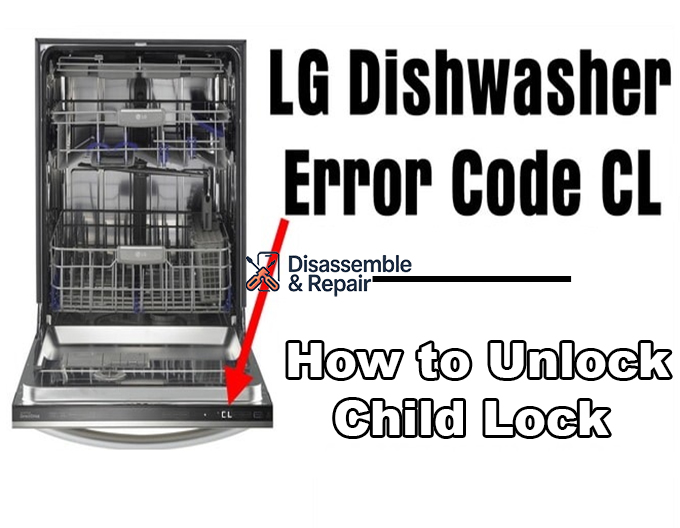
If you have recently noticed the LG dishwasher CL error code flashing on your display, you might be worried that your appliance is malfunctioning. However, this code is actually a helpful status indicator rather than a sign of a mechanical failure.
In most cases, the “CL” stands for Child Lock (or Control Lock), a safety feature designed to prevent accidental changes to your dishwasher cycle. When this feature is active, the buttons on the control panel become unresponsive, ensuring that children or accidental bumps do not interrupt the cleaning process. This guide will walk you through exactly how to manage this feature, troubleshoot potential issues, and get your dishwasher back to normal operation.
What is the LG Dishwasher CL Error Code?
Technically, “CL” is not an error code in the traditional sense. It does not indicate a broken part or a system failure. Instead, it is an informational message telling you that the Control lock is active.
This safety feature is standard on almost every modern LG dishwasher. Its primary purpose is to “lock” the control panel so that no buttons can be pressed while the machine is running or in standby mode. This is particularly useful in households with small children who might be tempted to press the buttons and disrupt a wash cycle.
Why Does the CL Code Appear?
The CL code appears when the Child Lock function has been activated. This can happen in two ways:
- Intentional Activation: You or another user manually activated the feature to secure the machine.
- Accidental Activation: You may have leaned against the front control panel or brushed the specific button combination required to turn it on without realizing it.
NOTE: You may also want to check out guides like ‘How to Reset the LG Dishwasher AE Error’ or ‘LG Dishwasher HE Error – Not Heating,’ as these are among the most common issues you’re likely to encounter when using your LG dishwasher.
How to Deactivate the Child Lock
To clear the LG dishwasher CL error code, you simply need to disable the Child Lock feature. The method to do this varies slightly depending on your specific model, but it almost always involves pressing and holding a specific button or combination of buttons for 3 to 5 seconds.
Identifying the Correct Buttons
First, look closely at your control panel. LG often prints a small lock icon or the text “Control Lock” near the buttons that control this feature.
Here are the most common button combinations found in the user manual for various models:
- Rinse Button + Spray Button: This is a very common combination. Look for a lock icon connecting these two buttons.
- Half Load + Energy Saver: On many top-control models, these two buttons act as the toggle for the lock.
- Dual Zone: Some models use the Dual Zone button as a dedicated key. Press and hold this single button for 3 seconds.
- Delay Start: Occasionally, the lock function is paired with the Delay Start button.
Step-by-Step Deactivation Guide
- Locate the Lock Indicator: Find the padlock icon or “CL” label on your panel.
- Press and Hold: Press the indicated button(s) simultaneously.
- Wait for the Beep: Hold them down for roughly 3 to 5 seconds. You should hear a chime or beep.
- Check the Display: The indicator light for the lock should turn off, and the “CL” code should disappear from the display.
Troubleshooting: When the CL Code Won’t Turn Off
If you have tried the standard deactivation methods and the LG dishwasher CL error code persists, you may need to perform some additional troubleshooting steps.
1. Perform a Hard Reset
Sometimes the electronic control board can experience a glitch. A hard reset can often clear these “stuck” logic errors.
- Turn off the dishwasher.
- Locate your home’s circuit breaker box and flip the breaker for the dishwasher to the “OFF” position.
- Wait for at least 60 seconds to allow the residual power to drain from the machine.
- Flip the breaker back on and check if the buttons are responsive.
2. Check for Stuck Buttons
Debris, food particles, or sticky residue can sometimes cause a button to stick in the pressed position.
- Inspect the buttons used for the Child Lock combination.
- Clean the area gently with a soft, damp cloth.
- Press each button to ensure it clicks or registers a touch normally.
3. Review Your User Manual
If standard combinations do not work, your specific model might have a unique method. Your user manual is the best resource for confirming the exact steps for your machine. If you have lost the physical copy, you can usually find a digital version on the LG website by searching your model number.
Using Child Lock Effectively
While the “CL” code can be confusing at first, it is a valuable feature when used correctly. Here is how to use it to your advantage:
- Protecting a Cycle: Activate the lock immediately after starting a dishwasher cycle. This ensures the cycle finishes without interruption, even if the door is bumped or buttons are pressed.
- Preventing Unwanted Starts: You can activate the lock while the dishwasher is off (in standby). This prevents children from accidentally turning the machine on.
Summary
The LG dishwasher CL error code is a safety status, not a repair warning. It indicates that the Child Lock is engaged, disabling the control panel to prevent accidental inputs. By identifying the correct button combination—often involving the Rinse button, Dual Zone, or similar keys—and holding them for a few seconds, you can easily toggle this feature on or off.
Always keep your user manual handy for model-specific instructions, and remember that a quick power reset can often resolve a panel that seems stuck. With this knowledge, you can ensure your dishwasher operates safely and efficiently for years to come.
Frequently Asked Questions
What does the “CL” code on my LG dishwasher mean?
“CL” stands for Child Lock (also known as Control Lock). It is an informational status indicator rather than a mechanical error code. When it appears, it means the safety lock feature is active, which disables the buttons on the control panel to prevent children or accidental contact from interrupting a wash cycle.
How do I turn off the CL error code?
To deactivate the Child Lock, you must press and hold the specific button or combination of buttons designated for your model for 3 to 5 seconds. Common combinations include the Rinse and Spray buttons, Half Load and Energy Saver buttons, or the Dual Zone button. You will hear a beep and the “CL” text will disappear once the panel is unlocked.
Can I activate the Child Lock while the dishwasher is not running?
Yes. You can activate the Child Lock while the dishwasher is in standby mode (turned off). This is a useful safety measure to prevent children from accidentally turning the machine on or starting a cycle.
What should I do if the CL code remains on the display even after I press the buttons?
If the buttons are unresponsive, first check for any food particles or sticky residue that might be causing a button to stick. If the buttons are clean, perform a hard reset by switching off the dishwasher’s circuit breaker for at least 60 seconds. If the code persists, consult your specific model’s user manual to ensure you are using the correct button combination.
Does the CL code mean my dishwasher needs a repair?
No, the CL code does not indicate a broken part or system failure. It is a standard safety feature designed to protect the integrity of the washing cycle. You do not need to call a technician unless the control panel remains unresponsive after trying all deactivation and reset methods.


