

Encountering an LG washer not starting can be a major disruption to your household routine, leaving you with a pile of unwashed laundry and rising frustration. Whether the display is completely blank or the machine lights up but refuses to initiate a cycle, diagnosing the root cause is the first step toward a solution. This guide illustrates the mechanical and electronic systems that govern your appliance and provides a professional roadmap for troubleshooting the issue.
Initial Power and Safety Inspections
Before dismantling the machine or ordering replacement parts, it is imperative to rule out external power issues and safety settings. Often, the problem lies not within the washer’s internal components, but in the power supply or user settings.
Checking the Electrical Supply
If the Display panel is completely dark and the machine is unresponsive, begin at the source. Ensure the power cord is firmly seated in the outlet. Next, inspect your home’s electrical panel. A tripped Circuit breaker is a common culprit, especially if the washer shares a circuit with other high-amperage appliances. If the breaker has tripped, reset it and attempt to turn the washer on again. If it trips immediately upon starting the machine, you likely have a short circuit within the internal wiring or the motor.
The Child Lock Feature
A frequent reason for a responsive but non-functional machine is the Child lock feature. This safety protocol prevents the unit from being tampered with during operation, but it can be accidentally engaged. Look at your Display panel for a “CL” code or a lock icon. When this mode is active, the control buttons are disabled. To disengage it, locate the button marked with a lock symbol (often the “Pre-wash” or “Rinse” button) and hold it for three to five seconds until the icon disappears.
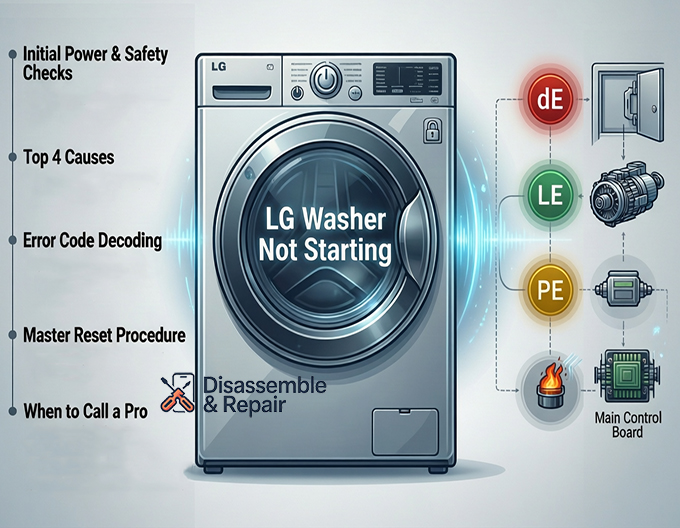
Top Reasons for an LG Washer Not Starting
If power is established and the safety lock is off, you must investigate the internal hardware. The following sections detail the most common mechanical and electronic failures associated with an LG washer not starting.
1. Door and Lid Security Assemblies
Modern washing machines are designed with strict safety interlocks. If the machine cannot verify that the door is securely closed, the Control board will prevent the cycle from beginning.
For Front Load Washers:
The Door latch assembly is a critical component. When you press start, you should hear an audible click indicating the door has locked. If the latch is broken mechanically or electrically, the machine will likely display a “dE” (Door Error) code. Additionally, check the Door striker, which is the plastic hook on the door itself. If the striker is cracked or misaligned, it cannot engage the latch assembly, and the washer will assume the door is open.
For Top Load Washers:
Top loaders utilize a Lid switch. This is often a magnetic or mechanical pin located near the hinge or under the main top. If the plastic tab on the lid is broken, or if the switch itself fails continuity testing, the motor will not engage.
2. Main Control Board and User Interface
The Control board (or Main PCB) is the brain of your appliance. It sends voltage to the motor, fill valves, and drain pump. If the board has suffered a short circuit or component failure, it may not send the necessary signal to start the cycle.
Read more LG washing machine E6 error
Symptoms of a faulty Main PCB include:
- Burnt spots or melted components visible on the board.
- The display works, but pressing “Start” results in no action.
- Erratic behavior, such as cycles stopping midway or lights flashing randomly.
Replacing a Control board is a significant repair, so it is best to verify all other components (like the door latch and thermal fuse) before condemning the main board.
3. Thermal Fuse Failure
The Thermal fuse is a safety device designed to protect the washer from overheating. If the washer motor or internal temperature exceeds safe limits, the fuse blows to cut power to the machine. Unlike a circuit breaker, a thermal fuse cannot be reset; it must be replaced.
On many models, if the thermal fuse is blown, the washer will appear completely dead, mimicking a power outage. You can test the thermal fuse for continuity using a multimeter. If there is no electrical path, the fuse is defective.
4. Line Filter and Terminal Block
If your LG washer not starting issue involves a completely dead machine despite a working outlet, the noise filter assembly (line filter) could be the cause. This component filters out electromagnetic interference. If it fails, power cannot flow from the wall cord to the internal components.
Decoding Error Codes
Your Front load washer or top loader is equipped with a diagnostic system that communicates specific failures via Error codes. Understanding these codes can significantly narrow down your troubleshooting list.
- dE / dE1 / dE2: Door Error. The Door latch assembly is not engaging. This requires inspecting the latch, the Door striker, and the wire harness connecting them to the main board.
- LE: Locked Motor Error. This often indicates a heavy load straining the motor, but it can also point to a failed Hall Sensor or the main Control board.
- IE: Inlet Error. The washer is not filling with water. While this usually doesn’t stop the machine from turning on, it will stop the cycle from starting the wash phase.
- PE: Pressure Sensor Error. If the water level sensor is faulty, the machine will not know how much water is in the drum and may refuse to start as a safety precaution.
The Master Reset Procedure
Before replacing hardware, perform a hard reset. Electronic glitches in the Main PCB can sometimes cause the system to freeze. The Reset procedure is a non-invasive way to clear the memory.
Step-by-Step Reset:
- Disconnect Power: Unplug the washer from the wall outlet or flip the Circuit breaker to the OFF position.
- Discharge Energy: With the power disconnected, press and hold the “Start/Pause” button for 5 seconds. Then, press and hold the “Power” button for 5 seconds. This discharges any residual static electricity in the capacitors of the control board.
- Restore Power: Plug the washer back in or flip the breaker ON.
- Test: Turn the machine on and attempt to run a short “Rinse & Spin” cycle to see if the issue is resolved.
Advanced Hardware Diagnosis
If the reset fails and the error codes are inconclusive, you may need to perform continuity tests on specific components. This requires a multimeter and the ability to safely access the internal wiring.
Testing the Start/Pause Button
Sometimes the issue is not the Control board logic, but the physical button on the Display panel. If the tactile switch behind the plastic button is worn out, it won’t make contact. If you press the button and it lacks the distinct “click” feel, or if the button feels stuck, the user interface board may need replacement.
Motor and Capacitor Issues
In older non-inverter models, a start capacitor helps the motor get up to speed. If this capacitor fails, the motor may hum but fail to turn. In modern direct-drive LG units, the issue is more likely related to the rotor/stator assembly or the Hall sensor (Rotor Position Sensor). If the main board attempts to start the motor but receives no position signal, it will halt the operation immediately.
When to Contact a Professional
Troubleshooting an LG washer not starting involves dealing with high-voltage electricity and sensitive electronics. While checking the Child lock, performing a Reset procedure, and inspecting the Door striker are safe for most homeowners, internal repairs carry risks.
You should consider calling a certified technician if:
- You suspect the Main PCB is faulty but are uncomfortable handling circuit boards.
- Multimeter testing confirms a blown Thermal fuse, as this usually indicates an underlying overheating issue that needs to be addressed.
- The machine is still under warranty. DIY repairs involving opening the cabinet can void your manufacturer’s warranty.
Conclusion
An LG washer not starting is rarely a catastrophic failure of the entire machine. More often, it is a specific component—such as the Door latch assembly, Lid switch, or Thermal fuse—that has done its job by stopping the machine to prevent damage or injury. By systematically checking the power source, clearing Error codes, and inspecting the physical locking mechanisms, you can identify the problem. Whether it requires a simple settings adjustment or a replacement Control board, this diagnostic approach ensures you address the core issue efficiently, restoring your appliance to full functionality.
Frequently Asked Questions
Why is my LG washer display completely dark and unresponsive?
If the display panel is blank, first ensure the power cord is firmly plugged into the outlet and check your home’s electrical panel for a tripped circuit breaker. If the outlet has power but the machine remains dead, the issue could be a blown thermal fuse, which protects the unit from overheating, or a faulty line filter that is preventing electricity from reaching the internal components.
What does the “CL” error code mean, and how do I remove it?
The “CL” code stands for Child Lock. This is a safety feature that disables the control panel buttons to prevent the machine from being tampered with. To disengage this mode, locate the button on your control panel with a lock icon next to it (typically the “Pre-wash” or “Rinse” button) and press and hold it for three to five seconds until the code disappears.
My washer has power, but the cycle won’t begin. What should I check?
The most common cause for a machine that powers on but won’t start is a door or lid security issue. For front-load washers, inspect the door latch assembly and the plastic striker; if the machine cannot confirm the door is locked, it will not start (often displaying a “dE” code). For top-load washers, ensure the lid switch is functional and that the plastic tab on the lid isn’t broken.
How do I perform a master reset on my LG washer?
To reset the electronic control board, unplug the washer from the power outlet or turn off the circuit breaker. While the power is disconnected, press and hold the “Start/Pause” button for five seconds, then press and hold the “Power” button for another five seconds. This discharges any remaining static electricity. Restore the power and try running a short cycle to see if the issue is resolved.
What should I do if my washer displays an “LE” error code?
An “LE” code indicates a Locked Motor Error. While this can sometimes be caused by a simple overload of laundry, it frequently points to a communication issue between the main control board and the motor’s Hall sensor. Try reducing the load size or performing a master reset. If the error persists, the sensor or the main PCB may require professional replacement.


