

If you have noticed your LG washer taking too long to finish a cycle, you are not alone in facing this frustrating disruption to your laundry routine. A washing machine that gets stuck on a specific time or extends its cycle by hours can indicate anything from simple user errors to complex mechanical failures. Modern high-efficiency appliances are designed with sophisticated sensors, but when one component falters, the entire system can slow down significantly to prevent damage.
This guide will walk you through the most common reasons for extended cycle times and how to troubleshoot them effectively using professional repair strategies.
Read more LG washer keeps disconnecting from wifi
Why is my LG washer taking too long to finish?
The primary reason for an LG washer taking too long to finish often lies in its intelligent programming. unlike older analog machines that ran on a fixed mechanical timer, modern LG washers use the SenseClean system. This technology weighs the laundry, checks water temperature, and monitors drum balance before and during the cycle.
If the sensors detect an anomaly—such as an unbalanced load, excessive suds, or slow water flow—the control board will automatically intervene. It may pause the timer, add water, or adjust the drum motion to correct the issue. While this protects your clothes and the machine, it often results in a wash cycle that drags on far past the estimated time.
Load Balancing and User Settings
Before tearing apart your machine to check for mechanical faults, it is crucial to rule out operational issues. The most frequent culprits for cycle delays are often related to how the machine is loaded and the settings selected.
The Unbalanced Load Issue
The most common cause of a stalled cycle is an unbalanced load. When you wash heavy items like blankets, towels, or a single pair of jeans, the wet weight can shift to one side of the drum during the spin cycle.
When the Hall sensor (which monitors motor speed and position) detects this imbalance, the main PCB (control board) stops the high-speed spin. The machine then attempts to redistribute the load by tumbling slowly and adding more water. If it fails to balance the load after several attempts, the timer will remain stuck, and the machine will continue this loop indefinitely or eventually display a “UE” (Unbalanced Error) code.
Solution:
- Pause the cycle and open the door.
- Manually redistribute the wet clothes evenly around the drum.
- Avoid washing single heavy items; add a few towels to counterbalance the weight.
Excessive Suds and the Rinse Cycle
Modern LG washers are designed to use High-Efficiency (HE) detergent. If you use regular detergent or too much HE detergent, the machine’s sensors will detect an overabundance of suds.
To prevent suds lock (where foam creates drag on the drum), the washer will automatically trigger an additional rinse cycle. This creates a “suds kill” routine that adds significant time to the wash. If the suds are not cleared, the machine may pause entirely to let them dissipate.
Solution:
- Only use HE detergent.
- Follow the manufacturer’s recommended amount—often much less than the detergent cap suggests.
- If you see visible suds in the door glass, run a rinse-only cycle without detergent to clear the system.
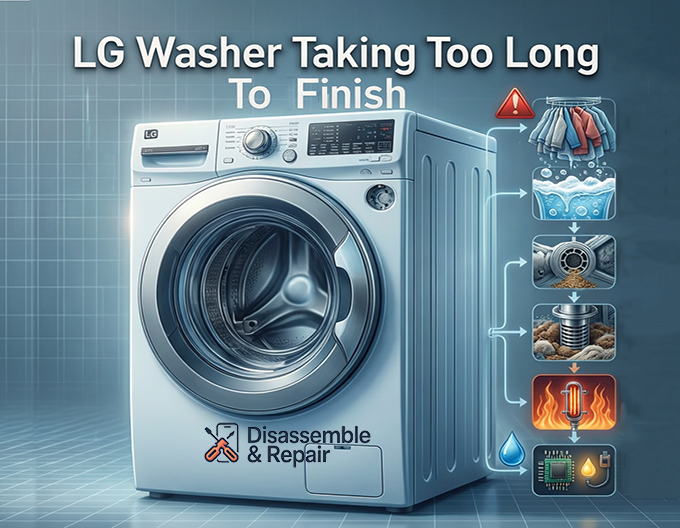
Water Supply and Heating System Failures
If your load is balanced and your detergent usage is correct, the delay might be caused by how the machine manages water.
Defective Water Inlet Valve
The water inlet valve controls the flow of hot and cold water into the machine. If the screens inside the valve ports are clogged with sediment, or if the solenoid itself is failing, the water flow will be restricted.
The washer is programmed to fill to a specific level within a set time. If the flow is a trickle, the control board will simply wait until the pressure switch signals that the tub is full. This can add 20 to 30 minutes to a cycle or cause the machine to time out with an “IE” (Inlet Error) code.
Inspection:
- Turn off the water supply faucets.
- Unscrew the inlet hoses from the back of the washer.
- Check the small mesh screens inside the valve intake. If they are dirty, clean them carefully.
- If the screens are clean but water flows slowly, the valve itself may need replacement.
Heating Element Delays
Many LG washers feature a sanitary cycle or a “steam” option that requires water to be at a very specific, high temperature. The heating element is responsible for raising the water temperature if the supply water is not hot enough.
If the heating element is covered in scale or is electrically failing, it will take much longer to heat the water. The timer on the display will pause or “hang” while the system waits for the thermistor to report the correct temperature. Until that temperature is reached, the cycle will not advance to the next stage.
Read more lg washing machine not filling with water
Drainage Problems and Filter Blockages
For a washer to finish its cycle, it must be able to drain water quickly and effectively. Any restriction in the drainage system will cause the machine to pause during the rinse and spin phases.
Clogged Drain Pump Filter
The drain pump filter is located behind a small access door at the bottom front of your washer. It is designed to catch lint, coins, and debris. If this filter becomes clogged, the water cannot exit the drum efficiently.
The washer attempts to drain for a specific duration. If the water level does not drop fast enough (monitored by the pressure switch), the machine will pause the spin cycle to prevent the pump from running dry or burning out. This results in the washer sitting idle while full of water or taking an eternity to drain between rinses.
Read more LG washer leaves clothes wet after spin
Maintenance:
- Place a shallow pan and towels under the filter access door.
- Unscrew the small drain hose to release residual water.
- Twist the filter counter-clockwise to remove it.
- Clean out any debris and rinse the filter under warm water before reinstalling.
Kinked or Obstructed Drain Hose
Similarly, the drain hose exiting the back of the machine must be clear. If the machine was pushed back too hard against the wall, the hose might be kinked. A restricted hose acts just like a clogged filter—it physically prevents water from leaving, causing the control board to extend the cycle time as it waits for the water level to decrease.
Sensor and Electronic Component Failures
When mechanical systems are working correctly, the issue may lie with the sensors that act as the machine’s “eyes and ears.”
The Hall Sensor (Rotor Position Sensor)
The Hall sensor is mounted on the stator of the Direct Drive motor. It communicates the precise speed and direction of the drum to the control board.
If the Hall sensor is failing, it may send erratic signals, causing the control board to believe the motor is struggling or the load is unbalanced when it is not. This often results in the drum “hunting” for the right speed, making a jerking motion, or stopping repeatedly. A faulty Hall sensor is a leading cause of the “LE” (Locked Motor) error code, but in its early stages of failure, it may simply cause long, interrupted cycles.
The Pressure Switch
The pressure switch (or water level sensor) uses air pressure from a small tube connected to the drum to determine how much water is in the machine.
If this switch is faulty or the air tube is clogged with gunk (a condition known as the “sludge trap”), the machine may think it still has water in it when it is actually empty, or vice versa. This confusion causes the control board to keep the drain pump running unnecessarily or delay the spin cycle, waiting for a “tank empty” signal that never comes.
Using Smart Diagnosis and Interpreting Error Codes
LG washers are equipped with a feature called Smart Diagnosis, which can be a powerful tool for pinpointing the root cause of a long cycle.
How to Use Smart Diagnosis
If your washer has the Tag On logo, you can use the LG ThinQ app on your smartphone to diagnose the issue.
- Open the app and select the Smart Diagnosis feature.
- Follow the prompts to hold your phone near the Power button.
- The washer will transmit a series of tones that the app decodes into specific issues.
Common Error Codes Related to Timing
If you do not use the app, the display may eventually show a code that explains the delay:
- UE / Ub: Unbalanced Load. The machine spent too much time trying to balance wet clothes.
- OE: Water Outlet Error. The drain pump filter or drain hose is clogged.
- IE: Water Inlet Error. The water inlet valve is not filling the tub fast enough.
- PE: Pressure Sensor Error. The pressure switch is sending invalid data.
- LE: Motor Locked Error. Often points to a bad Hall sensor, wiring harness, or main control board issue.
Conclusion
An LG washer taking too long to finish is rarely a sign that the machine is completely broken; rather, it is a symptom that one specific system is struggling to complete its task. By systematically checking the unbalanced load issues, cleaning the drain pump filter, and ensuring your water inlet valve is functioning, you can resolve the majority of these timing issues yourself.
However, if you have ruled out these maintenance items and the washer continues to stall—particularly if accompanied by grinding noises or electrical burning smells—the issue may lie with the control board or the Hall sensor. In these cases, contacting a professional technician to replace the internal components is the safest and most effective course of action to get your laundry routine back on schedule.
Frequently Asked Questions
Why does my LG washer timer stay on the same minute for a long time?
This usually happens because the washer’s SenseClean system has detected an unbalanced load. When items like heavy towels or blankets clump to one side, the machine pauses the countdown to attempt to redistribute the weight by tumbling slowly or adding more water. If the machine cannot balance the load, it will continue to loop or eventually display a “UE” error code.
Can using too much detergent make the wash cycle longer?
Yes. If you use non-HE detergent or excessive amounts of HE detergent, the sensors will detect an overabundance of suds. This triggers a “suds kill” routine, which adds extra rinse cycles to clear the foam. This process can add significant time to the total cycle and may even cause the machine to pause entirely until the suds dissipate.
How often should I clean the drain pump filter to prevent timing issues?
To ensure your washer drains quickly and finishes on time, you should check and clean the drain pump filter every few months. A filter clogged with lint, coins, or debris restricts water flow, forcing the machine to wait longer for the “tank empty” signal from the pressure switch before it can begin the spin cycle.
What does it mean if my washer “hangs” during a steam or sanitary cycle?
During high-temperature cycles, the washer relies on an internal heating element to reach specific temperatures. If the incoming water is too cold or the heating element has a buildup of scale, the timer will pause while the machine waits for the water to heat up. The cycle will not advance until the thermistor confirms the target temperature has been reached.
How can I quickly find out what is specifically causing my washer’s delay?
You can use the LG Smart Diagnosis feature via the LG ThinQ app. By holding your smartphone near the Power button while the app is active, the washer will transmit tones that the app decodes into a specific diagnosis. This can help identify if the delay is caused by a simple drainage clog (OE), a water inlet issue (IE), or a more complex sensor failure (LE or PE).


