

Encounters with appliance error codes can be frustrating, but the Lg Washing Machine Ie Error is one of the most common and solvable issues owners face. This code, which stands for “Inlet Error,” appears on the display when the washer fails to fill with water adequately within a specific timeframe, typically around eight minutes. When this occurs, the electronic controller halts the cycle to prevent damage to the machine, leaving your laundry damp or unwashed.
While it may seem like a major mechanical failure, the root cause is often a simple restriction in water flow. By understanding the components involved—from the water supply hoses to the internal pressure switch—you can often resolve the issue without a professional service call. This guide will walk you through a professional troubleshooting process, examining every potential culprit from basic external checks to advanced internal component testing.
What Causes the Lg Washing Machine Ie Error?
The “IE” code is a direct signal from your washer’s logic board that it is “thirsty.” It has opened the water valves but has not detected a rise in water level. To effectively troubleshoot, you must understand the specific entities that manage water flow.
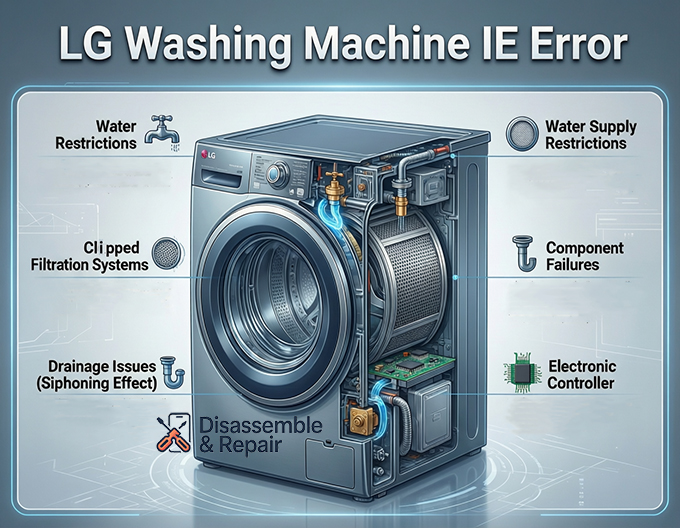
Water Supply Restrictions
The most frequent cause of this error is a lack of water pressure entering the machine. This can stem from the home’s plumbing or the water supply hoses connecting the unit to the wall. If a water tap is not fully open, or if the water pressure in your home drops below roughly 20 PSI, the machine cannot fill fast enough to satisfy the timer. Additionally, a kinked hose acts like a pinched straw, physically blocking the water regardless of the pressure at the source.
Read more LG washing machine fE error
Clogged Filtration Systems
To protect the internal components, LG washers are equipped with mesh filters located inside the water inlet valve connections. Over time, sediment buildup, calcium deposits, and debris from your home’s pipes can accumulate on these screens. When these filters become completely blocked, water cannot pass through, triggering the IE error even if your taps are wide open.
Component Failures
If external water flow is unobstructed, the issue may lie with the water inlet valve assembly itself. This component uses a solenoid valve—an electromagnetic switch—to open and close the water flow. If the solenoid coil burns out or mechanically jams, the valve will remain shut. Similarly, the pressure switch (or water level sensor) is responsible for telling the electronic controller how much water is in the drum. If this switch malfunctions or its air tube becomes blocked, the machine may fail to recognize that water is entering, causing it to time out and display the error.
Drainage Issues (The Siphoning Effect)
A less obvious cause is the siphoning effect. This occurs when the drain hose is installed too far down into the standpipe or is taped internally to the drain pipe so that it is airtight. Gravity can pull water out of the machine as fast as it fills, preventing the water level from ever reaching the target needed to satisfy the sensors.
Step-by-Step Troubleshooting Guide
Follow these steps in order, starting with the simplest external checks before moving to internal repairs.
Step 1: Inspect Water Taps and Hoses
Before reaching for tools, perform a visual inspection of the water supply.
- Check Water Taps: Ensure that both the hot and cold water tap valves on the wall are turned completely to the “Open” position. Sometimes vibrations can cause a valve to partially close over time.
- Inspect for Kinks: Pull the washing machine forward carefully to inspect the water supply hoses. Look for any sharp bends or pinches. A kinked hose is a common occurrence if the machine has been pushed too close to the wall.
- Verify Water Pressure: Turn off the taps, disconnect the hoses from the back of the washer, and place the ends into a bucket. Turn the taps back on briefly to verify that you have strong water pressure coming from the wall. If the flow is weak, the issue is with your home’s plumbing, not the machine.
Step 2: Clean the Mesh Filters
Sediment buildup is the silent killer of water flow. Cleaning the inlet filters is the most effective fix for the Lg Washing Machine Ie Error.
- Safety First: Unplug the washing machine from the power outlet and turn off both water taps completely.
- Disconnect Hoses: Unscrew the water supply hoses from the back of the washing machine. Have a towel ready, as some residual water will leak out.
- Locate Filters: Look inside the threaded intake ports on the back of the machine. You will see small plastic or metal screens. These are the mesh filters.
- Remove and Clean: Using a pair of needle-nose pliers, gently pull the filters out. Rinse them under warm running water. Use a small brush (like an old toothbrush) to scrub away any sand, grit, or mineral deposits.
- Reassemble: Insert the clean filters back into the inlet ports, reconnect the hoses securely, and turn the water taps back on. Check for leaks before testing the machine.
Step 3: Check for Siphoning
If your machine fills but never seems to stop filling, or fills and drains simultaneously, you are likely experiencing a siphoning effect.
- Inspect Drain Hose Height: Ensure the drain hose is secured properly. It should rise at least 30 inches above the floor before entering the drain.
- Check Insertion Depth: The drain hose should not be inserted more than 4 to 6 inches into the standpipe. If it goes too deep, it can sit in the standing water of the trap, creating a siphon that sucks water out of the drum.
- Air Gap: Ensure there is an air gap around the drain hose where it enters the standpipe. Do not seal this connection with duct tape; air must be able to flow to break any potential vacuum.
Step 4: Test the Water Inlet Valve
If the filters are clean and the water supply is strong, the water inlet valve assembly might be faulty. This assembly usually contains two or more solenoid valve coils.
- Access the Valve: Unplug the machine. Remove the top panel of the washer (usually held in place by screws at the back). The inlet valve is where the hoses connect.
- Visual Inspection: Look for signs of damage, such as burnt marks, cracks, or corrosion on the valve assembly.
- Multimeter Test: Set a multimeter to the Ohms (resistance) setting. Disconnect the wire harness from the solenoid coils. Probe the terminals of each solenoid. A functional solenoid typically reads between 2k to 4k Ohms (check your specific model’s service manual for exact specs). If a solenoid reads “OL” (Open Loop) or infinity, the coil is burnt out, and the entire water inlet valve assembly must be replaced.
Step 5: Inspect the Pressure Switch
The pressure switch monitors the water level via a small air tube connected to the bottom of the tub.
- Locate the Switch: It is usually located near the top of the machine, resembling a round disk with a rubber hose attached.
- Check the Air Tube: Inspect the tube running from the switch to the tub. Ensure it is not pinched, punctured, or clogged. If the tube has a hole, air pressure will escape, and the switch will never trigger the “full” signal.
- Check Connections: Ensure the electrical connector on the pressure switch is tight and free of corrosion. A loose connection here can disrupt the signal to the electronic controller.
Advanced Diagnosis: The Electronic Controller
If all mechanical components (valves, filters, hoses) are functioning correctly, the fault may lie with the electronic controller (main PCB). This computer acts as the brain of the washer. If the board fails to send voltage to the inlet valves or fails to read the signal from the pressure switch, the IE error will persist.
Diagnosing a main board failure is difficult without specialized equipment. However, if you have verified that the inlet valves are receiving voltage (using a multimeter during a fill cycle) but still not opening, or if they are not receiving voltage despite the cycle starting, the controller is the likely suspect. Replacing the electronic controller is a more expensive repair and is typically the last resort after all other troubleshooting steps have been exhausted.
Read more LG washer shaking violently during spin
Prevention and Maintenance
Once you have cleared the Lg Washing Machine Ie Error, regular maintenance can prevent it from returning.
- Biannual Filter Cleaning: Make it a habit to clean the mesh filters every six months, especially if you live in an area with hard water or frequent pipe work nearby.
- Inspect Hoses Regularly: Check your water supply hoses annually for wear, bulges, or hardening. Replace rubber hoses every 5 years to prevent bursting and ensure good flow.
- Winter Care: If your washer is located in a garage or unheated space, ensure the hoses do not freeze during winter. Frozen water in the line is a physical blockage that mimics a closed tap.
Conclusion
The Lg Washing Machine Ie Error is essentially a communication breakdown between the water supply and the washer’s sensors. By methodically isolating the variables—starting with the water tap and kinked hose, moving to the mesh filters, and finally checking the water inlet valve and pressure switch—you can identify the blockage or failure.
Most homeowners find that the solution is as simple as cleaning a sediment-filled filter or straightening a hose. However, recognizing when a component like the solenoid valve or electronic controller has failed is crucial for deciding whether to perform a DIY repair or contact a professional technician. With this guide, you now possess the technical knowledge to restore your washing machine to optimal performance.
Read more LG washing machine rusting
Frequently Asked Questions
What does the IE error code mean on an LG washing machine?
The IE code stands for “Inlet Error.” It indicates that the washing machine has failed to fill with an adequate amount of water within a set timeframe, usually about eight minutes. This error is a safety feature that halts the cycle to prevent the machine from running dry or damaging internal components.
How can I quickly fix the IE error without calling a technician?
The most common and simple fixes include ensuring your hot and cold water taps are fully turned on, checking the water supply hoses for any kinks or sharp bends, and cleaning the small mesh filters located at the water inlet valve connections on the back of the machine. Often, removing sediment buildup from these filters restores proper water flow immediately.
What is the “siphoning effect” and how does it trigger an IE error?
Siphoning occurs when the drain hose is installed incorrectly, such as being pushed too deep into the standpipe or being positioned too low (less than 30 inches from the floor). This causes gravity to pull water out of the drum as fast as it enters. Because the water level never rises high enough to trigger the pressure switch, the machine eventually times out and displays the IE code.
How do I know if my water inlet valve has failed?
If your water taps are open and the filters are clean but no water enters the machine, the inlet valve or its solenoids may be faulty. You can test this using a multimeter to check for resistance (Ohms). A reading of “OL” or infinity indicates that the solenoid coil is burnt out and the valve assembly needs to be replaced.


