

If you see the Lg Washing Machine Oe Error code flashing on your display, it means your washer is having trouble draining water during a cycle. This common issue can leave you with a drum full of soapy water and wet clothes, but fortunately, it is often resolvable without professional intervention.
This guide provides a professional, step-by-step approach to diagnosing and fixing the OE error on both front-load and top-load LG washers. By understanding the underlying causes and following these procedures, you can restore your appliance to optimal performance.
Understanding the OE Error Code
The OE error code stands for “Outlet Error” or “Water Outlet Error.” It signifies that the washing machine’s main control board has detected that water is not draining from the tub within the designated time limit (usually 10-15 minutes). When the pressure switch detects that the water level has not dropped despite the drain pump being active, the system triggers the OE code to prevent overflowing or mechanical damage.
While a faulty part can cause this error, it is frequently the result of a physical obstruction or a simple maintenance oversight.
Common Causes of the Lg Washing Machine OE Error
Before attempting repairs, it is essential to identify the likely culprits. The most frequent causes include:
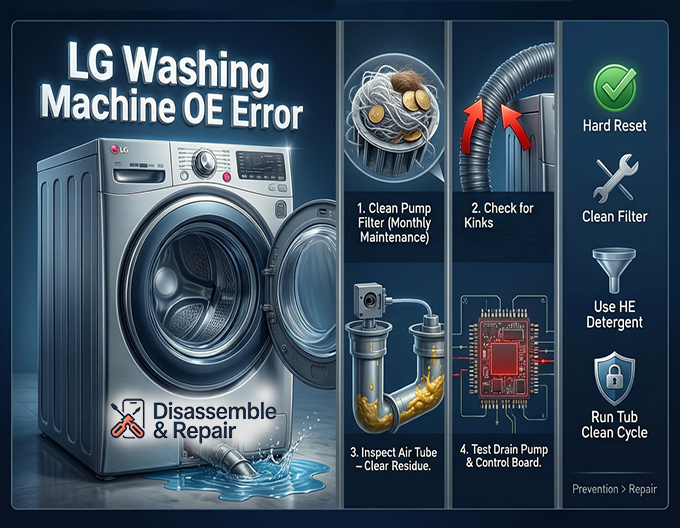
- Clogged Pump Filter: Debris such as lint, coins, hair, and small buttons can accumulate in the filter, blocking water flow.
- Kinked or Clogged Drain Hose: If the hose is bent, crushed behind the machine, or obstructed by internal debris, water cannot escape.
- Faulty Drain Pump: The mechanical pump responsible for expelling water may have failed or become jammed.
- Malfunctioning Pressure Switch: This sensor tells the machine how much water is in the drum; if it gives a false reading, the machine may “think” it hasn’t drained.
- Frozen Water Lines: In extremely cold climates, residual water in the drain hose can freeze, creating a blockage.
Step-by-Step Troubleshooting for Lg Washing Machine Oe Error
Follow these steps in order, starting with the simplest and most common solutions.
Read more LG washing machine OE error
1. Perform a Hard Reset
Electronic glitches can sometimes trigger false error codes. A hard reset clears the memory of the PCB control board.
- Power off the washing machine.
- Unplug the power cord from the wall outlet.
- Press and hold the Start/Pause button for 5 seconds.
- Plug the washer back in and turn it on.
- Run a “Spin Only” cycle to see if the water drains.
If the error persists, proceed to physical inspection.
2. Inspect the Drain Hose
The drain hose carries water from the pump to your home’s drainage system. Even a minor restriction here can trigger an OE error.
- Check for Kinks: Pull the washer forward carefully. Ensure the drain hose is not pinched between the back of the machine and the wall.
- Verify Height: The end of the drain hose must be installed at the correct height to prevent backflow or siphoning. It should typically be between 24 and 40 inches above the floor.
- Check for Clogs: If the hose connects to a sink spigot or garbage disposal, ensure the knockout plug inside the disposal has been removed. You can also disconnect the hose and run water through it to check for internal blockages.
3. Clean the Pump Filter (Debris Filter)
This is the most critical step for Front-load washer models and is the solution for the vast majority of OE errors. The pump filter is designed to catch foreign objects before they damage the drain pump.
Note: Expect water to spill when you open this filter. Have a shallow pan and towels ready.
- Locate the Access Panel: On most LG front-loaders, this is a small square door at the bottom left or right corner of the machine.
- Drain Remaining Water: Inside the panel, you will see a small black rubber hose and a large circular cap. Pull out the small hose, remove its plug, and let the standing water drain into your shallow pan.
- Remove the Filter: Once the water stops flowing, twist the large circular cap counter-clockwise to unscrew it.
- Clean the Filter: Remove the debris filter. Rinse it thoroughly under warm running water. Remove any lint, coins, or hair wrapped around it.
- Check the Housing: Shine a flashlight into the filter housing. Verify that the impeller (the small fan blade inside) can spin freely and is not obstructed by debris.
- Reassemble: Insert the clean filter, screw the cap back on tightly, replace the drain hose plug, and close the access panel.
4. Top-Load Washer Considerations
While the principles are the same, accessing the Pump filter on a Top-load washer can be different.
- Internal Filters: Some LG top-loaders do not have an external access panel. The filter may be located inside the drum (often under the agitator or on the side) or may not be user-accessible without removing the back panel of the machine.
- Drain Pump Access: If your top-loader does not have a front access door, you may need to disconnect the drain hose from the back to inspect for clogs at the pump connection point. Consult your user manual specifically for “filter cleaning” if no external door is visible.
Advanced Troubleshooting: Testing Components
If the hose is straight and the filter is clean, but the error remains, you may be dealing with a component failure.
Testing the Drain Pump
The drain pump usually consists of a motor and an impeller. If the motor fails or the impeller breaks, water cannot be pushed out.
- Listen to the Sound: Start a “Spin Only” cycle. Listen near the bottom of the washer.
- Humming/Buzzing: If you hear a humming sound but no water moves, the pump might be jammed with debris or the impeller is broken.
- Silence: If the machine enters the drain phase but makes absolutely no sound, the pump motor may be dead or not receiving power from the control board.
- Grinding: A grinding noise often indicates a physical obstruction (like a screw or wire) inside the pump housing.
The Pressure Switch
The pressure switch uses air pressure to determine the water level. A thin tube connects the tub to the switch. If this tube is clogged with “gunk” or suds, the switch may believe the tub is full of standing water even when it is draining.
- Symptoms: The washer drains completely, but the pump keeps running, and the OE error eventually appears. This suggests the sensor still “thinks” water is present.
Using LG Smart Diagnosis
Modern LG washers are equipped with Smart Diagnosis technology, which allows the machine to communicate directly with the LG ThinQ app or customer support to identify the specific nature of the problem. This can confirm if the issue is electrical (PCB control board) or mechanical.
How to Use Audible Smart Diagnosis:
- Download and open the LG ThinQ app on your smartphone.
- Power on the washing machine. Do not press Start.
- Locate the Smart Diagnosis logo (usually near the Power button).
- Place your phone’s microphone near the logo.
- Press and hold the button indicated for diagnosis (often the Temp or Water Temp button) for 3 seconds until a countdown appears or a series of fax-like tones begins.
- Keep the phone in place until the data transfer is complete. The app will analyze the tones and provide a specific diagnosis and troubleshooting steps.
Prevention and Maintenance
Preventing the “Lg Washing Machine Oe Error” is easier than fixing it. Regular maintenance ensures proper water drainage and extends the life of your appliance.
- Monthly Filter Cleaning: Make it a habit to clean the pump filter once a month. This prevents debris from building up and straining the drain pump.
- Check Pockets: Always empty pockets before washing. Coins, keys, and toothpicks are the leading causes of pump jams.
- Use High-Efficiency (HE) Detergent: Excess suds from non-HE detergent can confuse the pressure switch and coat the drain hose, leading to false errors and slow draining.
- Tub Clean Cycle: Run the LG Tub Clean cycle monthly to remove detergent residue and lint buildup from the internal hoses and drum.
When to Call a Professional
If you have cleaned the filter, straightened the hose, and reset the machine, but the OE error persists, the issue likely lies with the PCB control board, the wiring harness, or a completely failed drain pump motor that requires replacement.
Read more LG washer keeps filling with water
Replacing a drain pump is a moderate DIY task involving removing the front or back panel (depending on the model). However, if you are uncomfortable working with electrical components or if your machine is still under warranty, it is best to contact a certified LG technician.
By systematically checking the drain hose, pump filter, and running diagnostics, you can resolve the majority of drainage issues. The LG OE error is a protective mechanism, and addressing the root cause promptly will ensure your washer continues to operate efficiently for years to come.
Frequently Asked Questions
What exactly does the OE error code mean?
The OE error code stands for “Outlet Error.” This happens when your LG washing machine’s control board detects that water is not draining from the tub within the designated time limit, which is typically between 10 and 15 minutes.
Can I fix the OE error myself without a technician?
Yes, in many cases. Most OE errors are caused by physical obstructions rather than mechanical failure. By performing a hard reset, straightening a kinked drain hose, or cleaning the pump filter (debris filter), you can often resolve the issue without professional help.
Read more LG washing machine water not stopping
How often should I clean my LG washer’s pump filter?
To prevent the OE error from occurring, it is recommended to clean the pump filter at least once a month. Regular cleaning prevents lint, coins, and hair from building up and putting unnecessary strain on the drain pump.
Why does the OE error persist even though the water has drained out?
If the tub is empty but the error code remains, the issue may be with the pressure switch or its air tube. If the tube is clogged with detergent residue or “gunk,” the sensor may falsely signal to the machine that the drum is still full of water, preventing the cycle from continuing.
What should I do if my top-load washer shows an OE error but has no front access panel?
Unlike front-load washers, some LG top-loaders do not have a small door for filter access. In these models, the filter might be located inside the drum or may require disconnecting the drain hose from the back of the machine to check for clogs near the pump connection point. Consult your specific model’s manual for the exact filter location.


