Learning the correct Samsung washer self clean cycle how to use steps is essential for extending the lifespan of your appliance and ensuring your laundry remains fresh. If you have noticed a musty smell or visible residue in your machine, this guide will walk you through the specific procedures for both front load and top load models to restore optimal performance.
Owning a modern Samsung washing machine comes with the benefit of advanced maintenance features designed to do the hard work for you. Whether your model features Self Clean, Self Clean+, or Eco Drum Clean, the underlying technology uses a powerful hot water cycle and high-speed spinning to sanitize the washer tub. By following these maintenance steps, you can effectively tackle mold and mildew prevention without needing harsh chemical cleaners for every wash.
Read more How to flush Samsung washer hoses
Understanding the Self Clean Technology
Before diving into the step-by-step instructions, it is important to understand what happens during this cycle. The Self Clean function is a specialized maintenance program that eliminates detergent buildup and bacteria that accumulate in the drum, diaphragm, and door glass.
Eco Drum Clean vs. Self Clean+
Depending on the year and model of your appliance, you might see different terminology on your control panel.
- Eco Drum Clean: Common in earlier models and many international versions, this cycle focuses on using high-temperature water to dissolve residue on the drum’s surface.
- Self Clean+: Often found in newer front load washing machine models, this enhanced version targets not just the tub but also the dirt that gathers around the door gasket and diaphragm.
Regardless of the name, the goal is washing machine maintenance that keeps the internal components sterile. This cycle reduces the risk of odors transferring to your clothes and prevents the growth of allergens.
Samsung Washer Self Clean Cycle How to Use: Step-by-Step
Performing this maintenance task is straightforward, but precision is key to avoiding errors. Below is your detailed guide on Samsung washer self clean cycle how to use, broken down by machine type.
Preparation Before You Start
- Empty the Drum: Ensure the washer tub is completely empty. Never run this cycle with clothing inside, as the high water temperature and agitation speeds can damage fabrics.
- Dry the Door Area: Quickly wipe down the door gasket and glass to remove any pet hair or loose lint that might obstruct the cleaning process.
- Check for Chemicals: For the standard Self Clean cycle, no detergent is needed. The hot water and mechanical action are sufficient. However, if you are battling severe odors, some user manuals permit the use of liquid chlorine bleach. Note: Always check your specific owner’s manual. If allowed, bleach typically goes into the manual bleach compartment (filling to the Max line), not the main detergent dispenser.
Instructions for Front Load Washing Machine
Front-loaders are more prone to trapped moisture, making this cycle critical.
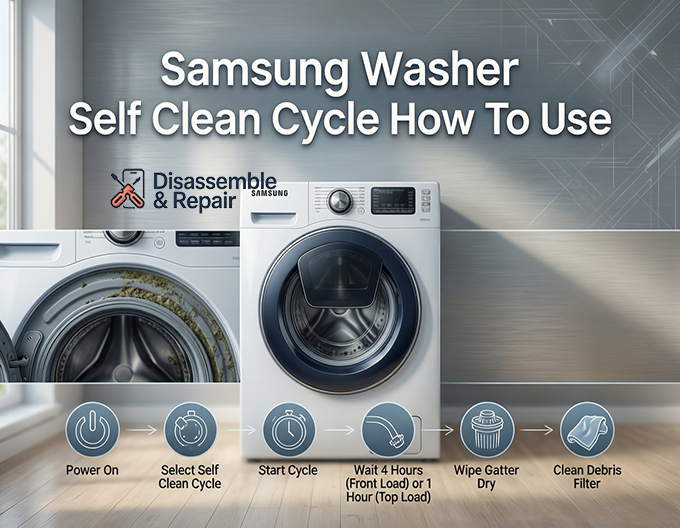
- Power On: Press the Power button to turn on the unit.
- Select Cycle: Turn the cycle selector knob until the indicator light illuminates next to Self Clean or Eco Drum Clean. On some digital models, you may need to press a specific button labeled “Self Clean.”
- Start: Press and hold the Start/Pause button to initiate the cycle.
- Duration: Expect the process to take approximately 4 hours. The machine will fill, soak, tumble, and spin repeatedly.
- Completion: Once finished, wipe the rubber gasket dry to prevent residual moisture from sitting in the folds.
Instructions for Top Load Washing Machine
Top-loaders generally have a shorter cleaning duration but still require regular attention.
Read more Samsung heavy duty cycle
- Power On: Press the Power button.
- Select Cycle: Rotate the dial to Self Clean.
- Start: Press the Start/Pause button.
- Duration: This cycle typically lasts about 1 hour. It utilizes a high water level to soak the upper ring of the tub where scum lines often form.
- Post-Clean: Leave the lid open after the cycle ends to allow the tub to air dry completely.
Decoding the Self Clean Indicator Light
One of the most convenient features of Samsung washers is the Self Clean indicator light. This reminder system is designed to take the guesswork out of maintenance schedules.
When Does the Light Turn On?
- Front Load Models: The reminder usually appears every 40 wash cycles.
- Top Load Models: The reminder typically activates every 20 wash cycles.
Resetting the Light
If you see the indicator light glowing, it is time to run the cycle. You can ignore the light for a few washes if you are in a hurry; however, it will persist until the cleaning cycle is performed.
- Automatic Reset: The light automatically turns off once the Self Clean cycle completes successfully.
- Manual Reset: You cannot simply “turn off” the light without running the cycle. This is a safety feature to ensure mold and mildew prevention protocols are followed. If the light remains on after a cycle, try powering off the machine and unplugging it for 5 minutes to reset the control board.
Essential Maintenance for Odor Removal
While the self-clean cycle handles the drum, comprehensive washing machine maintenance requires attention to other components where grime hides. If you still notice smells after running the cycle, check these areas.
Cleaning the Debris Filter (Front Load Only)
The debris filter (often called the pump filter) is a common source of “rotten egg” smells. It traps lint, coins, and hair that don’t make it out the drain.
- Locate the Panel: Find the small access door on the bottom front of your washer.
- Drain Water: Have a shallow pan or towel ready. Pull out the small emergency drain hose, uncap it, and let the residual water drain out.
- Remove Filter: Twist the debris filter knob counter-clockwise and pull it out.
- Clean: Rinse the filter under hot water and use a soft brush to scrub away slime. Check the housing for any obstructions.
- Reassemble: Insert the filter, twist it clockwise until tight, recap the drain hose, and close the panel.
scrubbing the Door Gasket
The gray rubber seal on front loaders is the number one spot for mold and mildew prevention failures. Water sits in the bottom fold, creating a breeding ground for black mold.
Read more How to clean Samsung AddWash compartment
- Inspection: Gently pull back the fold of the door gasket.
- Cleaning: Use a mixture of hot water and vinegar (or a mild mildew remover) to wipe the inside of the seal.
- Habit: After every wash, leave the door slightly ajar. This simple habit allows air to circulate and dries out the gasket, preventing odor removal issues before they start.
Managing Detergent Buildup
Using too much detergent is a leading cause of washer malfunction. Excess soap creates a waxy film called “scrud” inside the washer tub and hoses.
- Dispenser Drawer: Pull out the detergent drawer completely. Rinse it under warm water to remove hardened soap or fabric softener.
- Cavity Cleaning: Use an old toothbrush to scrub the inside of the drawer compartment where water jets enter. Detergent buildup here can block water flow and lead to ineffective cleaning.
Troubleshooting Common Issues
The Washer Smells Worse After Self Clean
Sometimes, the first Self Clean cycle loosens years of sludge but doesn’t fully flush it out, causing a temporary spike in odor.
- Solution: Run a “Rinse + Spin” cycle immediately after the self-clean cycle to flush out the loosened debris. You may need to run the Self Clean cycle a second time if the machine was heavily soiled.
Suds Appear During Self Clean
If you see suds during the cycle, it indicates significant residual detergent in your machine’s system.
- Solution: Do not add any cleaning agents. Run the cycle repeatedly until no suds are visible. This confirms that the detergent buildup has been successfully cleared.
Can I Use Bleach?
As mentioned, some models allow this. However, never mix bleach with other cleaners like vinegar or dedicated washer cleaning tablets, as this creates toxic fumes. If you choose to use a commercial washing machine cleaner tablet, place it directly in the drum, not the dispenser, and follow the tablet manufacturer’s instructions alongside the machine’s cycle.
Conclusion
Mastering the Samsung washer self clean cycle how to use instructions is the single best investment of time you can make for your laundry routine. By combining this automated feature with manual care of the debris filter and door gasket, you ensure your appliance runs efficiently and your clothes remain hygienic.
Remember, washing machine maintenance is not a one-time task but a monthly habit. Whether you own a front load washing machine or a top load washing machine, respecting the Self Clean indicator light will save you from costly repairs and the frustration of persistent odors. Keep your washer tub sparkling, and your laundry will thank you.
Frequently Asked Questions
How do I know when it is time to run the Self Clean cycle?
Samsung washing machines are equipped with an automatic reminder system. For front-load models, the Self Clean indicator light typically illuminates every 40 wash cycles. For top-load models, the reminder usually appears every 20 cycles. While you can bypass the reminder for a few loads, the light will remain on until a full cleaning cycle is completed.
Should I add detergent or cleaning tablets to the machine?
In most cases, no detergent is needed because the cycle relies on high-temperature water and powerful mechanical action. However, if you are dealing with severe odors, you may use liquid chlorine bleach if your specific model’s manual permits it. If using a commercial washing machine cleaner tablet, place it directly in the drum rather than the dispenser drawer. Never mix bleach with other chemicals.
Can I wash a small load of clothes while running Self Clean?
No. You must ensure the washer tub is completely empty before starting the cycle. The Self Clean function uses extremely high water temperatures and specialized agitation speeds that are designed to sanitize the drum but can easily damage or ruin clothing fabrics.
Why does my washer still have a musty smell after the cycle is done?
If the machine was heavily soiled, the first Self Clean cycle may loosen years of detergent buildup and sludge without fully flushing it away. If an odor persists, run a “Rinse + Spin” cycle immediately to clear out the remaining debris. For front-load users, you should also clean the debris filter and wipe down the rubber door gasket, as these areas often trap odor-causing mold.
How long does the Samsung Self Clean cycle take to complete?
The duration varies significantly based on the type of machine you own. A Self Clean cycle on a front-load washing machine typically takes about 4 hours to complete due to the intensive soaking and tumbling required. On a top-load washing machine, the cycle is generally much shorter, lasting approximately 1 hour.