

If your appliance has suddenly stopped mid-cycle and the display is flashing the Samsung washing machine 3C error, it indicates a specific malfunction within the motor or its control system. This code (often interchangeable with 3E on older models) is a direct signal from the main control board that it cannot detect the motor’s rotation or speed correctly.
As a Senior appliance technician, I have compiled this comprehensive guide to help you diagnose and resolve the 3C error. We will cover everything from basic resets using the Smart Care app to advanced multimeter testing of the BLDC motor and Hall sensor.
Understanding the Samsung Washer 3C Code
The 3C error specifically relates to the drive motor and its ability to communicate with the central processor. Modern Samsung front load and top load washers often use a BLDC motor (Brushless Direct Current motor) for efficiency and durability.
For the machine to operate, the control board sends power to the motor windings (stator) and relies on a feedback signal to know how fast the drum is spinning. This feedback is provided by a Hall sensor, which acts as a tachometer. If the control board sends power but receives no signal—or an irregular signal—it triggers the 3C error to prevent damage.
Common Culprits
- Faulty Hall Sensor (Tachometer): The sensor fails to report motor speed.
- Damaged Wiring Harness: Vibrations cause wire breaks or loose connections between the motor and the inverter board.
- Defective Inverter Board: The component responsible for converting power for the motor fails.
- Mechanical Obstruction: Coins or debris blocking the drum, or worn bearings preventing rotation.
- Drive Motor Failure: Physical damage to the rotor or stator coils.
Samsung Washing Machine 3C Error: Step-by-Step
This section details how to diagnose and fix the Samsung washing machine 3C error starting with non-invasive methods before moving to hardware testing.
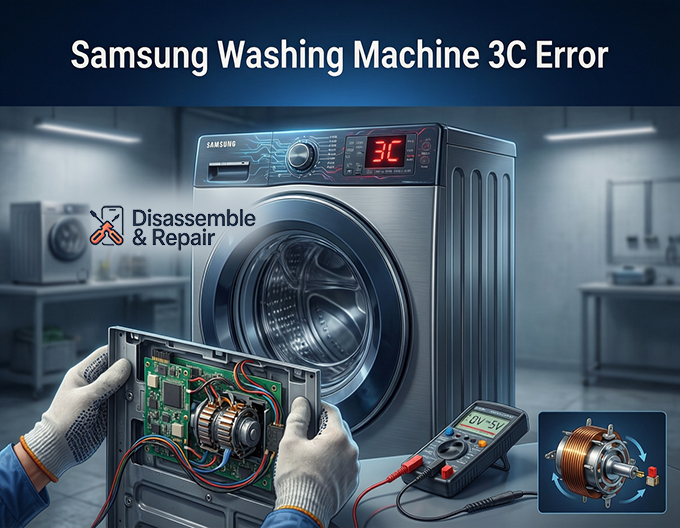
Step 1: Preliminary Checks and Smart Care
Before opening the machine, perform these basic diagnostic steps:
Read more Samsung washer pump running but not draining
- Power Cycle: Unplug the washer for at least 5 minutes to discharge the capacitors on the inverter board. Plug it back in and run a short “Rinse + Spin” cycle.
- Check for Overloading: A heavy, unbalanced load can strain the motor, causing a temporary 3C error. Remove heavy items and retry.
- Use the Smart Care App:
- Open the Samsung Smart Care app on your smartphone.
- Press the Smart Care button on your washer (or the specific key combination for your model) until the code displays a cryptographic pattern.
- Scan the screen with your phone camera. The app will confirm the error code diagnosis and offer model-specific suggestions.
Step 2: Running Diagnostic Mode
Entering diagnostic mode allows you to test the motor independently of a wash cycle.
How to Enter Diagnostic Mode (General Method for Front Loaders):
- Turn the washer on.
- Press and hold the Delay End and Temp buttons (or Soil Level and Spin) simultaneously for 3 seconds. Note: Key combinations vary by model; consult your technical sheet if these do not work.
- Rotate the dial until “TST” or “SPN” (Spin Test) appears.
- Press Start. The machine should attempt to ramp up the motor speed.
- Observe the display. If the tachometer detects movement, it will display the RPM. If it stays at 0 or flashes 3C immediately, the issue is electrical.
Step 3: Inspecting the Wiring Harness
Vibration is the enemy of washing machine electronics. The wiring harness connecting the main PCB (Printed Circuit Board) to the motor is frequently the cause of the 3C error.
- Access the Motor: For a front load washer, remove the rear panel. For a top loader, you may need to tip the unit back (secure the tub first) to access the bottom.
- Visual Inspection: Look for any loose connectors at the motor. Check for wires that may have rubbed against the chassis and exposed copper.
- Continuity Check: If you find a suspect wire, use a multimeter to check for continuity from the motor plug back to the inverter board.
Step 4: Testing the Drive Motor and Hall Sensor
If the wiring looks good, you must test the hardware using multimeter testing.
Testing the Stator (Motor Windings):
Read more Samsung washing machine 4C2 error
- Disconnect the main power harness from the motor.
- Set your multimeter to the Ohms (resistance) setting.
- Measure the resistance between pins 1-2, 2-3, and 1-3 on the motor connector.
- Expected Reading: You should see a consistent reading typically between 5 to 15 ohms (consult your specific tech sheet, as this varies by model).
- Result: If one reading is “OL” (Open Loop) or significantly different, the drive motor stator is faulty and needs replacement.
Testing the Hall Sensor:
The Hall sensor is usually mounted directly on the stator. It has a smaller connector with 3 or 4 small wires.
- Apply power to the machine (use extreme caution).
- Set your multimeter to DC Voltage.
- Measure between the ground pin and the signal pin on the sensor connector while slowly rotating the drum by hand.
- Expected Reading: The voltage should pulse (e.g., oscillating between 0V and 5V) as the magnets on the rotor pass the sensor.
- Result: If the voltage stays constant or is zero, the Hall sensor is dead.
Step 5: The Inverter Board (Control Board)
If the motor windings test fine (consistent resistance) and the Hall sensor is pulsing correctly, the issue likely lies upstream at the control board or the separate inverter board (found in the plastic housing at the bottom or rear of the machine).
The inverter board is responsible for driving the BLDC motor. If its internal capacitors or IGBTs (Insulated Gate Bipolar Transistors) fail, it cannot send the correct phase power to the motor, triggering the 3C error immediately upon cycle start. Replacing the inverter board is a common fix for persistent 3C errors where the motor tests good.
Summary of Repair Path
- Reset: Unplug for 5 minutes.
- Diagnose: Use the Smart Care app and diagnostic mode to confirm the motor is unresponsive.
- Inspect: Check the wiring harness for physical damage.
- Test: Use multimeter testing on the drive motor stator resistance and Hall sensor voltage.
- Replace: Swap the faulty component—usually the Hall sensor, the motor stator, or the inverter board.
By following this logical troubleshooting path, you can isolate the specific cause of the “Samsung washing machine 3C error” and avoid unnecessary part replacements. Always remember to unplug the appliance before touching internal components to ensure your safety.
Frequently Asked Questions
What does the 3C error code specifically mean on a Samsung washer?
The 3C error indicates a communication or functional failure between the drive motor and the main control board. It signifies that the control board cannot detect the motor’s rotation or speed, often due to a faulty Hall sensor, a defective inverter board, or a problem with the motor windings.
Can I fix a 3C error just by resetting the machine?
In some cases, yes. A 3C error can be triggered by a temporary electronic glitch or a heavily unbalanced load. You should try to resolve it by unplugging the washer for at least 5 minutes to discharge the capacitors and then ensuring the drum is not overloaded before restarting a cycle.
Is the 3C error the same as the 3E error code?
Yes, they are essentially the same. The 3E error code is typically found on older Samsung models, while newer front-load and top-load machines use the 3C designation. Both codes point toward motor-related malfunctions and follow the same troubleshooting steps.
Read more Samsung washing machine 4C error
How do I know if the Hall sensor is the cause of the error?
The Hall sensor acts as a tachometer for the motor. You can test it by using a multimeter to check the DC voltage while manually rotating the drum. If the voltage pulses (typically between 0V and 5V) as the drum turns, the sensor is working. If the voltage remains constant at zero or stays high without pulsing, the sensor is likely defective.
What should I do if my motor tests fine but the 3C error persists?
If your motor stator shows consistent resistance (usually 5 to 15 ohms) and your wiring harness is intact, the problem is likely the inverter board. This component is responsible for powering the BLDC motor, and if its internal transistors or capacitors fail, it will trigger the 3C error immediately at the start of a cycle.


