

If you are staring at a digital display flashing the Samsung washing machine 5C error, do not panic; this is one of the most common fault codes users encounter. This code serves as a direct communication from your appliance, signaling that the water inside the drum is failing to drain within a specific timeframe. While it can be frustrating to find your laundry trapped in a pool of soapy water, the underlying causes are often straightforward and resolvable without professional intervention.
This guide provides a professional, deep dive into the Samsung washing machine 5C error, exploring its causes, diagnostic steps, and effective solutions. By understanding the mechanics of your appliance’s drainage system, you can restore your washer to optimal performance.
Understanding the 5C Error Code
The 5C error code (often used interchangeably with the 5E error code on older models) indicates a drainage failure. Your Samsung washer is equipped with sensors that monitor the water level. When the cycle attempts to drain, the machine expects the water level to drop to zero within a set period. If the sensor detects that water remains in the drum after the drain pump has activated, it triggers the error to prevent potential flooding or mechanical damage.
This issue is particularly prevalent in the front load washer design, though top loaders are not immune. The problem rarely lies with the main control board; instead, it typically stems from a physical obstruction or a mechanical hiccup in the path where water exits the machine.
Read more Samsung washer dripping water into drum
Common Causes of the Samsung Washing Machine 5C Error
To effectively troubleshoot, one must first identify the potential culprits. The drainage process relies on a few critical components working in harmony.
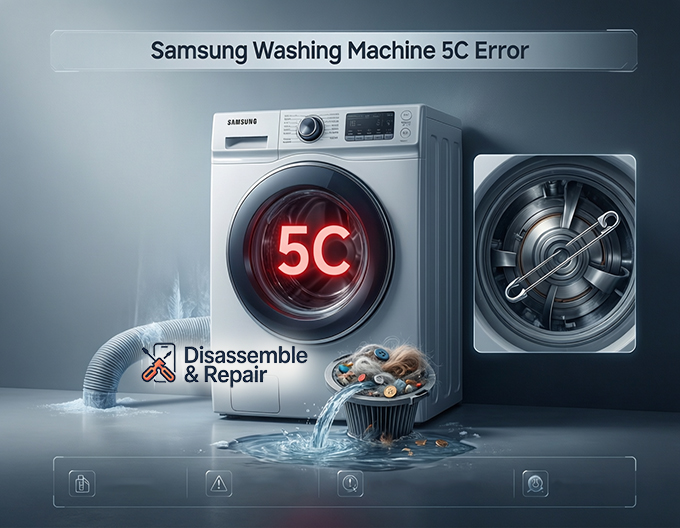
1. A Clogged Debris Filter
The most frequent offender is a clogged filter. Located at the bottom front of most Samsung washers, the debris filter is designed to catch lint, coins, buttons, and other foreign objects that escape your pockets. Over time, this accumulation restricts water flow, choking the pump’s ability to empty the drum.
Read more Samsung washer drain pump reset
2. Issues with the Drain Hose
The drain hose transports water from the machine to your home’s plumbing. If this hose is obstructed, the water has nowhere to go. Common issues include:
- Kinked hose: If the machine was pushed back too tightly against the wall, the hose might be bent, cutting off flow.
- Freezing: In colder climates, residual water in the hose can freeze, creating an ice block.
- Improper installation: If the hose is inserted too far into the standpipe or positioned too low/high, it can cause siphoning or backflow issues.
3. Pump Impeller Obstruction
The drain pump contains a small rotating component called an impeller. Small hard objects like bobby pins, gravel, or screws can bypass the filter and lodge themselves in the pump impeller. This prevents the pump from spinning, leading directly to a drainage fault.
Read more Samsung washing machine 5E error
4. Hardware Failure
While less common, the drain pump motor itself can burn out after years of service. If the electrical windings fail, the pump will not activate even if the path is clear.
Step-by-Step Troubleshooting Guide
Before attempting any repairs, ensure safety by powering off the machine and unplugging it from the electrical outlet. You will be dealing with water, so have old towels and a shallow bucket ready.
Step 1: Emergency Draining
Since the 5C error means water is stuck in the drum, you cannot simply open the main door without risking a flood. You must use the emergency drain tube.
- Locate the filter cover panel on the bottom front of your washer. Open it by pressing the tab or using a thin tool.
- You will see a small rubber hose (the emergency drain tube) and a larger round cap (the debris filter).
- Pull the emergency drain tube out slightly and remove its cap while holding it over a shallow basin or bowl.
- Allow the water to drain completely. You may need to empty your bowl several times.
- Once the flow stops, replace the cap securely and push the tube back into place.
Step 2: Debris Removal and Filter Cleaning
With the water removed, you can safely inspect the filter.
- Turn the debris filter cap counter-clockwise (left) to unscrew it.
- Pull the filter out. It is normal for a small amount of residual water to spill out.
- Inspect the filter housing and the filter itself. You will likely find lint, hair, or small objects.
- Perform a thorough debris removal under running warm water. Use a soft brush (an old toothbrush works well) to scrub away slime or mold buildup.
- Before reinserting, shine a flashlight into the empty filter housing. Check for any objects that might be sitting at the very back, near the pump impeller.
- Reinsert the filter and turn it clockwise until it is tight.
Step 3: Inspecting the Drain Hose
If the filter was clean, the blockage might be further down the line.
- Pull the washing machine away from the wall to access the back.
- Visually inspect the drain hose for any sharp bends or kinks. Straighten the hose if necessary.
- Disconnect the hose from your home’s drain pipe.
- Run a long, flexible brush or a snake tool through the hose to check for internal clogs.
- Ensure the end of the hose is not submerged in water within the standpipe, as this can create a vacuum that prevents draining.
Step 4: Testing the Drain Pump
If the filter and hose are clear, the issue may lie with the drain pump mechanics.
Read more Samsung washer not draining
- With the filter removed (as in Step 2), look inside the housing to locate the impeller blades.
- Use a non-metallic object, like a pen, to gently flick the impeller. It should move with some magnetic resistance but should not be seized.
- If the impeller spins freely and is not broken, but the pump does not run during a cycle (no humming sound), the pump motor may be electrically dead and require replacement.
Preventing Future Drainage Issues
Maintenance is key to avoiding the recurrence of the Samsung washing machine 5C error. Adopting a few simple habits can extend the life of your appliance.
- Regular Cleaning: Make it a habit to clean the debris filter once every month. This prevents the gradual buildup of lint that eventually leads to a full clog.
- Pocket Checks: Always empty pockets before loading laundry. Coins, keys, and receipts are the enemies of your washer’s drainage system.
- Use a Laundry Bag: For small items like baby socks or handkerchiefs, use a mesh laundry bag to prevent them from getting sucked into the drain line.
- Check Hose Placement: If you move the washer for cleaning, double-check that the drain hose hasn’t been crushed against the wall when pushing the unit back.
When to Call a Professional
If you have performed debris removal, straightened every kinked hose, and verified that the pump impeller is free of obstructions, yet the error persists, you may be facing a more complex issue.
- Wiring Issues: Internal wiring harnesses connecting the pump to the main board can become loose or damaged.
- Control Board Failure: Rarely, the main computer may fail to send the voltage signal to the drain pump.
- Pump Replacement: If the pump motor is burned out, a replacement part is necessary. While a handy homeowner can replace a drain pump, it involves disassembling the front or bottom panel of the machine.
Conclusion
The Samsung washing machine 5C error is an inconvenience, but it is rarely a catastrophe. It is a safety mechanism designed to protect your home from water damage. By methodically checking the drain hose, cleaning the debris filter, and ensuring the drain pump is operational, you can resolve the vast majority of these errors on your own.
Remember that your washing machine handles heavy loads and gallons of water daily; treating the drainage system with regular care ensures it continues to serve your household efficiently. Whether it is a simple clogged filter or a kinked hose, patience and a systematic approach to troubleshooting will save you time and money on repair bills.
Frequently Asked Questions
What is the difference between the 5C and 5E error codes?
The 5C and 5E error codes are essentially the same. Older Samsung washing machine models typically display “5E,” while newer digital models use “5C.” Both codes indicate a drainage failure where the machine is unable to remove water from the drum within the required timeframe.
How do I safely drain the water when a 5C error occurs?
To avoid a flood when opening the machine, you must use the emergency drain tube. Locate the small access panel on the bottom front of your washer, pull out the small rubber tube, and remove its cap to drain the water into a shallow basin. Once the drum is empty, you can safely unscrew the debris filter for cleaning.
How often should I clean the debris filter to prevent this error?
To keep your drainage system running smoothly and prevent the 5C error from returning, it is recommended to clean the debris filter at least once a month. Regular cleaning removes accumulated lint, hair, and small objects that can eventually lead to a total blockage.
Can a kinked hose really cause a 5C error?
Yes. If the drain hose is pinched or bent—often caused by pushing the washing machine too close to the wall—the water flow will be restricted or completely blocked. This prevents the pump from emptying the drum, triggering the error code. Always ensure there is enough clearance behind the machine for the hose to remain straight.
What should I check if the filter and hose are both clear?
If the filter and hose are free of obstructions, the problem might be the pump impeller. With the debris filter removed, you can see the small blades of the impeller at the back of the housing. Ensure no small objects like bobby pins or pebbles are jamming the blades. If the impeller moves but the pump makes no sound during the drain cycle, the pump motor may have failed.


