

If you own a dual-wash system and see the Samsung washing machine LC2 error on your display, it indicates a specific leakage issue that requires immediate attention. Unlike generic error codes, the LC2 code typically points to a water leak or moisture detection specifically associated with the main (lower) washer in FlexWash models, distinguishing it from the LC1 error which affects the upper top-load unit.
This guide serves as a professional resource for diagnosing and resolving the LC2 error. We will explore the technical triggers, the role of the leakage sensor, and step-by-step solutions to restore your appliance to working order.
Read more Samsung washing machine TC error
Understanding the Samsung Washing Machine LC2 Error
The Samsung washing machine LC2 error is part of the “LC” family of codes, which stands for “Leak Check.” In standard front load washers, you might simply see “LC” or “LE.” However, in advanced FlexWash systems that feature two separate washing drums, the system must distinguish between them.
Read more Samsung washing machine ND error
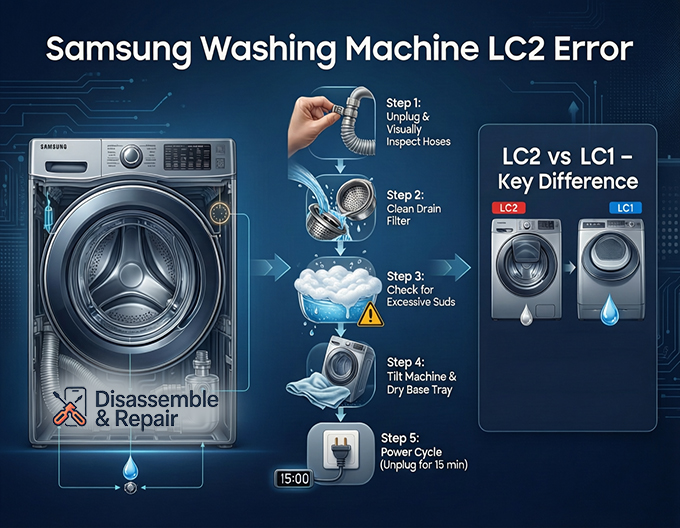
- LC1 / 1 LC: Indicates a leak detected in the upper, smaller top-load washer.
- LC2: Indicates a leak or moisture detected in the lower, main front load washer.
When this code appears, the machine’s safety protocols engage immediately. The water leak detection system triggers the drain pump to run continuously—even if the machine is turned off—to evacuate water and prevent flooding. You may hear the pump humming loudly, and the door may lock to prevent accidental spillage.
The Role of the Leakage Sensor
At the heart of this error is the leakage sensor (often called a moisture sensor). This small device is located at the very bottom of the machine, sitting in the base tray (also known as the drip pan).
The sensor consists of two metal contacts. When water accumulates in the base tray, it bridges the gap between these contacts, completing an electrical circuit. This signal tells the main control board that there is an internal leak, prompting the LC2 error code. It is a critical safety feature designed to protect your home from water damage.
Common Causes of the LC2 Error
While a physical crack in the tub is rare, several common issues can trigger the moisture sensor.
1. Drain Hose Issues
The drain hose is a frequent culprit. If the hose is kinked, punctured, or not securely attached, water can seep out during the drain cycle.
- Improper Installation: If the drain hose is inserted too far into the standpipe, it can cause siphoning, where water flows back into the machine.
- Loose Connections: The clamp holding the hose to the drain pump or the back of the machine may have loosened over time due to vibration.
2. Excessive Suds
Using too much detergent or using non-HE (High Efficiency) detergent in a front load washer can create excessive suds. These suds can expand rapidly, rising up the overflow tubes or escaping through air vents. When these bubbles burst, they turn back into liquid water, which drips down into the base tray and triggers the sensor.
3. Drain Filter Blockages
The drain filter (or debris filter) catches lint, coins, and buttons. If this filter is clogged, water cannot drain effectively. This back-pressure can force water out of internal hoses or seals, leading to a slow leak that eventually fills the base pan.
4. Internal Component Failure
In more serious cases, the leak may originate from the drain pump itself, the water inlet valve, or the bellows (the rubber door seal). A crack in the drain pump housing or a tear in the door gasket will allow water to escape directly into the machine’s chassis.
Step-by-Step Troubleshooting Guide
Before attempting any repairs, ensure safety by unplugging the unit. However, note that if the machine is currently draining (pump running), you may want to let it finish emptying the drum before disconnecting power.
Step 1: Perform a Visual Inspection
Start by pulling the washer away from the wall.
- Check the External Hoses: Inspect the hot and cold water inlet hoses and the main drain hose. Run your hand along them to feel for moisture. Tighten any loose connections at the faucet or the back of the machine.
- Check the Drain Filter: Locate the small door at the bottom front of the washer. Place a towel underneath, open the door, and unscrew the drain filter. Clean it thoroughly. Note: If the LC2 error is active, there may be water in the tub, so be prepared for spillage.
Step 2: Inspect for Excessive Suds
Did you recently run a cycle with a large amount of detergent? Look through the glass door. If you see thick foam or residue, excessive suds are likely the cause.
- Solution: You need to clear the suds. If the machine allows, run a “Rinse + Spin” cycle with no detergent. You may need to do this multiple times. In the future, use only HE detergent and follow the manufacturer’s recommended amount.
Step 3: Check the Base Tray
This is the most technical step. To confirm an LC2 error, you need to verify if there is water in the base tray.
- Tilt the Machine: Carefully tilt the washer backward (you will need a helper).
- Look for Drips: If water runs out from the bottom, you have confirmed a leak in the base pan.
- Dry the Sensor: If the leak was caused by a one-time event (like suds), draining the water from the base tray might fix the immediate error. You can use a wet-dry vac or towels to soak up the water. The moisture sensor must be completely dry to reset the circuit.
Step 4: Reset the Error Code
Once you have identified and fixed the leak, or dried the sensor, you need to perform an error code reset.
Read more Samsung washing machine not filling with water
- Power Cycle: Samsung washers do not have a dedicated “reset” button for errors. Unplug the washing machine from the power outlet.
- Wait: Leave it unplugged for at least 15 minutes. This allows the electrical charge to dissipate and the control board to reset.
- Restart: Plug the machine back in and turn it on. If the sensor is dry, the LC2 code should be gone.
Advanced Troubleshooting: Checking Internal Components
If the error returns immediately after a reset, you have an active, ongoing leak. You may need to remove the back or top panel of the washer to locate the source.
Inspecting the Drain Pump and Hoses
With the panels removed, run a small test cycle (if possible) or visually inspect the drain pump assembly. Look for white, crusty residue which indicates a slow, evaporated leak. Check the black rubber hoses connecting the tub to the pump. These can sometimes develop small tears from friction.
The Tub-to-Pump Hose
A common failure point is the corrugated hose connecting the bottom of the outer tub to the drain pump. It constantly flexes during the wash cycle. If this hose is damaged, it will dump water directly onto the leakage sensor below.
When to Contact Samsung Support
If you have dried the base tray, checked for hoses, and ensured no suds are present, but the LC2 error persists, the issue might be electronic.
- Faulty Sensor: The moisture sensor itself can corrode or fail, sending a false “wet” signal to the board.
- Main Control Board: Rarely, the computer board may be misinterpreting signals.
At this stage, it is advisable to contact Samsung support or a certified technician. They have diagnostic tools to read the specific voltage values of the sensor and can replace internal components safely.
Prevention Tips
To prevent the Samsung washing machine LC2 error from recurring:
- Level Your Washer: Ensure the machine is perfectly level. Rocking causes internal hoses to rub against the frame, leading to leaks.
- Clean the Drain Filter: Make this a monthly habit to prevent back-pressure in the drain system.
- Watch Your Detergent: Excessive soap is the #1 cause of “false” leaks where suds overflow into the base.
- Inspect Hoses Yearly: Rubber degrades over time. Replace inlet hoses every 5 years to prevent catastrophic bursts.
By understanding the mechanics behind the LC2 code—specifically its relation to the lower washer’s base tray and leakage sensor—you can approach the repair process with confidence. Whether it is a simple case of too much soap or a loose drain hose, a systematic approach will help you get your laundry routine back on track.
Frequently Asked Questions
What is the difference between the LC1 and LC2 error codes?
While both codes indicate a leak detection, they refer to different parts of a dual-wash (FlexWash) system. The LC1 (or 1 LC) error means a leak has been detected in the upper, smaller top-load washer. The LC2 error specifically indicates that moisture or a leak has been detected in the lower, main front-load washer.
Why is my washing machine making a loud humming noise when the LC2 error appears?
When the LC2 error is triggered, the machine activates a safety protocol to prevent flooding. The loud humming you hear is the drain pump running continuously to evacuate water from the drum. This pump will often stay on even if you turn the power off, as long as the machine remains plugged in.
Can using the wrong detergent trigger an LC2 error?
Yes. Using non-HE (High Efficiency) detergent or excessive amounts of soap creates “excessive suds.” These suds can overflow through air vents or tubes and condense into water in the base tray. Once this moisture hits the leakage sensor at the bottom of the machine, the LC2 error code will display.
How do I reset the Samsung washer after fixing the leak?
Samsung washing machines do not have a specific reset button. To clear the code after the leak is repaired and the sensor is dry, unplug the machine from the power outlet and wait for at least 15 minutes. This allows the electrical charge to dissipate and the control board to reset before you plug it back in.
Where is the leakage sensor located?
The leakage sensor is located at the very bottom of the unit, sitting inside the base tray (also known as the drip pan). It consists of two metal contacts that trigger the error code as soon as water pools in the tray and bridges the gap between them.


