

When your laundry routine is interrupted by a Samsung washing machine NF error, it immediately signals that your appliance is struggling to fill with water. This “No Fill” code is one of the most common issues owners face, but fortunately, it is often resolvable without professional help.
The NF error (often interchangeable with the 4E error code) acts as a safeguard, stopping the cycle to prevent damage when the water pressure or flow is insufficient. Whether you own a front-load washer or a top-load washer, the underlying causes—ranging from a simple closed cold water faucet to a faulty water inlet valve—remain largely the same.
Read more Samsung washing machine HE error
Understanding the Samsung Washing Machine NF Error
The Samsung washing machine NF error appears on the digital display when the machine fails to detect enough water entering the tub within a specific timeframe. In some models, this might also display as “4E” or “4C.”
Technically, the washer’s main PCB (Printed Circuit Board) monitors the water level via a pressure switch. If the switch doesn’t register the correct water level after the fill cycle begins, the board triggers the NF code to protect the heating element and pump from running dry.
Read more Samsung washing machine DE error
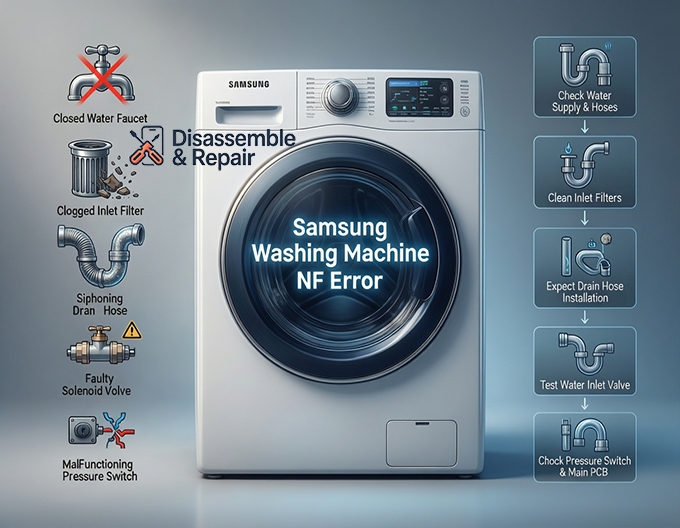
Common Causes of the NF Error
Before dismantling your machine, it is helpful to understand the specific components that usually trigger this alarm:
- Restricted Water Supply: The most frequent culprit is a closed valve or a kinked water supply hose.
- Clogged Filters: The inlet filters inside the valve connections trap sediment and debris, eventually blocking water flow.
- Drain Hose Issues: If the drain hose is installed incorrectly, water may siphon out of the drum as fast as it enters.
- Component Failure: A defective solenoid valve (within the inlet valve assembly) or a malfunctioning pressure switch can prevent the machine from filling or detecting water.
Step-by-Step Troubleshooting Guide
Follow these steps in order, starting with the simplest external checks before moving to internal components.
1. Check Water Supply and Hoses
The first step is to verify that your home’s water supply is functioning correctly.
- Inspect Faucets: Ensure that both the hot and cold water faucet behind the washer are turned fully counter-clockwise (open).
- Check Hoses: Pull the washer slightly away from the wall. Inspect the water supply hoses for any sharp bends, kinks, or heavy objects resting on them that could restrict flow.
- Verify Pressure: Disconnect the hoses from the machine and run them into a bucket to confirm you have adequate water pressure. Samsung washers typically require between 20 and 116 psi to operate the water inlet valve correctly.
2. Clean the Inlet Filters
If your water supply is fine, sediment build-up is the next likely suspect.
- Turn off the water faucets and unscrew the water supply hoses from the back of the washer.
- Look inside the threaded connections on the machine; you will see small mesh screens known as inlet filters.
- Use a pair of needle-nose pliers to gently pull these filters out.
- Rinse them under running water to remove sand or debris.
- Reinstall the filters, reconnect the hoses, and test a cycle to see if the Samsung washing machine NF error clears.
3. Inspect the Drain Hose Installation
A “siphoning” effect can trigger an NF error. This happens when the drain hose is pushed too far into the standpipe, causing water to drain out by gravity immediately after filling.
- Ensure the drain hose is not inserted more than 6-8 inches into the drain pipe.
- Make sure there is an air gap around the drain hose; the connection should not be airtight.
4. Test the Water Inlet Valve
If the external checks fail, the water inlet valve itself may be the issue. This component uses a solenoid valve to electrically open and close the water flow.
- Listen for the Hum: Start a cycle. If you hear a buzzing or humming sound but no water enters, the solenoid is receiving power but may be mechanically stuck or the coil has failed.
- Multimeter Test: If you are comfortable with DIY repairs, unplug the washer and remove the top panel. Locate the inlet valve assembly. Use a multimeter to check the resistance of the solenoid coils. A reading of “infinity” or zero indicates a bad valve that needs replacement.
5. Check the Pressure Switch and Main PCB
The pressure switch (or water level sensor) tells the main PCB when the tub is full.
- Tube Inspection: A small clear tube connects the pressure switch to the drum. Ensure this tube is not disconnected, punctured, or clogged.
- Wiring: Check the wire harness connecting the pressure switch to the main control board for any loose or corroded connections.
- Main PCB: If all other components (valves, hoses, switch) are working correctly, the main PCB itself may be failing to send voltage to the valves. This is rare and usually requires professional diagnostic tools to confirm.
Front-Load vs. Top-Load Considerations
While the Samsung washing machine NF error affects both types, the access points differ:
- Front-Load Washer: You typically remove the top panel to access the inlet valves and pressure switch.
- Top-Load Washer: You may need to remove the rear console panel or the entire top deck.
- Door/Lid Switch: On a top-load washer, a faulty lid switch can sometimes prevent the fill cycle from starting, mimicking an NF error, whereas front-loaders will usually display a different code (like dE) for door issues.
Conclusion
The Samsung washing machine NF error is usually a minor inconvenience caused by water flow restrictions rather than a major mechanical failure. By systematically checking the water supply hoses, cleaning the inlet filters, and verifying the water inlet valve function, you can often resolve the issue in under 30 minutes. However, if these steps do not clear the 4E error code or NF alert, it may be time to replace the pressure switch or consult a professional technician to inspect the main PCB.
Read more Samsung washing machine HE3 error
Frequently Asked Questions
What does the NF error code mean on a Samsung washing machine?
The NF error code stands for “No Fill.” it indicates that the washing machine is unable to fill with water or is not detecting a rise in the water level within a specific timeframe. On some Samsung models, this same issue may be displayed as a 4E or 4C error code.
Can I fix an NF error without calling a technician?
Yes, most NF errors are caused by external issues that you can resolve yourself. Common fixes include fully opening the hot and cold water faucets, straightening kinked water supply hoses, and cleaning the small mesh inlet filters located where the hoses connect to the back of the machine.
Why is my washer showing an NF error even though my faucets are open?
If the water supply is active but the error persists, the problem may be restricted flow due to clogged inlet filters or a “siphoning” effect. Siphoning occurs if the drain hose is inserted too far into the standpipe, causing water to flow out of the machine as fast as it flows in.
What should I do if cleaning the filters doesn’t clear the code?
If the filters are clean and the hoses are straight, the issue may be a mechanical failure. You should inspect the water inlet valve to see if the solenoids are functioning. If you hear a humming sound but no water enters, or if a multimeter shows no continuity in the valve, the water inlet valve assembly likely needs to be replaced.
How do I prevent the NF error from happening again?
To prevent future water supply issues, periodically check your supply hoses for wear or kinks and clean the mesh inlet filters at least once a year, especially if you live in an area with hard water or high sediment levels. Ensure your drain hose is installed with a proper air gap to prevent siphoning.


