

Encountering a Sharp washer C05 error mid-cycle can be frustrating, especially when your wet laundry is trapped inside a machine that refuses to spin. This specific error code typically indicates a washing machine imbalance or a failure in the spin cycle safety protocols, halting the appliance to prevent internal damage.
While Sharp washing machines are known for their durability, sensors can trigger this alert if the drum detects violent vibrations or an inability to reach the necessary RPM for spinning. Below is a comprehensive guide to diagnosing and fixing the C05 error, ranging from simple load adjustments to advanced mechanical checks.
Understanding the Sharp Washer C05 Error
The C05 code is primarily associated with front-loading washer models and indicates that the machine’s drum sensor has detected an instability. Unlike simple door lock errors, the C05 is a safety intervention. When the appliance senses that the load is unevenly distributed or the drum is wobbling excessively, it cuts power to the motor to stop the spin cycle.
Ignoring this error can lead to severe damage to the suspension springs or the drum bearings. Therefore, the machine will not resume operation until the underlying cause of the imbalance is resolved.
Quick Fixes for C05 Error
Before attempting any mechanical repairs, perform these initial checks. In many cases, the C05 error is a temporary glitch caused by daily usage habits.
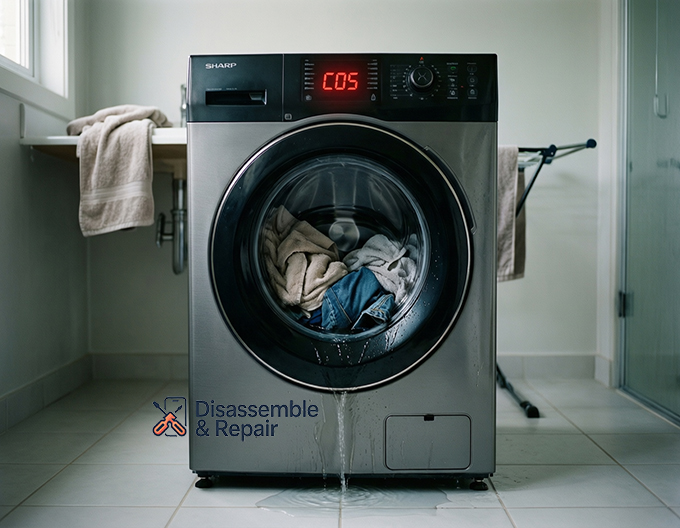
1. Adjust Laundry Load Distribution
The most common culprit for a Sharp washer C05 error is a heavy or tangled load.
- The Problem: Large items like duvets, towels, or jeans can absorb significant water weight and ball up on one side of the drum. This creates an eccentric force during the spin cycle.
- The Fix:
- Pause the machine and wait for the door lock to disengage.
- Manually redistribute the wet laundry. Untangle sleeves and pant legs.
- If washing a single heavy item (like a bath mat), add a few dry towels to counterbalance the weight.
- Restart the spin cycle to see if the error clears.
2. Check the Leveling Feet
For the sensors to work correctly, your machine must be perfectly flat.
- The Problem: If one corner of the washer is not touching the floor firmly, the entire cabinet will rock during high-speed spins, triggering the imbalance sensor.
- The Fix:
- Place a spirit level on top of the machine (measure both side-to-side and front-to-back).
- Locate the leveling feet at the bottom corners of the washer.
- Rotate the feet clockwise or counter-clockwise to raise or lower them until the bubble in your level is centered.
- Once level, tighten the locking nuts against the base of the washer to prevent them from shifting during future vibrations.
Advanced Troubleshooting for Persistent C05 Errors
If balancing the load and leveling the machine does not resolve the issue, the problem may lie within the machine’s drainage or suspension systems.
3. Inspect the Drain Pump Filter
A machine that cannot drain water effectively will never reach high spin speeds. The extra weight of retained water often mimics an imbalance issue.
- Locate the Filter: On most Sharp front-loaders, the drain pump filter is located behind a small door at the bottom right of the unit.
- Cleaning Steps:
- Place a towel and a shallow tray under the filter door to catch residual water.
- Unscrew the filter counter-clockwise and pull it out.
- Remove any lint, coins, or buttons clogging the chamber.
- Check the impeller inside the pump housing to ensure it spins freely.
- Reinstall the filter securely and test the machine on a “Spin Only” cycle.
4. Suspension Springs and Shock Absorbers
The drum is held in place by suspension springs (top) and shock absorbers (bottom). If these components fail, the drum will bang against the cabinet even with a balanced load.
- Suspension Springs: Remove the top panel of the washer. Check if any springs are detached, stretched, or broken. A damaged spring causes the drum to sag, triggering the C05 error immediately upon spinning.
- Shock Absorbers: Locate these at the bottom of the drum (requires removing the back or front panel). If the shock absorbers are leaking oil or have no resistance when you compress them, they must be replaced. Worn shocks cannot dampen the vibration of the spin cycle.
5. Control Board Reset
Modern appliances run on complex firmware that can occasionally stall. A “hard reset” can sometimes clear a false Sharp washer C05 error from the memory.
- Procedure:
- Turn the washer off and unplug it from the power outlet.
- Wait for at least 5 to 10 minutes. This allows the capacitors on the control board reset themselves.
- Plug the machine back in.
- Select a standard cycle (not a quick wash) and run it empty to recalibrate the sensors.
When to Consult an Appliance Repair Manual
If you have inspected the load, leveling, drainage, and suspension but the C05 error persists, the issue may be electrical. A faulty drum sensor (tachometer) or a defective motor control board may be sending incorrect signals.
At this stage, referring to the specific appliance repair manual for your model series (e.g., Sharp ES-FW series) is critical. The manual will provide the specific resistance values (Ohms) needed to test the motor and sensors with a multimeter. If you are not comfortable working with live electronics, it is recommended to contact a certified Sharp technician.
Preventive Maintenance Tips
To prevent the Sharp washer C05 error from returning:
- Use Mesh Bags: Wash small items like socks and underwear in mesh bags to prevent them from getting stuck in the pump filter.
- Monthly Maintenance: Clean the drain pump filter once a month.
- Check Stability: Periodically push down on the diagonal corners of the machine to ensure the leveling feet haven’t shifted.
By following this troubleshooting guide, you can systematically rule out the causes of the C05 error and get your laundry routine back on track without unnecessary service costs.
Frequently Asked Questions
What does the C05 error code mean on a Sharp washing machine?
The C05 error indicates a washing machine imbalance. It is a safety feature that triggers when the drum sensor detects excessive vibration or an uneven load, causing the machine to stop the spin cycle to prevent internal damage to the motor and suspension.
How do I quickly clear the C05 error code?
The fastest way to resolve the error is to pause the machine, wait for the door to unlock, and manually redistribute the laundry. Ensure that heavy items like towels or jeans are spread out evenly and not tangled together, then restart the spin cycle.
Can an unlevel floor cause a persistent C05 error?
Yes. If the washing machine is not perfectly level, the cabinet will rock during high-speed spins, which triggers the imbalance sensor. You should use a spirit level to check the machine and adjust the leveling feet at the bottom corners until the unit is stable and flat.
What should I check if redistributing the load doesn’t work?
If the error persists, check the drain pump filter for clogs; trapped water adds significant weight that creates an imbalance. You should also inspect the suspension springs and shock absorbers to ensure they aren’t broken or worn out, as these components are responsible for dampening drum movement.


