

Encountering a sudden interruption during your laundry routine can be incredibly frustrating, especially when your appliance displays a cryptic fault code. The Sharp washer C5 error is a specific diagnostic indicator alerting the user that the machine is experiencing significant drainage difficulties. When this code appears, the washing machine has detected that water is not leaving the drum within the expected timeframe, forcing the cycle to halt to prevent overflow or mechanical damage.
As a Senior SEO Specialist and appliance analyst, I have compiled this professional troubleshooting guide to help you understand, diagnose, and resolve this issue. By addressing the specific entities involved—from the drain pump to the pressure switch—you can often resolve the malfunction without immediate professional intervention.
Understanding the Nature of the C5 Code
Modern appliances, particularly the sophisticated Sharp front-loading washer models, rely on a complex network of sensors to monitor performance. The C5 code is not merely a random glitch; it is a calculated response from the control board.
During the drain cycle, the central processor expects the water level to drop to zero within a specific duration (usually a few minutes). If the water level sensor reports that water remains in the drum after the pump has been active, the system triggers the C5 error. This failsafe protects the drain pump from burning out due to dry running or obstruction and prevents water damage to the surrounding floor area.
While this error is predominantly a drainage issue, the root cause can range from simple physical blockages to more complex electrical faults within the drainage system.
Common Triggers for the Sharp Washer C5 Error
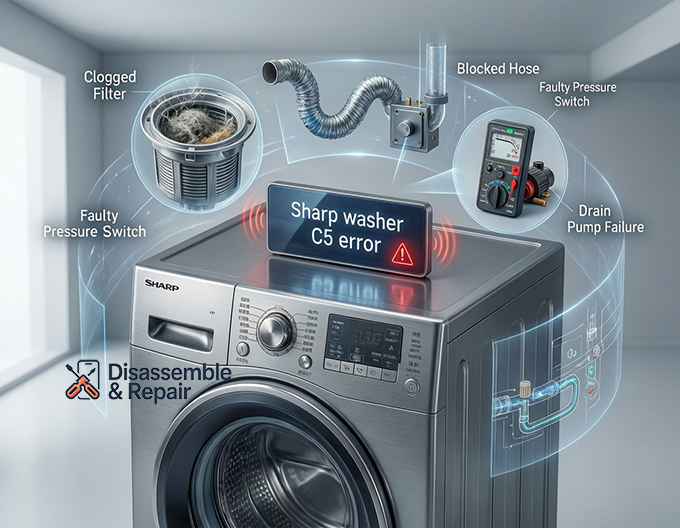
To effectively repair the unit, one must first identify the source of the problem. The Sharp washer C5 error is generally caused by one of the following hardware or environmental factors:
- Clogged Washing Machine Filter: The most frequent culprit, where lint, coins, or debris physically stop water flow.
- Blocked Hose: Kinks or obstructions in the waste pipe.
- Faulty Drain Pump: Mechanical failure of the component responsible for expelling water.
- Sensor Malfunction: A defective pressure switch or sensor giving false readings to the main board.
- Wiring Issues: Corroded or loose connections between the pump and the control board.
Step-by-Step Troubleshooting Guide
Before attempting any diagnostics or repairs, safety is paramount. Always turn off the washing machine and unplug it from the power source. Additionally, have a bucket and towels ready, as dealing with drum drainage issues often involves spilling excess water.
1. Inspecting and Cleaning the Washing Machine Filter
In the vast majority of cases, the C5 error is triggered by a lack of maintenance regarding the debris filter. This component is designed to catch foreign objects before they reach the pump impeller.
- Locate the Filter: On most Sharp models, this is located behind a small flap at the bottom right or left corner of the unit.
- Emergency Drain: If the drum is full of water, look for a small emergency drain tube next to the filter. Pull the cap and drain the water into a shallow tray.
- Remove the Filter: Turn the washing machine filter counter-clockwise to unscrew it. Be prepared for residual water to flow out.
- Clean Thoroughly: Remove any lint build-up, hair, coins, or buttons. Rinse the filter under warm running water.
- Check the Housing: Shine a flashlight into the filter housing. Ensure the pump impeller (the small fan-like blade inside) can spin freely and is not obstructed by debris.
Once cleaned, reinsert the filter strictly according to the owner’s manual instructions to ensure a watertight seal.
2. Verifying the Drainage System and Hose
If the filter is clean, the next logical step is to inspect the external drainage path. A blocked hose creates backpressure that mimics a pump failure.
- Check for Kinks: Pull the washer forward carefully and inspect the drain hose. If the hose has been crushed against the wall or twisted, the water flow will be restricted. Straighten out any kinks.
- Inspect for Clogs: Disconnect the drain hose from the waste pipe. Blow through it or run water through it to ensure it is clear. Debris often accumulates at the connection points.
- Verify Height: The installation height of the drain hose is critical. If the hose is inserted too deep into the standpipe or sits too low, it can cause siphoning. Conversely, if the drainage point is higher than the pump’s maximum lift capacity (usually 1 meter), the pump cannot push the water out, triggering the error.
3. Testing the Drain Pump
The drain pump is the heart of the evacuation process. If the filter and hose are clear, the pump itself may be the issue.
- Listen to the Machine: Select a “Spin/Drain” cycle. Listen closely to the bottom of the washer. If you hear a low humming or buzzing sound but no water is moving, the pump motor may be jammed or seized.
- Mechanical Check: If you are comfortable performing minor appliance repair, you can access the pump (refer to your specific model’s diagrams). Ensure the electrical connections to the pump are secure.
- Multimeter Test: For advanced troubleshooting, use a multimeter to check the resistance of the pump motor. An open circuit (infinite resistance) indicates a burnt-out coil, necessitating a replacement.
4. Examining the Pressure Switch and Water Level Sensor
Sometimes, the washer drains perfectly fine, but the C5 error persists. This is a classic sign of a sensor synchronization issue. The water level sensor (or pressure switch) tells the control board how much water is in the drum.
- The Air Chamber Issue: These sensors operate via a small air tube connected to the drum. If this tube becomes blocked with sludge or mold, the air pressure will not change as the water drains. The sensor will “think” the drum is still full.
- Cleaning the Tube: Locate the thin tube connecting the pressure switch to the drum. Disconnect it and blow through it to clear any blockages.
- Sensor Failure: If the tube is clear, the switch itself may be stuck in the “full” position. A faulty pressure switch requires replacement to restore proper communication with the control board.
5. Control Board and Wiring Analysis
If all mechanical components are functioning correctly, the issue may lie within the washer’s electronic brain. The control board sends voltage to the drain pump and interprets signals from the sensors.
- Visual Inspection: Look for signs of burn marks, blown capacitors, or corrosion on the main PCB (Printed Circuit Board).
- Wiring Harness: Vibration from the spin cycle can sometimes loosen wiring harnesses. Ensure all plugs connecting to the main board are seated firmly.
- Reset Procedure: Sometimes, the board simply experiences a logic glitch. Perform a hard reset by unplugging the washer for at least 10 minutes. Press and hold the Start/Pause button for 5 seconds while unplugged to discharge capacitors, then plug it back in and test.
When to Call for Professional Appliance Repair
While this troubleshooting guide covers the most common causes of the C5 error, certain situations require the expertise of a certified technician. You should seek professional assistance if:
- The control board shows visible signs of damage.
- Replacing the drain pump and pressure switch does not resolve the error.
- You are uncomfortable working with electrical components or disassembling the machine casing.
- The appliance is still under warranty. DIY repairs on internal components may void your manufacturer’s guarantee.
Preventative Maintenance for Sharp Washers
To avoid the recurrence of the Sharp washer C5 error, regular maintenance of the drainage system is essential. Adopting a proactive approach can extend the lifespan of your appliance significantly.
- Monthly Filter Cleaning: Make it a habit to clean the drain filter once a month. This prevents the gradual buildup of lint that eventually leads to blockages.
- Pocket Checks: Coins, keys, and hairpins are the enemies of drain pumps. rigorously check all pockets before loading the washer.
- Drum Cleaning Cycles: Run a hot maintenance wash with a washing machine cleaner or vinegar once a month. This dissolves detergent residue and sludge that can clog the pressure switch tube and drain hoses.
- Correct Detergent Use: Use High Efficiency (HE) detergent for front-loading washer models. Excess suds can confuse water level sensors and make drainage difficult.
Conclusion
The Sharp washer C5 error is a clear signal that your appliance is struggling to evacuate water. While the code can be alarming, it is often resolved through simple maintenance steps like cleaning the filter or straightening the drain hose. By systematically checking the drain pump, blocked hose, and water level sensor, you can isolate the issue effectively.
However, if these steps do not clear the code, it indicates a more serious electrical or mechanical failure requiring professional appliance repair. Always consult your owner’s manual for model-specific diagrams and instructions before beginning any repair work. With patience and the right approach, you can restore your Sharp washer to optimal performance and banish the C5 error for good.
Frequently Asked Questions
What does the C5 error code mean on a Sharp washing machine?
The C5 error code is a diagnostic indicator that signifies a drainage problem. It specifically means the washing machine has detected that water is not leaving the drum within the required timeframe. This is a safety feature designed to prevent the drain pump from burning out and to protect your home from potential water damage or overflows.
How do I perform a hard reset to clear the C5 error?
If the error is caused by a temporary logic glitch in the control board, you can perform a hard reset. Unplug the washing machine from the power source for at least 10 minutes. While it is unplugged, press and hold the Start/Pause button for about 5 seconds to discharge any remaining electricity in the capacitors. Plug the unit back in and attempt to run a drain or spin cycle.
Where is the drain filter located, and how do I clean it?
On most Sharp front-loading models, the drain filter is located behind a small access flap at the bottom right or left corner of the machine. To clean it, place a towel or shallow tray underneath, unscrew the filter counter-clockwise, and remove any debris like lint, coins, or hair. Always ensure the pump impeller inside the housing can spin freely before reinserting the filter.
Why does the C5 error persist even after I have drained the water?
If the drum is empty but the error remains, the issue is likely related to the water level sensor or pressure switch. This can happen if the small air tube connected to the sensor is blocked by sludge or mold, preventing the sensor from detecting that the water has been evacuated. Cleaning this tube or replacing a faulty pressure switch usually resolves the issue.
Can I prevent the C5 error from happening again?
Yes, regular maintenance is the best way to avoid drainage issues. You should clean the debris filter once a month, check all clothing pockets for small objects before washing, and use High Efficiency (HE) detergent to prevent excess suds. Additionally, running a monthly maintenance wash with a dedicated cleaner or vinegar helps dissolve residue that can clog internal sensors.


