

Facing a Sharp washer E9 error can be frustrating, especially when it interrupts your laundry routine with a tub full of soapy water. This specific fault code typically points to a malfunction in the water level sensor, indicating that the automatic washing machine is struggling to detect the correct water amount or sensing an overflow situation.
Understanding the Sharp Washer E9 Error
The E9 code is a communication signal from your appliance’s control board alerting you that the water level readings are erratic or non-existent. While it primarily relates to the water level sensor (also known as a pressure switch), the issue can sometimes stem from the drainage system or the water supply.
When this error triggers, the machine will usually stop all operations and may attempt to drain water automatically to prevent flooding. Understanding the root causes is the first step in effective home appliance repair.
Common Causes of the E9 Code
Before attempting a repair, it is helpful to know what components are likely at fault:
- Faulty Pressure Switch: The sensor itself may be electrically dead or stuck.
- Blocked Pressure Sensor Hose: Debris or kinks in the tube can trap air, giving false readings.
- Wiring Harness Issues: Rodents or vibrations can damage the wires connecting the sensor to the main board.
- Drainage Problems: A clogged drain filter or failing drain pump can cause water retention, leading to overflow errors.
- Defective Inlet Valve: If the valve sticks open, water continues to fill until the machine panics and throws the E9 code.
How to Fix Sharp Washer E9 Error
Follow this professional troubleshooting guide to diagnose and resolve the issue. Always ensure the machine is unplugged before touching internal components.
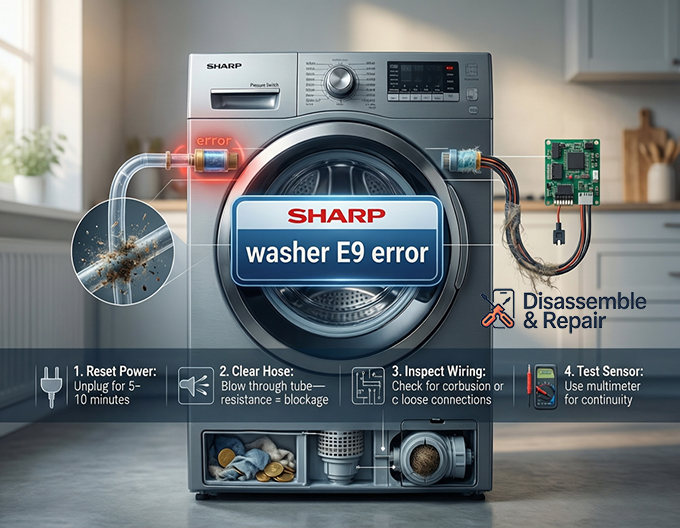
1. Perform an Error Code Reset
Sometimes, the E9 code is a momentary glitch caused by a power surge.
- Turn off the washing machine and unplug it from the wall outlet.
- Wait for at least 5 to 10 minutes to allow the capacitors on the control board to discharge.
- Plug the machine back in and run a short cycle to see if the error clears.
2. Inspect the Pressure Sensor Hose
The pressure sensor hose is a small clear or black tube connecting the tub to the pressure switch.
- Locate the pressure switch (usually found under the top panel).
- Check the hose for any kinks, holes, or physical damage.
- Disconnect the hose from the switch and blow through it. If you feel resistance, it may be clogged with lint or detergent gunk. Clear the blockage and reconnect it tightly.
3. Check the Wiring Harness
A compromised wiring harness is a frequent culprit in older machines.
- Trace the wires from the water level sensor back to the main circuit board.
- Look for signs of corrosion, loose connections, or physical damage (cuts or burns).
- Reseat the connectors to ensure a solid electrical contact.
4. Test the Water Level Sensor (Pressure Switch)
If the hose and wiring look good, the sensor itself might be the problem.
- You can test the switch for continuity using a multimeter if you have technical skills.
- If the switch shows no continuity or erratic resistance, it must be replaced. This is a common part in home appliance repair and is relatively inexpensive.
5. Examine the Drain System
If the machine thinks it is overflowing, it might be because it cannot drain fast enough.
- Open the service flap at the bottom of the machine and clean the drain filter. Coins, buttons, or lint often get stuck here.
- Inspect the drain pump impeller for obstructions. If the pump hums but doesn’t move water, it may need replacement.
6. Verify the Inlet Valve
If water enters the drum even when the machine is off or during a spin cycle, your inlet valve is likely defective.
- A leaking valve causes the water level to rise continuously, eventually triggering the pressure switch to signal an E9 overflow error.
- Replace the valve if you notice water dripping into the drum when the machine should be dry.
Summary
The Sharp washer E9 error is solvable with a systematic approach. By isolating the water level sensor, checking the air hose, and ensuring your drain pump is clear, you can often save the cost of a service call. However, if these steps fail, the issue may lie within the central control board, which typically requires professional diagnosis.
Frequently Asked Questions
What exactly does the E9 error code mean on a Sharp washing machine?
The E9 error indicates a communication issue or a malfunction involving the water level sensor (also known as a pressure switch). It means the machine’s control board is receiving erratic readings or is unable to detect how much water is inside the drum, often leading to a forced drain for safety.
Can I fix the E9 error by simply resetting the washer?
Sometimes. If the error is caused by a minor electronic glitch or a power surge, unplugging the machine for 5 to 10 minutes can discharge the control board and clear the code. However, if the error returns immediately during a cycle, there is likely a physical fault with the sensor, hose, or wiring.
How do I check if the pressure sensor hose is the problem?
Locate the small, thin tube connected to the pressure switch (usually under the top panel). Inspect it for kinks or holes. You can disconnect the hose and blow through it; if you feel resistance, it is likely blocked by detergent residue or lint, which must be cleared to allow the sensor to work properly.
Could a clogged drain filter cause an E9 error?
Yes. If the drain filter or pump is obstructed, the machine may fail to empty the water quickly enough. This can lead to the water level sensor detecting an “overflow” state, which triggers the E9 code as a protective measure to prevent flooding.
When should I call a professional for an E9 error?
If you have checked the pressure sensor, cleaned the hose, and ensured the drainage system is clear but the error persists, the issue may be a faulty main control board. Since diagnosing a control board requires specialized tools and electrical knowledge, it is best to contact a professional technician at that stage.


