

If your appliance display is flashing the Sharp washer H2 error, it indicates a specific failure within the machine’s temperature sensing system. This fault code typically halts the wash cycle to prevent overheating or improper washing conditions, requiring immediate attention to the internal electronics.
As a Senior SEO Specialist and appliance repair expert, I have compiled this technical guide to help you diagnose and resolve this issue. This article covers the technical meaning of the H2 code, the components involved, and a detailed step-by-step troubleshooting process for your front load washer.
Understanding the Sharp Washer H2 Error Code
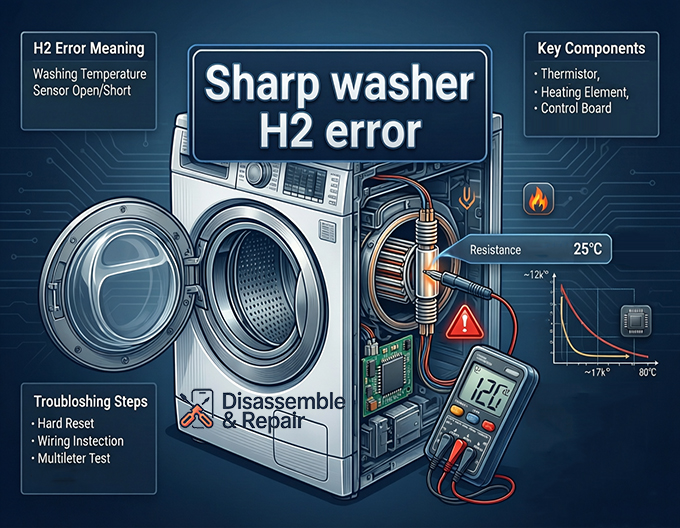
The Sharp washer H2 error is technically defined as a “Washing Temperature Sensor Open/Short” fault.
Modern front load washers rely on precise water temperature readings to regulate the wash cycle. The primary component responsible for this is the thermistor, a variable resistor that changes its electrical resistance based on temperature. When the control board detects that the resistance value from the thermistor is out of the expected range (indicating an open circuit or a short circuit), it triggers the H2 fault code to protect the machine and your laundry.
Key Components Involved
- Thermistor (Temperature Sensor): The primary suspect. It monitors the water temperature inside the drum.
- Wiring Harness: The collection of wires connecting the sensor to the main PCB.
- Heating Element: While H2 is a sensor error, the heater is physically located next to the thermistor and should be inspected.
- Control Board: The brain of the washer that interprets the sensor’s signals.
Troubleshooting the Sharp Washer H2 Error
Before attempting any repairs, ensure you exercise strict safety precautions. Always unplug the washing machine from the power outlet and turn off the water supply.
Step 1: Perform a Hard Reset
Sometimes, a momentary glitch in the electronic control system can trigger a false positive.
- Power off the washing machine.
- Unplug the unit from the mains electricity.
- Wait for at least 5 minutes to allow the capacitors on the control board to discharge.
- Plug the washer back in and run a short test cycle.
If the Sharp washer H2 error persists, proceed to the physical inspection.
Step 2: Access the Thermistor and Heating Element
On most Sharp front load washers, the temperature regulation components are located at the back of the tub, near the bottom.
- Remove the rear access panel of the washer by unscrewing the retaining screws.
- Locate the heating element assembly at the bottom of the outer tub.
- The thermistor is usually a small probe embedded into the heating element flange or located directly adjacent to it. It will have a small plastic connector with two thin wires.
Step 3: Inspect the Wiring Harness
Vibration during the spin cycle can cause connections to loosen or wires to chafe.
- Visually inspect the wiring harness running from the thermistor to the main control module.
- Check for any signs of damage, cuts, or corrosion on the wires.
- Disconnect the thermistor plug and ensure the terminals are clean and tight. A loose connection creates an “open” circuit reading, which is the primary trigger for the H2 code.
Step 4: Multimeter Testing of the Thermistor
This is the most critical step. You will need a digital multimeter to measure the resistance value of the sensor.
- Set your multimeter to the Ohms (Ω) or Resistance setting (20kΩ range is usually appropriate).
- Disconnect the wire connector from the thermistor so you are testing the part in isolation.
- Place the multimeter probes on the two metal terminals of the thermistor.
Target Resistance Values:
- At Room Temperature (25°C / 77°F): A healthy Sharp thermistor typically reads approximately 12kΩ (12,000 Ohms).
- At Higher Temperatures: As the temperature rises, the resistance should drop. For example, at 80°C, the resistance may drop to around 1.7kΩ.
Diagnosing the Result:
- Reading is Infinity (∞) or “OL”: The sensor is “Open.” The internal circuit is broken. Replace the thermistor.
- Reading is 0 Ohms: The sensor is “Short.” The internal circuit has fused. Replace the thermistor.
- Reading is correct (~12kΩ): The sensor is likely good. The issue may lie in the wiring harness or the control board.
Step 5: Check the Heating Element
Although the H2 code specifically points to the sensor, a damaged heating element can sometimes affect the sensor’s reading if there is electrical leakage.
- Switch your multimeter to the continuity mode.
- Touch the probes to the two main terminals of the heating element.
- You should hear a beep or see a low resistance reading (typically between 20Ω and 50Ω).
- If the element reads “Open” (Infinity), it is burnt out and requires replacement.
Step 6: Control Board Diagnosis
If the thermistor tests within the correct specification and the wiring continuity is good, the fault lies with the control board. The board may be failing to read the input signal correctly. In this scenario, professional appliance repair is recommended, as replacing the main PCB requires specific programming and model matching.
NOTE: You might also want to check out how to fix the Sharp washing machine’s PF error code—it’s one of the most common issues you’ll likely run into while using your machine.
Preventive Maintenance Tips
To avoid future temperature sensing issues:
- Descaling: Regularly use a washing machine descaler to prevent limescale buildup on the heating element and thermistor probe, which can insulate the sensor and cause inaccurate readings.
- Avoid Overloading: Heavy loads cause excessive vibration, which can damage the wiring harness over time.
- Water Temperature: Ensure your inlet water temperature is within the machine’s operating specifications.
By systematically testing the thermistor and checking the resistance value, you can accurately diagnose the Sharp washer H2 error without guessing. If you are uncomfortable working with live electricity or multimeter testing, contacting a certified technician is the safest option to restore your washer to working order.
Frequently Asked Questions
What does the H2 error code mean on a Sharp washing machine?
The H2 error indicates a “Washing Temperature Sensor Open/Short” fault. This happens when the machine’s control board detects that the thermistor (temperature sensor) is sending a signal outside of its expected range, suggesting the circuit is either broken or shorted.
Can I fix the H2 error with a simple reset?
In some cases, a momentary electronic glitch can cause a false error. You can attempt a hard reset by powering off the machine and unplugging it from the wall for at least five minutes. If the code reappears after plugging it back in and starting a cycle, a physical inspection of the sensor and wiring is required.
What should the resistance reading be for a healthy Sharp thermistor?
When testing with a digital multimeter at room temperature (approximately 25°C or 77°F), a functional thermistor should show a resistance value of about 12kΩ (12,000 Ohms). If the multimeter displays “OL” (Open) or 0 Ohms (Short), the sensor is defective and must be replaced.
Where is the temperature sensor located in the washer?
On most Sharp front-load models, the thermistor is located at the back of the unit near the bottom of the outer tub. It is typically a small probe found directly on or adjacent to the heating element assembly. You will need to remove the rear access panel to reach it.
Does an H2 error always mean the sensor is broken?
Not necessarily. While a faulty thermistor is the most common cause, the H2 code can also be triggered by damaged or corroded wires in the wiring harness, a malfunctioning heating element, or a failure in the main control board’s ability to process temperature signals.


