

Encountering a malfunction with your kitchen appliances can be a significant source of frustration, but learning how to perform a Whirlpool refrigerator reset can often restore functionality immediately. Whether you are dealing with a non-responsive control panel, a flashing error code, or cooling inconsistencies, this procedure is often the first line of defense recommended by technicians. Modern refrigeration units are sophisticated machines equipped with complex electronics, meaning they behave much like computers that occasionally require a reboot to clear temporary glitches.
In this guide, we will explore the various methods to reset your appliance, ranging from basic power cycling to advanced diagnostic modes. We will cover how to handle specific components like the ice maker and water filter, and when it is time to consult a professional regarding hardware failures.
Read more best whirlpool refrigerator models
Why Your Refrigerator May Need a Reset
Before attempting any troubleshooting steps, it is important to understand why your appliance is acting up. Modern Whirlpool refrigerators rely heavily on a main Control Board to regulate temperature, defrost cycles, and user interface commands. Just like a laptop or smartphone, this electronic brain can freeze or encounter logic errors.
Common scenarios that necessitate a reset include:
- Power Outage: Sudden electrical interruptions can confuse the control board. When power is restored, the Digital Display Panel may flash specific Error Codes such as “PO” (Power Outage) to alert the user that the temperature rose above safe limits.
- Ice Maker Malfunctions: If the ice maker stops producing ice or becomes stuck in a harvest cycle, a reset can force the mechanical components to realign.
- Erratic Cooling: Sometimes the Refrigerator Cooling System (compressor and evaporator fan) fails to sync with the thermostat settings, leading to warm interiors.
- False Alarms: A glitch in the system might trigger the Door Alarm even when the doors are securely closed.
The Official Whirlpool Refrigerator Reset Guide
There is no single “reset button” on most Whirlpool models that fixes every issue instantly. Instead, a Whirlpool refrigerator reset involves a combination of button presses or a hard power cycle. Below are the standard methods used to reset the appliance safely.
Method 1: The Hard Reset (Power Cycling)
The most effective way to clear the memory of the electronic control board is a hard reset. This discharges any residual electricity in the capacitors that might be holding onto the error.
- Disconnect Power: Pull the refrigerator plug from the wall outlet. If the outlet is difficult to reach (behind heavy cabinetry), locate your home’s electrical panel.
- Use the Circuit Breaker: Flip the Circuit Breaker dedicated to the kitchen or refrigerator to the “OFF” position.
- Wait: Leave the power disconnected for at least 5 to 10 minutes. This duration is crucial; unplugging it for only a few seconds may not allow the computer to fully power down.
- Restore Power: Plug the unit back in or flip the breaker back to “ON.”
- Verification: Listen for the compressor to kick in and check the display panel. It may take up to 24 hours for the internal temperature to stabilize.
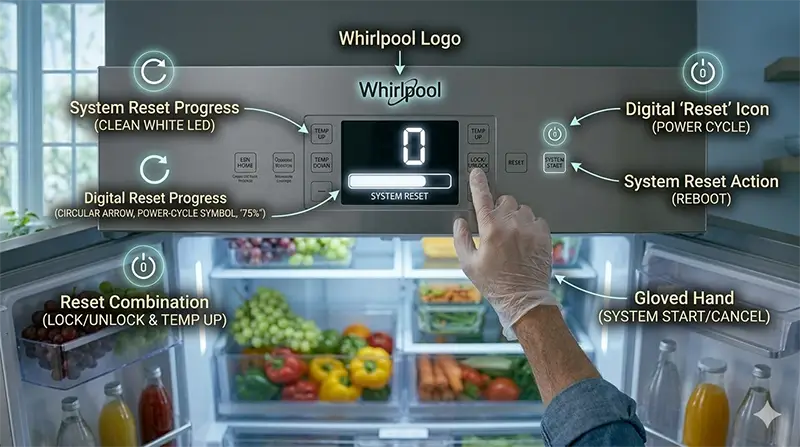
Method 2: Resetting the Digital Display Panel
If the issue is isolated to the user interface—such as the screen acting frozen or displaying odd characters—you can try a soft reset using the keypad.
Read more whirlpool french door refrigerator reviews
- Door Switch Method: Open the refrigerator door. Within 10 seconds, press the “Door Switch” (the plunger that detects if the door is open) and the “Refrigerator Temperature Up” (+) button simultaneously three times. Release the buttons and wait for the display to show “0” or return to normal.
- Lock Mode: Ensure the control lock is not active. Press and hold the “Lock” button for 3 seconds to unlock the panel.
Troubleshooting Specific Components
Often, the entire unit does not need a reset; rather, specific subsystems like the filtration or ice production units require attention.
Water Filter Reset Procedures
After replacing your filter, the “Replace Filter” light will not turn off automatically. You must manually reset the status light to ensure the system tracks the lifespan of the new filter accurately.
- Standard Interface: Locate the button labeled “Filter Reset,” “Water Filter,” or “Fast Ice.” Press and hold this button for 3 seconds. The light should change from red/orange to blue or turn off completely.
- Touch Screen Models: Navigate through the Digital Display Panel menu: Settings > Water Filter > Reset.
- Always consult your User Manual Instructions if your model’s button configuration differs, as Whirlpool manufactures various interface designs.
Ice Maker Troubleshooting and Reset
Ice Maker Troubleshooting is one of the most common reasons homeowners seek out reset instructions. If the ice maker is on but not producing ice, follow these steps:
Read more whirlpool refrigerator not cooling
- Check the Feeler Arm: Ensure the metal arm is in the down position. If it is stuck up, the machine thinks the bin is full.
- Locate the Reset Button: Many Whirlpool ice makers (specifically the modular ones inside the freezer) have a small reset button on the bottom or side of the ice maker module. You may need to remove the front cover plate.
- Force a Cycle: Press and hold the reset button (if available) for roughly 5 to 10 seconds until you hear the motor start to turn. This forces the ice maker to run a harvest cycle.
- Optics Test: For door-mounted ice makers, check the infrared sensors. If opening the door interrupts the beam, the ice maker stops. Cleaning these sensors can sometimes act as a “reset” for the detection logic.
Entering Diagnostic Mode
For a more granular analysis, you can put the refrigerator into Diagnostic Mode. This allows you to test individual components like the evaporator fan, the compressor, or the damper control without waiting for a full cooling cycle.
Read more whirlpool refrigerator first time setup
Note: The specific key combination varies by model, but a common sequence involves:
- Press and hold the “SW1” and “SW2” buttons (often Temperature Up and Down) simultaneously for 3 seconds.
- Release both buttons when the display changes.
- Use the temperature buttons to scroll through test codes.
- This mode allows you to verify if the Refrigerator Cooling System hardware is functional or if the issue is purely electronic.
- To exit Diagnostic Mode, unplug the refrigerator or wait for it to time out (usually after 20 minutes of inactivity).
Understanding Error Codes
When a Whirlpool refrigerator reset is performed, existing error codes usually clear. However, if the underlying mechanical fault remains, the code will reappear.
- PF (Power Failure): Indicates the power was out. A simple button press usually acknowledges and clears this.
- E1 or E2: Often relates to thermistor (temperature sensor) faults.
- d (Damper): Indicates a stuck air damper which controls airflow between the freezer and fridge.
If an error code persists after a hard reset, it indicates a permanent failure requiring part replacement rather than a software glitch.
Factory Reset vs. Standard Reset
It is important to distinguish between a standard reset and a Factory Reset.
Read more whirlpool refrigerator reset
- Standard Reset: Reboots the system, clears temporary memory, and restarts the cooling cycle. It generally keeps your user preferences.
- Factory Reset: Wipes all user settings, including temperature presets, alarm volume configurations, and WiFi connection data (for smart models). This returns the fridge to its “out of the box” state. This is usually done via the main settings menu on touch-screen models (“Restore Factory Settings”).
When to Inspect the Control Board and Circuit Breaker
If you have attempted a hard reset by unplugging the unit and the refrigerator remains dead (no lights, no sound), the issue is likely electrical.
- Circuit Breaker: Check your home’s electrical panel again. If the breaker trips immediately after plugging the fridge back in, you have a short circuit in the wiring or a compressor ground fault.
- Control Board Failure: If the lights work but the cooling system never engages, or if the display is erratic despite resets, the main control board may have sustained damage from a power surge. Look for burn marks or swollen capacitors on the board (located behind a panel on the back of the fridge).
Conclusion
Performing a Whirlpool refrigerator reset is a valuable troubleshooting skill that can save you the cost of a service call for minor glitches. By understanding how to manage the Digital Display Panel, interpret Error Codes, and perform Ice Maker Troubleshooting, you can maintain your appliance’s efficiency and longevity.
However, if a reset fails to resolve the issue, or if you suspect electrical damage to the Control Board, it is imperative to refer to your User Manual Instructions or contact a certified professional. Always prioritize safety by disconnecting power before inspecting internal components to ensure your kitchen remains a safe environment.
Frequently Asked Questions
How do I perform a hard reset on my Whirlpool refrigerator?
To perform a hard reset, disconnect the refrigerator from its power source by either unplugging it from the wall outlet or flipping the dedicated circuit breaker to the “OFF” position. You must leave the power disconnected for at least 5 to 10 minutes to allow the electronic control board to fully discharge and clear its memory before restoring power.
Why is my refrigerator displaying a “PO” or “PF” error code?
A “PO” (Power Outage) or “PF” (Power Failure) code indicates that the appliance recently lost electrical power. This is an automated alert to let you know that the internal temperature may have risen above safe limits during the outage. You can typically clear this notification by pressing any button on the digital display panel to acknowledge the alert.
How can I reset the “Replace Filter” light after installing a new water filter?
The status light does not reset automatically upon installation. To reset it, locate the button labeled “Filter Reset,” “Water Filter,” or “Fast Ice” on your control panel and hold it down for 3 seconds. For models with a touch screen, you may need to navigate through the settings menu to the “Water Filter” section to select the reset option.
What is the difference between a standard reset and a factory reset?
A standard reset is essentially a system reboot that clears temporary glitches and restarts the cooling cycle while keeping your custom settings intact. A factory reset is more comprehensive; it wipes all user-defined data, including temperature presets, alarm volumes, and WiFi configurations, returning the appliance to its original factory state.
How do I reset my Whirlpool ice maker if it stops producing ice?
First, ensure the metal feeler arm is in the down position. If the unit still won’t produce ice, you can force a harvest cycle by pressing and holding the reset button located on the ice maker module (often found behind the front cover plate) for 5 to 10 seconds until the motor begins to turn. For door-mounted models, cleaning the infrared sensors can also resolve logic errors that prevent ice production.