Whirlpool Refrigerator Temperature Control Settings
Whirlpool Refrigerator Temperature Control Settings: The Complete Guide
Maintaining the correct Whirlpool Refrigerator Temperature Control Settings is essential for keeping your food fresh, preventing spoilage, and ensuring your appliance runs efficiently. Whether you have a modern French door model with a digital display or a classic top-freezer unit with a manual dial, understanding how to calibrate these controls can save you money on groceries and energy bills.
Recommended Temperature Settings
For the vast majority of Whirlpool refrigerators, the factory default settings are the optimal choices for food preservation.
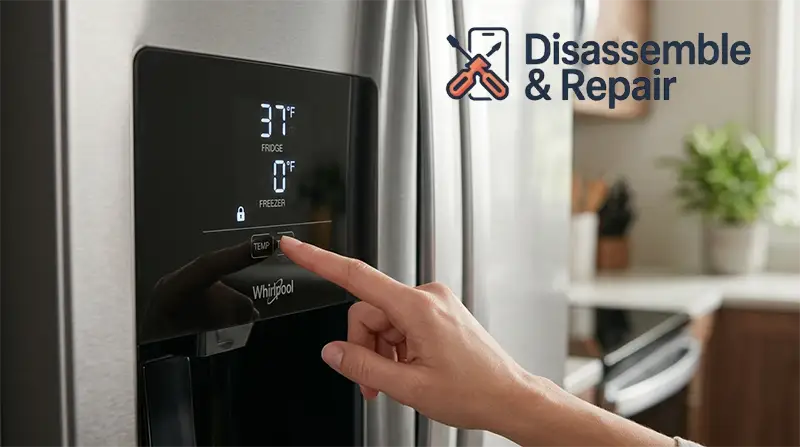
- Refrigerator Compartment: 37°F (3°C)
- Freezer Compartment: 0°F (-18°C)
These specific temperatures are designed to inhibit bacterial growth in the fridge while keeping frozen goods solidly frozen without causing unnecessary freezer burn. If your model uses a dial system instead of degrees, the “Mid-Setting” (often represented by the number 3 or three illuminated bars) is the standard recommendation.
How to Adjust Whirlpool Refrigerator Temperature Control Settings
The method for adjusting your temperature depends on the type of control panel your unit possesses. Below are the instructions for the most common configurations.
1. Digital Control Panels (French Door & Side-by-Side)
Most modern Whirlpool refrigerators, including French door models and Side-by-Side refrigerators, feature a digital touch interface located on the exterior door or the interior door frame.
- Unlock the Controls: Many panels automatically lock to prevent accidental changes. Press and hold the Lock (or “Control Lock”) button for 3 seconds to unlock the interface.
- Adjusting Temperature:
- Press the Temp button to view the current settings.
- Press Temp repeatedly or use the (+) and (-) buttons to cycle through the available temperatures.
- Stop when you reach 37°F for the fridge or 0°F for the freezer.
- Save Settings: Stop pressing buttons; the display will usually flash and then save the new setting automatically after a few seconds of inactivity.
2. Standard Temperature Dials (Top/Bottom Freezer Models)
Older or more basic models often use a rotary temperature dial located inside the refrigerator compartment, typically near the top or on a side wall.
- Understanding the Scale: The dial is usually numbered 1 to 5 (or sometimes 1 to 7).
- Higher Number = Colder: On Whirlpool appliances, setting the dial to a higher number (e.g., 5) makes the fridge colder.
- Lower Number = Warmer: Setting the dial to 1 makes the fridge warmer.
- Factory Default: The recommended setting is usually marked as “Normal,” “Recommended,” or the number 3.
- Snowflake Icons: Some models use snowflakes instead of numbers. In this case, more snowflakes (or larger snowflakes) indicate a colder setting.
3. LED Bar Controls
Some internal control panels use a series of lit bars.
Read more whirlpool refrigerator repair near me
- 1 Bar: Least cold.
- 5 Bars (All Lit): Coldest setting.
- Adjustment: Press the button to cycle through the bars. The standard setting is typically 3 bars.
Troubleshooting Cooling Issues
If your food is spoiling too quickly or freezing in the fridge section, you may need to troubleshoot your Whirlpool Refrigerator Temperature Control Settings.
Fridge is Too Warm
If beverages aren’t cold enough or ice cream is soft:
- Check Air Vents: Ensure no food items are blocking the air vents between the freezer compartment and the refrigerator. This is a common cause of poor cooling.
- Clean Condenser Coils: Dust buildup on the coils (usually at the bottom or back) can restrict heat release, forcing the fridge to work harder and cool less effectively.
- Adjust Setting: Adjust the control to the next colder setting (e.g., from 37°F to 36°F, or dial 3 to 4). Wait 24 hours for the temperature to stabilize before checking again.
Fridge is Too Cold (Freezing Food)
If you find ice crystals on your lettuce or eggs:
- Check Location: Ensure sensitive items like produce are not placed directly in front of the cooling vents.
- Adjust Setting: Move the setting one step warmer (e.g., from 37°F to 38°F, or dial 3 to 2). Again, wait 24 hours for the change to take effect.
Using an Internal Thermometer
Do not rely solely on the digital display, as it shows the target setting, not necessarily the actual air temperature. To verify accuracy:
- Place a high-quality internal thermometer in a glass of water and set it on the middle shelf.
- Leave it for at least 8 hours (or overnight).
- Check the reading. If it differs significantly from your display, your thermostat or temperature sensor may need calibration or replacement.
Managing Humidity Control
Beyond temperature, managing the humidity control on your crisper drawers is vital for produce freshness.
- High Humidity (Closed Vent): Best for leafy greens, spinach, and vegetables prone to wilting. This setting traps moisture to keep them crisp.
- Low Humidity (Open Vent): Best for fruits and vegetables with skins, such as apples, pears, and peppers. This allows ethylene gas to escape, preventing premature rotting.
Control Lock and Reset Functions
If your control panel is unresponsive, it may be locked or in need of a reset.
- Control Lock: Look for a padlock icon or a button labeled “Lock.” Press and hold it for 3 seconds. The display should count down (3, 2, 1) and then unlock.
- Factory Reset: If the electronics are acting strangely or the cooling seems stuck, you can perform a hard reset. Unplug the refrigerator from the wall outlet for 5 to 10 minutes. Plug it back in to reset the main control board.
Conclusion
Correctly configuring your Whirlpool Refrigerator Temperature Control Settings is a simple yet effective way to extend the life of your food and your appliance. Start with the factory defaults of 37°F and 0°F, use an independent thermometer to verify accuracy, and always wait a full 24 hours between adjustments to allow the system to stabilize.
Read more whirlpool refrigerator ice maker replacement
Frequently Asked Questions
What are the ideal temperature settings for a Whirlpool refrigerator?
For most models, the recommended factory settings are 37°F (3°C) for the refrigerator compartment and 0°F (-18°C) for the freezer. These settings are designed to keep food fresh while preventing bacterial growth and freezer burn. If your unit uses a dial or bar system, the middle setting (typically the number 3) is considered optimal.
How do I unlock my refrigerator’s digital control panel?
If the controls are unresponsive, the panel is likely locked to prevent accidental changes. To unlock it, press and hold the “Lock” or “Control Lock” button for three seconds. You will typically see a countdown on the display, and the interface will become active once the countdown finishes.
Why is my food freezing in the refrigerator compartment?
Food may freeze if it is placed directly in front of the cooling vents, which can blast items with very cold air. It could also mean the setting is too low. Try moving sensitive items away from the vents and adjusting the temperature one degree warmer. Always wait a full 24 hours for the temperature to stabilize after making any changes.
Read more whirlpool french door refrigerator problems
On a dial control, does a higher number mean colder or warmer?
On Whirlpool appliances with a manual dial, a higher number represents a colder setting. For example, setting the dial to 4 or 5 will make the refrigerator colder, while setting it to 1 or 2 will make it warmer.
How can I reset the temperature controls if they aren’t working correctly?
If the digital display is acting strangely or the cooling seems stuck, you can perform a hard reset. Unplug the refrigerator from the wall outlet for 5 to 10 minutes, then plug it back in. This will reset the main control board and often resolves minor electronic issues.