Whirlpool Refrigerator Water Filter Reset
Comprehensive Guide to the Whirlpool Refrigerator Water Filter Reset Process
Maintaing the efficiency of your kitchen appliances is essential for longevity and hygiene, and performing a Whirlpool Refrigerator Water Filter Reset is a critical step that must be taken every six months. While replacing the cartridge physically clears the water path, the electronic brain of the refrigerator requires this manual reset to accurately track usage and time for the next cycle. Without resetting the system, the indicator light will remain red, failing to alert you when your water quality may actually be compromised.
As a Senior SEO Specialist and home appliance expert, I have compiled this detailed guide to help you navigate the various control panels found on Whirlpool units. Whether you own a modern French door refrigerator or a classic side-by-side refrigerator, this guide will ensure your filter status is accurate and your water remains pristine.
Understanding the Filter Status System
Before attempting to reset the light, it is helpful to understand how the system works. Your Whirlpool refrigerator does not chemically analyze the water quality in real-time. Instead, the Control panel utilizes a sophisticated algorithm based on two primary factors:
- Gallon Usage: It tracks the volume of water flowing through the Water dispenser.
- Time Elapsed: It includes a timer that triggers after six months, which is the standard lifespan of an EveryDrop filter.
When the system calculates that the filter is nearing the end of its life, the Indicator light will typically turn orange or yellow. When the filter is expired, the Red status light illuminates. This is your visual cue to install a Replacement filter. However, simply sliding the new filter into the Filter housing does not automatically communicate to the computer that the task is done; you must manually trigger the reset.
Read more whirlpool refrigerator temperature too high
Mastering the Whirlpool Refrigerator Water Filter Reset Procedure
Because Whirlpool manufactures a wide variety of models with different user interfaces, there is no single universal button for every unit. However, the logic remains similar across the board. Below are the specific methods categorized by the style of the interface.
Method 1: Modern Touch Screen Control Panels
High-end models, particularly the newer French door refrigerator styles, often feature fully digital touch screens above the Water dispenser.
Read more whirlpool refrigerator vacation mode
- Locate the button labeled “Options” or “Settings” on the Control panel.
- Navigate through the menu until you see the “Filter Reset” or “Filter Status” option.
- Press and hold the indicated area (often a digital button on the screen) for three seconds.
- The system will beep, and the Indicator light should shift from red back to blue or green, indicating the cycle has restarted.
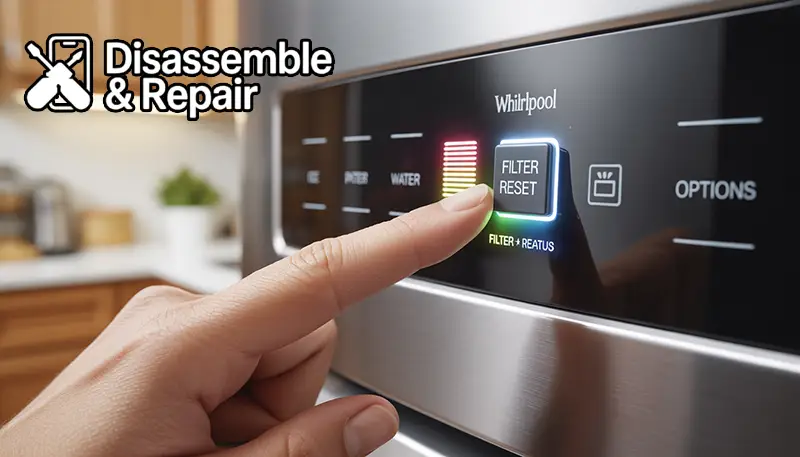
Method 2: The Physical “Filter Reset” Button
Many mid-range models feature a straightforward physical interface. This is common in both French door and Side-by-side refrigerator configurations.
- Look at the button cluster above the external dispenser.
- Identify the button specifically labeled “Filter Reset.”
- Press and hold this Reset button firmly for 3 seconds.
- Watch the Filter status light. It will flash and then reset to its “Good” status color.
Method 3: The Combination Key Press (Hidden Reset)
If your Control panel lacks a dedicated reset button, your model likely uses a combination of other function buttons to trigger the reset. This is a common design to save space on the interface.
- Locate the “Lock” and “Water” buttons, or sometimes the “Fast Ice” and “Light” buttons.
- Look for small text connecting two buttons that says “Filter Reset 3 Sec.”
- Press and hold both buttons simultaneously for 3 full seconds.
- Release the buttons when you hear a chime or see the Red status light turn off.
Method 4: Interior Control Panels
Some sleek models do not have external dispensers. Instead, the controls are located inside the refrigerator, usually on the ceiling or near the crispers.
Read more whirlpool refrigerator wifi connectivity
- Open the refrigerator doors.
- Locate the digital interface on the interior casing.
- Press and hold the “Water Filter” button for 3 seconds.
- Ensure the display confirms the reset before closing the door.
Method 5: Old-School Dial Controls
For older models where the Filter compartment is located in the base grille:
Read more whirlpool refrigerator installation guide
- Locate the filter cap in the base grille.
- After replacing the filter, ensure the cap is vertical.
- Some of these mechanical models do not have a light. If they do, the reset is often triggered by pressing the light switch (the plunger that turns off the interior light when the door closes) 5 times within 10 seconds.
Location of the Filter Compartment
To perform a successful reset, you must first ensure the new Replacement filter is installed correctly. If the filter is not seated properly in the Filter housing, the flow of water may be restricted, and in some smart models, the system may detect an error.
- Top Right Corner (Interior): This is standard for most French door units. The compartment drops down or pulls out.
- Base Grille (Exterior): Common in older side-by-side models. The filter is located at the very bottom of the fridge in the kick plate.
- Between Crisper Drawers: Occasionally found in specific bottom-freezer units.
Always ensure you are using a genuine EveryDrop filter. Generic or counterfeit filters may not fit the Filter compartment precisely, leading to leaks or damage to the housing.
Troubleshooting: Why Won’t the Light Reset?
If you have followed the steps for the “Whirlpool Refrigerator Water Filter Reset” and the Red status light persists, consider the following troubleshooting steps:
1. The “Door Open” Safety Feature
Many Whirlpool refrigerators disable the Control panel when the doors are open. If you are trying to reset an internal panel, ensure you are holding the button down firmly. If it is an external panel, ensure the doors are completely closed and latched.
2. The Button Lock is Engaged
If the “Control Lock” or “Child Lock” is active, the dispenser and buttons will be unresponsive. Look for a padlock icon on your display. Press and hold the “Lock” button for 3 seconds to unlock the panel, then attempt the Reset button procedure again.
3. Electronic Glitch
Occasionally, the refrigerator’s control board may experience a minor glitch. To fix this, you can perform a hard reset of the appliance:
- Unplug the refrigerator from the wall outlet.
- Wait for 2 to 5 minutes to allow the capacitors to discharge.
- Plug the refrigerator back in.
- Attempt the filter reset sequence again.
The Importance of the EveryDrop Filter
Whirlpool refrigerators are specifically engineered to work with EveryDrop filter technology. These filters are certified to reduce contaminants such as lead, pharmaceuticals, and pesticides.
Ignoring the Indicator light and failing to change the filter can lead to:
- Reduced Water Flow: As the filter traps particles, it becomes clogged, slowing down your Water dispenser.
- Bacterial Growth: An expired charcoal filter can eventually become a breeding ground for bacteria, making your water quality worse than tap water.
- Scale Buildup: The filter helps mitigate scale. Without it, the internal lines and the ice maker mechanism can suffer from mineral deposits.
Therefore, the reset process is not just about turning off an annoying light; it is a commitment to the maintenance schedule that keeps your water safe and your appliance running smoothly.
Frequently Asked Questions
Can I reset the light without changing the filter?
Yes, technically you can perform a Whirlpool Refrigerator Water Filter Reset without changing the cartridge. However, this is highly discouraged. The light is a timer meant to protect your health. Resetting it without replacing the filter will cause you to lose track of when the filter has expired, potentially exposing your household to contaminants.
How do I know which filter my refrigerator needs?
The specific filter number (e.g., EveryDrop Filter 1, 2, 3, or 4) is usually printed on the old filter or on the door of the Filter compartment. You can also check the user manual or look up your refrigerator’s model number on the Whirlpool website.
Why is my water dispenser flow still slow after changing the filter?
If you have changed the filter and reset the light, but the flow is slow, you may have air trapped in the lines. Flush the system by dispensing about 3 to 4 gallons of water. If the problem persists, ensure the Replacement filter is fully locked into the Filter housing.
Does the red light stop the water from dispensing?
No. The Red status light is purely an Indicator light. It warns you that the filter is expired, but it will not shut off the water supply. However, continuing to use an old filter may result in poor taste and odor.
Conclusion
Managing your kitchen appliances requires attention to detail, and the Whirlpool Refrigerator Water Filter Reset is a small but vital part of that routine. By ensuring you promptly replace your EveryDrop filter and correctly reset the Filter status, you guarantee that your family has access to clean, fresh-tasting water year-round. Whether you are navigating a complex touch screen on a French door refrigerator or a simple button layout on a Side-by-side refrigerator, the process is designed to be a quick, user-friendly interaction that resets your maintenance clock for the next six months. Remember, the light is there for your safety—keep it blue, keep it fresh.
Frequently Asked Questions
Can I reset the indicator light without actually changing the filter?
Yes, you can manually trigger the Whirlpool Refrigerator Water Filter Reset without installing a new cartridge. However, this is strongly discouraged because the indicator is a safety timer. Resetting it without a replacement means you will lose track of the filter’s lifespan, potentially exposing your household to contaminants once the carbon media is exhausted.
How do I determine which EveryDrop filter is compatible with my model?
The specific filter number (such as EveryDrop Filter 1, 2, 3, or 4) is usually printed directly on the label of your old filter or on the interior door of the filter compartment. You can also locate the correct part by searching for your refrigerator’s model number on the Whirlpool website or referring to your user manual.
Read more whirlpool vs samsung refrigerator
Why is the water flow from my dispenser slow even after a filter change?
If you experience low water pressure after a replacement, there is likely air trapped in the lines. You should flush the system by dispensing approximately 3 to 4 gallons of water. If the flow remains slow, double-check that the replacement filter is fully seated and locked into the filter housing.
Does the red status light mean my refrigerator will stop dispensing water?
No, the red light is strictly an indicator and does not act as a shut-off valve. Your refrigerator will continue to dispense water and produce ice; however, the quality, taste, and odor of the water will diminish as the expired filter loses its ability to trap impurities and minerals.
What should I do if the control panel does not respond to the reset buttons?
First, ensure that the “Control Lock” or “Child Lock” feature is not engaged; if you see a padlock icon, hold the lock button for 3 seconds to disable it. Additionally, make sure the refrigerator doors are firmly closed, as many models disable the external control panel functions while a door is open. If it still fails to reset, try unplugging the unit for 5 minutes to clear any electronic glitches.