

If you are frustrated and asking, “why does the lg thinq take so long to dry“, you are not alone; this is one of the most common questions from owners of modern high-efficiency dryers. While LG ThinQ dryers are designed to save energy and protect fabrics, these “smart” features often result in longer cycle times compared to older, hotter machines.
Read more LG washing machine FL error
Below is a comprehensive guide to understanding why your dryer is slow and how to fix it, covering everything from eco-friendly settings to airflow blockages.
Why Does the LG ThinQ Take So Long to Dry? (The Main Reasons)
The primary reason your LG ThinQ takes so long to dry often stems from its default energy-efficiency settings rather than a malfunction. Modern dryers, especially those with heat pump technology or Energy Star ratings, operate at lower temperatures to conserve electricity and prevent fabric damage.
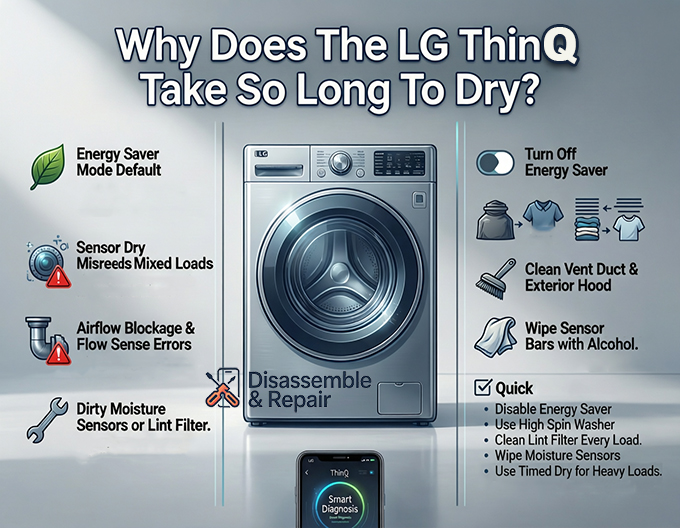
1. The “Energy Saver” Mode Default
Many LG ThinQ dryers ship with an Energy Saver option enabled by default on cycles like “Normal.”
- How it works: This setting adds a passive air-dry portion to the beginning of the cycle or lowers the drying temperature significantly.
- The Result: It can extend a standard 60-minute cycle to over 90 minutes.
- The Fix: Before starting your load, look at the control panel and turn off the “Energy Saver” button. This will engage the heating element or compressor immediately and shorten the drying time.
2. Sensor Dry vs. Damp Clothes
Your dryer uses a moisture sensor—two small metal bars usually located near the lint filter—to detect humidity in the drum.
- The Issue: If you use Sensor Dry (which is the default for most cycles), the machine stops as soon as it “thinks” the clothes are dry. If you are drying a mixed load (e.g., heavy towels with light t-shirts), the sensors may touch a dry t-shirt and end the cycle while the towels are still damp.
- The Fix: Sort your laundry by fabric weight. For mixed loads or heavy items, switch to Timed Dry, which forces the machine to run for a set duration regardless of sensor readings.
Airflow and Venting: The Silent Time Killer
If your settings are correct but the dryer is still slow, the culprit is almost always restricted airflow. An LG dryer cannot dry clothes efficiently if the moist air cannot escape through the exhaust vent.
1. Vent Blockage and “Flow Sense”
LG dryers feature a “Flow Sense” system that detects restrictions in your home’s ductwork.
- Symptoms: You might see error codes like d80, d90, or d95 on the display (indicating 80%, 90%, or 95% blockage). Even without a code, a clogged vent traps moisture in the drum, turning the dryer into a sauna.
- The Fix:
- Disconnect the vent hose from the back of the dryer.
- Clean the ductwork leading outside your house using a vent cleaning brush.
- Check the exterior vent hood to ensure it isn’t blocked by lint or bird nests.
2. The Lint Filter Trap
A dirty lint filter is the most basic cause of poor airflow.
- The Issue: Even a thin layer of lint reduces air velocity. Furthermore, if you use dryer sheets, a clear, waxy residue can coat the filter mesh, blocking air even if the filter looks clean.
- The Fix: Clean the lint filter before every load. Once a month, wash the filter with warm soapy water and a soft brush to remove invisible chemical residue.
Mechanical and Maintenance Factors
1. Dirty Moisture Sensors
Over time, the moisture sensor bars inside the drum can get coated with residue from fabric softeners or dryer sheets.
- The Symptom: The dryer shuts off after only a few minutes, leaving clothes soaking wet.
- The Fix: Locate the two metal strips inside the drum (usually on the front rim). Wipe them vigorously with a clean cloth and a little rubbing alcohol or vinegar to remove the buildup.
2. Washer Spin Speed
The drying process actually begins in the washer.
- The Issue: If your washer is set to a low spin speed, clothes enter the dryer with excess water weight.
- The Fix: Ensure your washing machine is set to “High” or “Extra High” spin for sturdy fabrics. This mechanically extracts water, significantly reducing the work the dryer’s condenser or heating element has to do.
3. Load Capacity Errors
- Overloading: Stuffing the drum past 75% capacity prevents hot air from circulating between items.
- Underloading: Drying just one or two items can also be slow on Sensor Dry cycles because the items may not touch the sensors often enough to keep the cycle running efficiently.
Using the LG ThinQ App for Troubleshooting
Since you have a smart appliance, use the LG ThinQ app to diagnose the problem without calling a technician.
- Open the App: Connect your dryer to Wi-Fi.
- Smart Diagnosis: Navigate to the “Smart Diagnosis” section in the app.
- Run a Check: The app can communicate with the dryer to detect internal issues. It will specifically tell you if:
- The exhaust vent is clogged (Flow Sense error).
- There is an issue with the heating element or thermostat.
- The temperature sensors are reading incorrectly.
When to Call a Professional
If you have cleaned the vents, disabled Energy Saver, and wiped the sensors, but the unit still takes 2+ hours to dry a standard load, you may have a hardware failure:
Read more How to turn off wifi on LG washer
- Heating Element/Heat Pump Failure: If the air inside the drum stays cold throughout the cycle, the heat source may be broken.
- Blower Wheel: If the dryer rumbles or vibrates excessively and airflow is weak, the blower wheel may be stripped or clogged.
Summary Checklist for Faster Drying:
Read more LG washing machine HE error
- Turn OFF “Energy Saver” mode.
- Use “High Spin” on your washer.
- Clean the lint filter every single time.
- Wipe down the moisture sensor bars.
- Check the exhaust vent for blockages (look for d80/d90 codes).
- Use Timed Dry for heavy or mixed loads.
Frequently Asked Questions
Why does my LG ThinQ dryer take over 90 minutes for a “Normal” cycle?
The most common reason is the “Energy Saver” mode, which is often enabled by default. This setting uses lower temperatures or a passive air-dry phase to save electricity, significantly extending the cycle time. To speed up the process, manually turn off the “Energy Saver” button on the control panel before starting the load.
What should I do if my dryer displays error codes like d80, d90, or d95?
These are “Flow Sense” codes indicating that your home’s exhaust vent is restricted by 80%, 90%, or 95%. When air cannot escape, moisture stays trapped in the drum. You should disconnect the vent hose from the back of the dryer and clean the entire duct leading to the outside of your home to restore proper airflow.
Why are my clothes still damp even though the “Sensor Dry” cycle finished?
This typically happens when drying mixed loads, such as heavy towels with light t-shirts. The moisture sensors may touch a dry, lightweight item and end the cycle prematurely. To fix this, sort your laundry by fabric weight or switch to the “Timed Dry” setting for heavy or bulky items. Additionally, try wiping the two metal moisture sensor bars inside the drum with rubbing alcohol to remove any residue from dryer sheets.
How can I use the LG ThinQ app to fix drying issues?
You can use the “Smart Diagnosis” feature within the LG ThinQ app to communicate directly with your appliance. The app can identify specific hardware failures, such as a broken heating element or thermostat, and can also confirm if your slow drying times are caused by external vent blockages.
Does my washing machine affect how long the LG ThinQ takes to dry?
Yes. If your washer is set to a low spin speed, the clothes will remain saturated with water. To reduce drying time, ensure your washer is set to a “High” or “Extra High” spin speed to mechanically extract as much water as possible before the clothes ever enter the dryer.


